VectorStyler
    • Categories
    • Unread
    • Recent
    • Tags
    • Popular
    • Register
    • Login

    Stroke mitre/overlap question

    Scheduled Pinned Locked Moved Questions and Support
    6 Posts 2 Posters 5.0k Views 2 Watching
    Loading More Posts
    • Oldest to Newest
    • Newest to Oldest
    • Most Votes
    Reply
    • Reply as topic
    Log in to reply
    This topic has been deleted. Only users with topic management privileges can see it.
    • G Offline
      greenbeetle
      last edited by

      Hi,

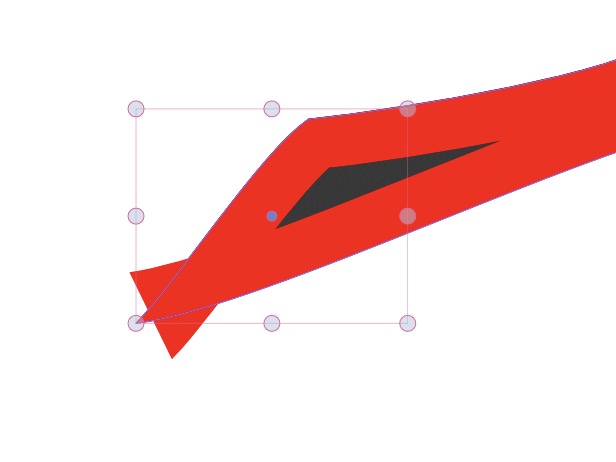
      With a stroke with a thickness set to "outside" the line, I'm getting the following result. The mitre limit in the Stroke Edit Panel doesn't appear to affect this... Am I looking in the right place, or is this unavoidable?

      Thanks!

      LM
      0_1669559596891_Screenshot 2022-11-27 at 14.27.55.jpg

      VectorStylerV 1 Reply Last reply Reply Quote 0
      • VectorStylerV Offline
        VectorStyler @greenbeetle
        last edited by

        @greenbeetle said in Stroke mitre/overlap question:

        With a stroke with a thickness set to "outside" the line, I'm getting the following result

        For small shapes (relative to stroke width), setting the stroke outside or inside might result in some cases that are difficult to handle.
        Is the dark region inside the same as the original shape?

        Send me an example with this stroke issue to support at vectorstyler.com and I will try to find the issue.

        1 Reply Last reply Reply Quote 0
        • G Offline
          greenbeetle
          last edited by

          Hi,

          Thank you for the swift reply!

          Sorry, that wasn't a great image... The dark area is irrelevant background.

          I've sent the file over (bit on the large side).

          Thanks again,

          LM

          VectorStylerV 1 Reply Last reply Reply Quote 0
          • VectorStylerV Offline
            VectorStyler @greenbeetle
            last edited by

            @greenbeetle Got it!
            The outer stroke was created using the stroke profile. This should work in some cases, but in this case it did not handle the corners (opened a bug on this one).

            But clearing the stroke profile, and using the stroke alignment buttons with Relative Alignment enabled in the menu should work.

            1 Reply Last reply Reply Quote 0
            • G Offline
              greenbeetle
              last edited by

              Cool, I'll try that option, thank you!

              LM

              1 Reply Last reply Reply Quote 0
              • G Offline
                greenbeetle
                last edited by

                Success. Excellent, thanks.

                1 Reply Last reply Reply Quote 1
                • First post
                  Last post
