VectorStyler
    • Categories
    • Unread
    • Recent
    • Tags
    • Popular
    • Register
    • Login

    Easy way to switch from a shape with two node points to one

    Scheduled Pinned Locked Moved Questions and Support
    8 Posts 3 Posters 6.9k Views 3 Watching
    Loading More Posts
    • Oldest to Newest
    • Newest to Oldest
    • Most Votes
    Reply
    • Reply as topic
    Log in to reply
    This topic has been deleted. Only users with topic management privileges can see it.
    • B Offline
      B-Vs-V
      last edited by

      Is there an easy way to go from a two-node shape to a one-node shape with the node in the middle? I think I did this in Illustrator but I don't remember how:
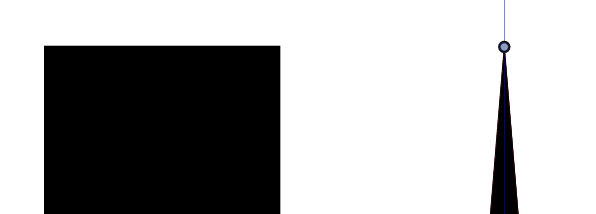
      0_1668697159614_cef3c3d7-9b87-4195-bb90-ebbc26af20cf-image.png

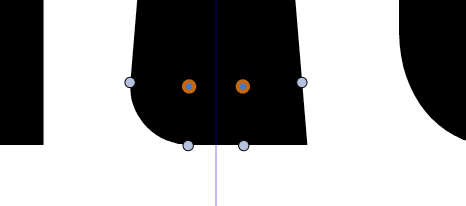
      Also, I don't understand this behaviour: I want to use the corner editor tool and deal with these two node points but only one sharp corner becomes rounded:
      0_1668697367875_0afbf543-2de7-4532-ae21-1bcd977ca201-image.png

      W11 Pro 25H2 - 12th Gen Intel(R) i7-12700K 3.61 GHz - RAM 64 Go - NVIDIA GF GTX 4070 Ti - Intuos - Dell UP3216Q / Eizo ColorEdge
      W11 Pro 25H2 - 12th Gen Intel(R) i7-12700KF 3.60 GHz -RAM 64 Go - NVIDIA GF GTX 3080 - IntuosPro- ProArt PA329C

      VectorStylerV 1 Reply Last reply Reply Quote 0
      • VectorStylerV Offline
        VectorStyler @B-Vs-V
        last edited by

        @Pat said in Easy way to switch from a shape with two node points to one:

        Is there an easy way to go from a two-node shape to a one-node shape with the node in the middle?

        Not sure if I understood this, but if this is about inserting a new node, then just select the starting node (in the shape direction) and press the + key.
        If it is about deleting a node and having the result at the center, the first align the two nodes (with the alignment options) and then delete one of the nodes.

        Also, I don't understand this behavior: I want to use the corner editor tool and deal with these two node points but only one sharp corner becomes rounded

        There might be an extra node at that corner (two or more overlapping nodes), or the shape is not closed? Send me that example with the corner and I will try to figure what is going on.

        b77B B 4 Replies Last reply Reply Quote 0
        • b77B Offline
          b77 @VectorStyler
          last edited by b77

          @VectorStyler A 'Merge Nodes at Center' button would be faster. 🙂

          MacBook Pro (Intel) running Monterey 12.6.4

          1 Reply Last reply Reply Quote 3
          • B Offline
            B-Vs-V @VectorStyler
            last edited by

            @VectorStyler It is not adding or deleting a node. As @b77 mentions it is more a merge nodes at the centre of the shape.

            W11 Pro 25H2 - 12th Gen Intel(R) i7-12700K 3.61 GHz - RAM 64 Go - NVIDIA GF GTX 4070 Ti - Intuos - Dell UP3216Q / Eizo ColorEdge
            W11 Pro 25H2 - 12th Gen Intel(R) i7-12700KF 3.60 GHz -RAM 64 Go - NVIDIA GF GTX 3080 - IntuosPro- ProArt PA329C

            VectorStylerV 1 Reply Last reply Reply Quote 0
            • B Offline
              B-Vs-V @VectorStyler
              last edited by

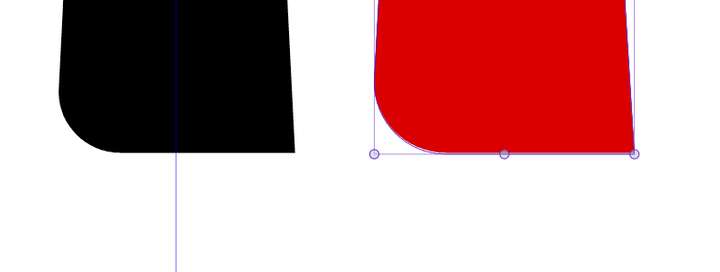
              @VectorStyler No extra node. It works as expected before I move two nodes at the middle of rectangle.

              After moving these two nodes, I can't get two rounded corners.
              0_1668700183837_afaa88e8-c4ef-410a-88fe-98ec80c9277c-image.png

              W11 Pro 25H2 - 12th Gen Intel(R) i7-12700K 3.61 GHz - RAM 64 Go - NVIDIA GF GTX 4070 Ti - Intuos - Dell UP3216Q / Eizo ColorEdge
              W11 Pro 25H2 - 12th Gen Intel(R) i7-12700KF 3.60 GHz -RAM 64 Go - NVIDIA GF GTX 3080 - IntuosPro- ProArt PA329C

              1 Reply Last reply Reply Quote 0
              • VectorStylerV Offline
                VectorStyler @B-Vs-V
                last edited by

                @Pat said in Easy way to switch from a shape with two node points to one:

                @VectorStyler It is not adding or deleting a node. As @b77 mentions it is more a merge nodes at the centre of the shape.

                Added this to the backlog.

                B 1 Reply Last reply Reply Quote 1
                • B Offline
                  B-Vs-V @VectorStyler
                  last edited by

                  @VectorStyler Amazing 👍 Thanks !

                  0_1669650427333_Capture.JPG

                  0_1669650376366_Capture'.JPG

                  W11 Pro 25H2 - 12th Gen Intel(R) i7-12700K 3.61 GHz - RAM 64 Go - NVIDIA GF GTX 4070 Ti - Intuos - Dell UP3216Q / Eizo ColorEdge
                  W11 Pro 25H2 - 12th Gen Intel(R) i7-12700KF 3.60 GHz -RAM 64 Go - NVIDIA GF GTX 3080 - IntuosPro- ProArt PA329C

                  1 Reply Last reply Reply Quote 3
                  • B Offline
                    B-Vs-V @VectorStyler
                    last edited by

                    @VectorStyler ... and -at least on this test- the corner editor tool works very well ! you may not see it here but at the beginning, it was a rectangle which I rounded the corners ☺

                    0_1669651936139_Cap.JPG

                    W11 Pro 25H2 - 12th Gen Intel(R) i7-12700K 3.61 GHz - RAM 64 Go - NVIDIA GF GTX 4070 Ti - Intuos - Dell UP3216Q / Eizo ColorEdge
                    W11 Pro 25H2 - 12th Gen Intel(R) i7-12700KF 3.60 GHz -RAM 64 Go - NVIDIA GF GTX 3080 - IntuosPro- ProArt PA329C

                    1 Reply Last reply Reply Quote 1
                    • First post
                      Last post