VectorStyler
    • Categories
    • Unread
    • Recent
    • Tags
    • Popular
    • Register
    • Login

    How to apply effects to other objects?

    Scheduled Pinned Locked Moved Questions and Support
    26 Posts 3 Posters 35.0k Views 3 Watching
    Loading More Posts
    • Oldest to Newest
    • Newest to Oldest
    • Most Votes
    Reply
    • Reply as topic
    Log in to reply
    This topic has been deleted. Only users with topic management privileges can see it.
    • B Offline
      B-Vs-V @VectorStyler
      last edited by

      @VectorStyler file sent

      W11 Pro 25H2 - 12th Gen Intel(R) i7-12700K 3.61 GHz - RAM 64 Go - NVIDIA GF GTX 4070 Ti - Intuos - Dell UP3216Q / Eizo ColorEdge
      W11 Pro 25H2 - 12th Gen Intel(R) i7-12700KF 3.60 GHz -RAM 64 Go - NVIDIA GF GTX 3080 - IntuosPro- ProArt PA329C

      1 Reply Last reply Reply Quote 0
      • VectorStylerV Offline
        VectorStyler @B-Vs-V
        last edited by

        @Pat said in How to apply effects to other objects?:

        I think there is still enough space to get sharp pointed edges but no way by modulating the miter limit... another way ?

        Set the Miter Limit value to very small (5 or less).

        B 1 Reply Last reply Reply Quote 0
        • B Offline
          B-Vs-V @VectorStyler
          last edited by

          @VectorStyler I've tried all the possible values ☺

          W11 Pro 25H2 - 12th Gen Intel(R) i7-12700K 3.61 GHz - RAM 64 Go - NVIDIA GF GTX 4070 Ti - Intuos - Dell UP3216Q / Eizo ColorEdge
          W11 Pro 25H2 - 12th Gen Intel(R) i7-12700KF 3.60 GHz -RAM 64 Go - NVIDIA GF GTX 3080 - IntuosPro- ProArt PA329C

          VectorStylerV 1 Reply Last reply Reply Quote 0
          • VectorStylerV Offline
            VectorStyler @B-Vs-V
            last edited by

            @Pat Got the crash reports, I will try to replicate this issue.

            B 1 Reply Last reply Reply Quote 1
            • B Offline
              B-Vs-V @VectorStyler
              last edited by

              @VectorStyler you should have got the file too.

              W11 Pro 25H2 - 12th Gen Intel(R) i7-12700K 3.61 GHz - RAM 64 Go - NVIDIA GF GTX 4070 Ti - Intuos - Dell UP3216Q / Eizo ColorEdge
              W11 Pro 25H2 - 12th Gen Intel(R) i7-12700KF 3.60 GHz -RAM 64 Go - NVIDIA GF GTX 3080 - IntuosPro- ProArt PA329C

              VectorStylerV 1 Reply Last reply Reply Quote 1
              • VectorStylerV Offline
                VectorStyler @B-Vs-V
                last edited by

                @Pat Yes, I have the file. But could not replicate the crash yet.

                Maybe a short recording would help: to know precisely what to select, and how much offset to try.

                B 1 Reply Last reply Reply Quote 0
                • B Offline
                  B-Vs-V @VectorStyler
                  last edited by

                  @VectorStyler just click preview after having selected a few shapes on the left

                  W11 Pro 25H2 - 12th Gen Intel(R) i7-12700K 3.61 GHz - RAM 64 Go - NVIDIA GF GTX 4070 Ti - Intuos - Dell UP3216Q / Eizo ColorEdge
                  W11 Pro 25H2 - 12th Gen Intel(R) i7-12700KF 3.60 GHz -RAM 64 Go - NVIDIA GF GTX 3080 - IntuosPro- ProArt PA329C

                  VectorStylerV 1 Reply Last reply Reply Quote 0
                  • VectorStylerV Offline
                    VectorStyler @B-Vs-V
                    last edited by

                    @Pat Is the offset created with the "Object -> Shape -> Offset Path" or with the "Effects -> Outline -> Offset Path" ?

                    Only these have a "preview"

                    B 1 Reply Last reply Reply Quote 0
                    • B Offline
                      B-Vs-V @VectorStyler
                      last edited by

                      @VectorStyler Object -> Shape -> Offset Path

                      W11 Pro 25H2 - 12th Gen Intel(R) i7-12700K 3.61 GHz - RAM 64 Go - NVIDIA GF GTX 4070 Ti - Intuos - Dell UP3216Q / Eizo ColorEdge
                      W11 Pro 25H2 - 12th Gen Intel(R) i7-12700KF 3.60 GHz -RAM 64 Go - NVIDIA GF GTX 3080 - IntuosPro- ProArt PA329C

                      VectorStylerV 1 Reply Last reply Reply Quote 1
                      • VectorStylerV Offline
                        VectorStyler @B-Vs-V
                        last edited by

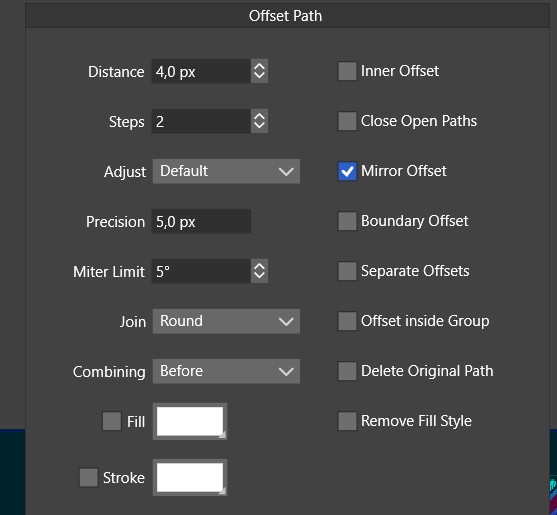
                        @Pat What values are in the "Distance" and "Steps" field?

                        B 1 Reply Last reply Reply Quote 0
                        • B Offline
                          B-Vs-V @VectorStyler
                          last edited by

                          @VectorStyler close to this:

                          0_1670185527208_Details.jpg

                          W11 Pro 25H2 - 12th Gen Intel(R) i7-12700K 3.61 GHz - RAM 64 Go - NVIDIA GF GTX 4070 Ti - Intuos - Dell UP3216Q / Eizo ColorEdge
                          W11 Pro 25H2 - 12th Gen Intel(R) i7-12700KF 3.60 GHz -RAM 64 Go - NVIDIA GF GTX 3080 - IntuosPro- ProArt PA329C

                          VectorStylerV 1 Reply Last reply Reply Quote 1
                          • VectorStylerV Offline
                            VectorStyler @B-Vs-V
                            last edited by

                            @Pat Still no luck. I will try it again tomorrow.

                            1 Reply Last reply Reply Quote 0
                            • VectorStylerV Offline
                              VectorStyler @B-Vs-V
                              last edited by

                              @Pat said in How to apply effects to other objects?:

                              I think there is still enough space to get sharp pointed edges but no way by modulating the miter limit... another way ?

                              The blunt corners are caused by open paths. At the highlighted locations, the nodes overlap, but the paths are actually open. Use the Node tool and the command in the context panel to connect the nodes.

                              1 Reply Last reply Reply Quote 1
                              • First post
                                Last post