Is there a way to specify overprint attribute for a color?
-
@Arde There is no overprint yet, it has been requested already, and it is in the backlog. Overprinting will be available in version 1.
There are 3 types of colors in the palette (set when editing the color in the Mode field):
Expanded - this is just copied as a color, no link to the palette.
Process - this is linked to the palette and a tint can be set in the color or palette panel. This is what you are looking for. These are shown with black triangle, but will be separated (or should be separated) in printing. Tint can be set in the palette or color panel.
Spot - these are the spot colors, shown with black triangle and small circle (spot) in the palette. These will show up as spot colors in printing. -
Overprinting will be included in version 1.0? Awesome!
-
@vectoradmin
@vectoradmin said in Is there a way to specify overprint attribute for a color?:
Process - this is linked to the palette and a tint can be set in the color or palette panel. This is what you are looking for. These are shown with black triangle, but will be separated (or should be separated) in printing. Tint can be set in the palette or color panel.
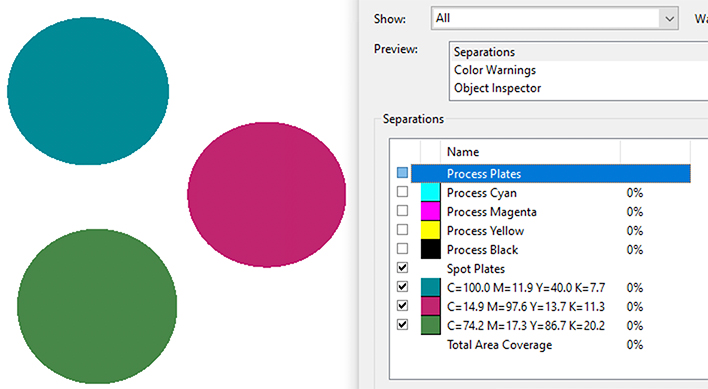
That was what i would have expected, but colors that have been assigned by using "Process" color swatches will be output e.g. in PDF as spot colors, which is all wrong. They should be separated normally but just act as global colors within document so that you can properly control use of colors in the art. But perhaps the feature is broken somehow? So far my experience has been that as long as color swatches are assignable, they will be separated on their own plates even if not created or set to behave as spot colors.
-
@Arde I will try to replicate this issue.
-
See here. I can post the file in email...
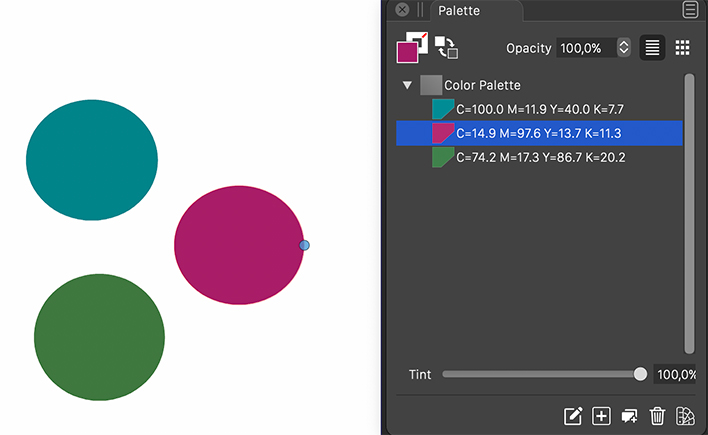
a) This is what I have in the document (three ellipses in CMYK mode and colors assigned with process swatches; the assignment shows so that when I select an object, its color assignment is reflected in the palette):
b) When I export a CMYK PDF from this document, this is what I get:
-
@Arde Yep, the palette colors should not be marked by the app as separations (like spot colors are). IIRC, this was working correctly a few months ago when I tested this.
-
-
@vectoradmin said in Is there a way to specify overprint attribute for a color?:
Overprint is available in the new build. (will work only when separating for printing)
Thanks, but I did not get its idea? Shouldn't it be ink-specific so that I can e.g. have a spotcolor named Black overprint, then add it it as an ink in the separations and specify it as overprinting where as other inks still knock out?
-
@Arde Yes, the overprint options can be assigned to spot inks (or process plates). This can be done in the Styles -> Overprint Options -> menus.
The overprint settings are stored in the document, and are separate from the color defined in the palette.Some consequences of this design:
- it is possible to define common document (or canvas) level overprint settings. For example: overprint a spot plate above 90%.
- it is possible to override these settings locally for a layer, group or object (Object Overprint), with different settings, or removal of overprint.
- and a bit more complicated: for each spot color, it is possible to have different overprint levels, depending on the other spot pr process plates being printed. For example: overprint my spot color on the cyan plate, but not on the magenta plate.
The stroke / fill overprint states set in the Appearance panel are used only to override the above scheme.
-
@vectoradmin said in Is there a way to specify overprint attribute for a color?:
This can be done in the Styles -> Overprint Options -> menus.
Ok, thanks. Did not quite follow but I'll try to figure out how this combines with the separations printing!

