VectorStyler
    • Categories
    • Unread
    • Recent
    • Tags
    • Popular
    • Register
    • Login

    Adobe Illustrator's Quick Preview When Moving Complex Object Around
    Scheduled Pinned Locked Moved Features and Ideas
    5 Posts 3 Posters 5.4k Views 3 Watching
    Loading More Posts
    • Oldest to Newest
    • Newest to Oldest
    • Most Votes
    Reply
    • Reply as topic
    Log in to reply
    This topic has been deleted. Only users with topic management privileges can see it.
    • G Offline
      gotanidea
      last edited by

      I think both VectorStyler and Adobe Illustrator have similar performance when we move complex objects (the ones with thousands of points or text boxes with thousands of characters) around.

      The difference is Adobe Illustrator will show a "very quick preview" that makes the complex object placement more accurate and intuitive. Please take a look at the "blue quick preview" in the screenshot below:
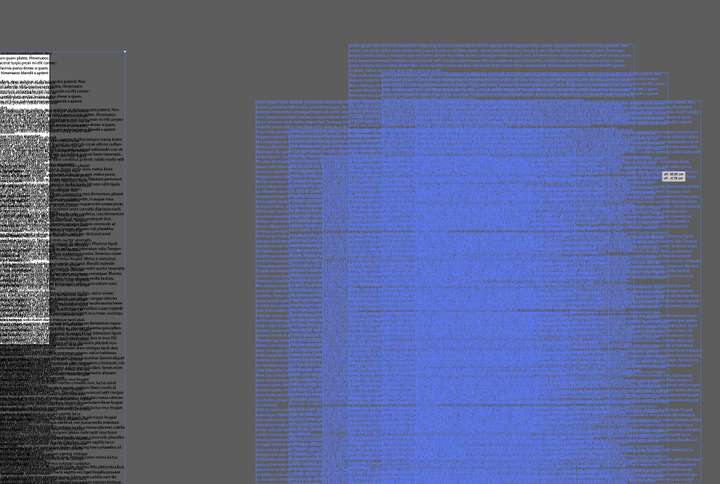
      0_1673477153789_Quick_Preview_When_Moving_Object.jpg

      You could see it in action on this YouTube video, after 00:42 time:

      https://www.youtube.com/watch?v=dwPp1LsqQ8c

      Dragging complex objects in VectorStyler looks slow and heavy, because there is no such "quick preview". You could try to drag the text objects around in this file:

      0_1673477572108_Multiple_Text_Boxes.vstyler

      b77B VectorStylerV 2 Replies Last reply Reply Quote 0
      • b77B Offline
        b77 @gotanidea
        last edited by b77

        @gotanidea When dealing with a complex document, you can disable 'Direct Preview Editing' from
        the View menu > Display.

        An alternative would be the app disabling this direct preview automatically per object when its node
        count is over 500(?) nodes or the text frame has over 2000(?) characters. It would be OK with me.

        MacBook Pro (Intel) running Monterey 12.6.4

        G 1 Reply Last reply Reply Quote 3
        • G Offline
          gotanidea @b77
          last edited by

          @b77 Thanks for the info. After disabling the Direct Preview Editing option, dragging complex objects is smoother now. Your idea about automatically disabling the Direct Preview Editing option for complex objects sounds good too

          1 Reply Last reply Reply Quote 0
          • VectorStylerV Offline
            VectorStyler @gotanidea
            last edited by

            @gotanidea I will try to improve this.

            G 1 Reply Last reply Reply Quote 1
            • G Offline
              gotanidea @VectorStyler
              last edited by

              @VectorStyler Thanks Admin

              1 Reply Last reply Reply Quote 0
              • First post
                Last post
