VectorStyler
    • Categories
    • Unread
    • Recent
    • Tags
    • Popular
    • Register
    • Login

    Deselecting A Text Object using Ctrl + Left Mouse Button Click on Empty Region

    Scheduled Pinned Locked Moved Features and Ideas
    3 Posts 2 Posters 3.6k Views 2 Watching
    Loading More Posts
    • Oldest to Newest
    • Newest to Oldest
    • Most Votes
    Reply
    • Reply as topic
    Log in to reply
    This topic has been deleted. Only users with topic management privileges can see it.
    • G Offline
      gotanidea
      last edited by

      In Adobe Illustrator, we can use Ctrl key + left mouse button click on an empty region to deselect a text object. Please download this file:

      0_1673714449955_Text_Problems.vstyler

      Use the Text Tool to select any word of the text object, then use Ctrl key + left mouse button click on an empty region to deselect a text object:
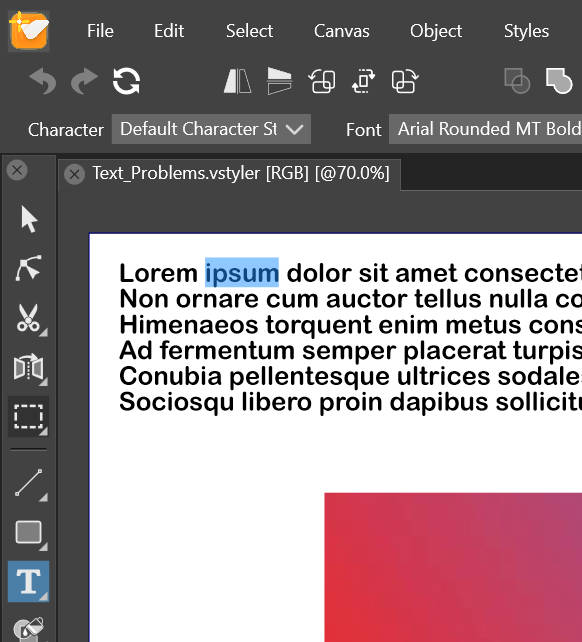
      0_1673714550543_Cannot_Deselect_A_Text_Object_using_Ctrl_&_Mouse_Click.jpg

      VectorStylerV 1 Reply Last reply Reply Quote 1
      • VectorStylerV Offline
        VectorStyler @gotanidea
        last edited by VectorStyler

        @gotanidea Currently, clicking away will create a new text shape.
        I will add this feature for text deselection.

        G 1 Reply Last reply Reply Quote 1
        • G Offline
          gotanidea @VectorStyler
          last edited by

          @VectorStyler Thanks Admin

          1 Reply Last reply Reply Quote 0
          • First post
            Last post
