VectorStyler
    • Categories
    • Unread
    • Recent
    • Tags
    • Popular
    • Register
    • Login

    Searching for an app able to export APNG at 144 ppi and also control looping

    Scheduled Pinned Locked Moved General Discussion
    11 Posts 5 Posters 11.9k Views 4 Watching
    Loading More Posts
    • Oldest to Newest
    • Newest to Oldest
    • Most Votes
    Reply
    • Reply as topic
    Log in to reply
    This topic has been deleted. Only users with topic management privileges can see it.
    • VectorStylerV Offline
      VectorStyler @b77
      last edited by

      @b77 VS cannot do animated export.

      1 Reply Last reply Reply Quote 0
      • S Offline
        Subpath @b77
        last edited by Subpath

        @b77

        "Looking for an app that can export APNG at 144 ppi and also control looping".

        I stumbled across the "APNG" format a few days ago when I was looking at the export
        formats of "ScreentoGif" (Win only) which i use for Screenrecording and saw that it can
        also save "APNG". I don't know what resolution, I only use gif and never cared about resolution.
        ("ScreentoGif" (Win only) is a very small but feature rich tool for screen recording).

        But "Clipstudio Paint" also came to my mind. It has animations,
        I don't use the animation feature of CPS because I don't do animations.
        But I looked around and found these two links here.

        https://www.clip-studio.com/site/gd_en/csp/userguide/csp_userguide/500_menu/500_menu_save_anime_apng.htm

        https://tips.clip-studio.com/en-us/articles/1582

        btw it could also be that there is a Gimp plugin for it

        Win 11
        CPU: AMD Ryzen 5 9600X, 6-core.
        GPU: Nvidia Geforce RTX 5070.

        1 Reply Last reply Reply Quote 1
        • F Offline
          fde101 Global Moderator
          last edited by

          Tumult Hype offers a checkbox to enable/disable looping when exporting animated PNG, but does not appear to offer DPI/PPI control either. Not sure why it would - this format is mostly a Web thing, and DPI/PPI is largely irrelevant in that field.

          In any case, it looks like ImageMagick can do it if you don't mind converting from the command line.

          1 Reply Last reply Reply Quote 1
          • b77B Offline
            b77
            last edited by

            @Subpath & @fde101 Thank you both. I'll see…

            MacBook Pro (Intel) running Monterey 12.6.4

            VectorStylerV 1 Reply Last reply Reply Quote 1
            • VectorStylerV Offline
              VectorStyler @b77
              last edited by

              @b77 There is also Cavalry App: https://cavalry.scenegroup.co/
              Don't know if exports to APNG.

              S 1 Reply Last reply Reply Quote 1
              • S Offline
                Subpath @VectorStyler
                last edited by Subpath

                @VectorStyler said in Searching for an app able to export APNG at 144 ppi and also control looping:

                @b77 There is also Cavalry App: https://cavalry.scenegroup.co/
                Don't know if exports to APNG.

                Yes, it does .APNG. Dont know the resolution.
                Even in the free Version, you need a account
                to download a copy.

                But it may a bit over the top, it is for 2d vector motion graphics.
                Have a copy on my computer. But you can also create vector graphics
                with it and save them as .SVG.

                Instead of save/export you need to render
                your result and choose your format in the
                Render Manager.

                Here a video of the APNG Output
                reorded with recordit so it plays not smooth
                but the APNG is butter smooth
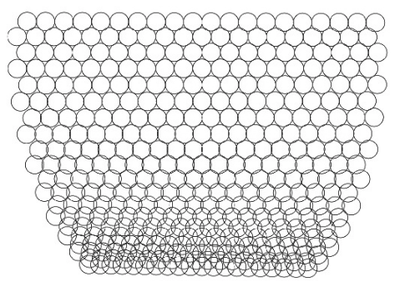
                Here the video

                0_1674480740895_Cavalry.png

                Win 11
                CPU: AMD Ryzen 5 9600X, 6-core.
                GPU: Nvidia Geforce RTX 5070.

                1 Reply Last reply Reply Quote 0
                • H Offline
                  Harry
                  last edited by

                  @b77 Maybe a bit late, but Krita is quite capable in animation. It has an APNG option in rendering animation:
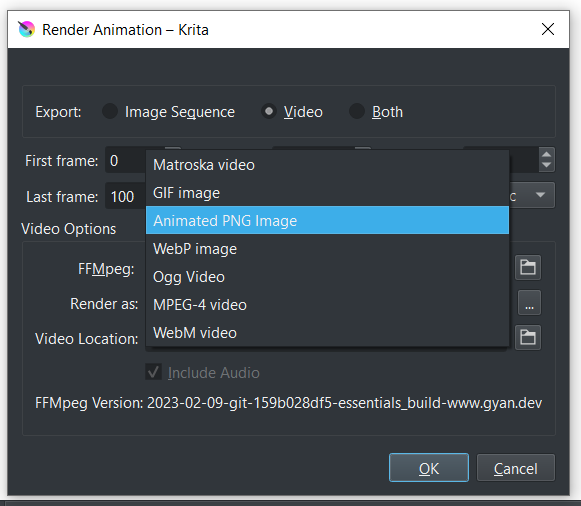
                  0_1675948739310_obraz_2023-02-09_141859307.png

                  Win 11, XP Pen Deco 01 V2 graphic tablet

                  b77B 1 Reply Last reply Reply Quote 1
                  • b77B Offline
                    b77 @Harry
                    last edited by

                    @Harry Thank you. I imported some PNGs on separate layers, but the 'Render Animation' command is greyed out.

                    MacBook Pro (Intel) running Monterey 12.6.4

                    1 Reply Last reply Reply Quote 0
                    • H Offline
                      Harry
                      last edited by

                      @b77 When you first open Krita, you have to save file as krita document (.kra extension) to enable Render Animation option. Then you have to install ffmpeg to Krita.

                      This is a great tutorial how to do it:
                      https://www.youtube.com/watch?v=-B3LDBlkFWU

                      Win 11, XP Pen Deco 01 V2 graphic tablet

                      b77B 1 Reply Last reply Reply Quote 0
                      • b77B Offline
                        b77 @Harry
                        last edited by b77

                        @Harry Thanks! I found Mac builds on this website, installed FFMpeg and APNG export is working now.

                        But… I have no control over ppi and looping… I'll try again tonight to make sure I didn't miss some setting.

                        Thanks again. 👍

                        MacBook Pro (Intel) running Monterey 12.6.4

                        1 Reply Last reply Reply Quote 1
                        • First post
                          Last post
