VectorStyler
    • Categories
    • Unread
    • Recent
    • Tags
    • Popular
    • Register
    • Login

    Mysterious guide

    Scheduled Pinned Locked Moved Questions and Support
    11 Posts 3 Posters 13.3k Views 1 Watching
    Loading More Posts
    • Oldest to Newest
    • Newest to Oldest
    • Most Votes
    Reply
    • Reply as topic
    Log in to reply
    This topic has been deleted. Only users with topic management privileges can see it.
    • 861475_VctSt8 Offline
      861475_VctSt
      last edited by

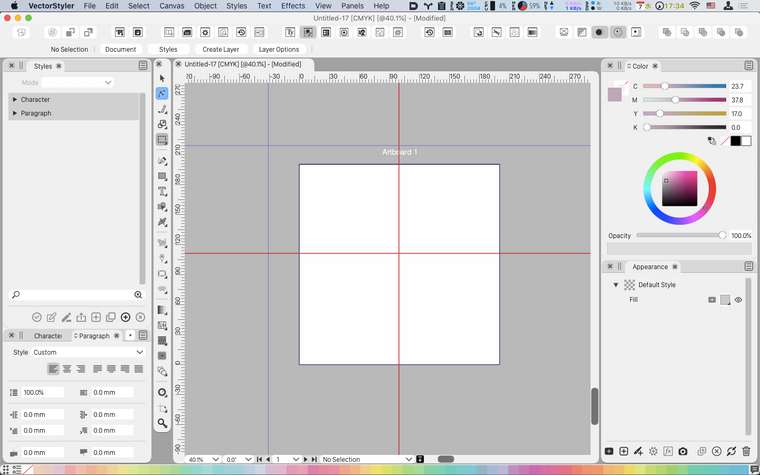
      a) Option + drag from the upper left of the ruler.
      b) Zoom out.
      c) Two irregular cross guides are drawn.

      Is it a harbinger of some function?

      Of course, "a)" itself is meaningless.
      0_1617784995318_ 2021-04-07.png

      LIc. 0 OS10.15.7
      MacBook Air (13-inch, Mid 2012) / Intel Core i5, 8GB / Intel HD Graphics 4000
      LIc. 1 OS13.6.7
      MacBook Pro (14-inch, 2023) / Apple M2 Pro, 16GB / Apple GPU

      VectorStylerV 2 Replies Last reply Reply Quote 0
      • VectorStylerV Offline
        VectorStyler @861475_VctSt
        last edited by

        @861475_VctSt Looks like a bug. Option+ when dragging guidelines should duplicated, but not in this case. (similar bug occurs when Option+dragging from the ruler). I add this to the backlog.

        b77B 1 Reply Last reply Reply Quote 0
        • b77B Offline
          b77 @VectorStyler
          last edited by b77

          @vectoradmin The double guidelines when Option-dragging only from the top or left ruler is not OK.

          But I'm not sure you should delete all this. Option-dragging both a horizontal and a vertical guideline from the corner of the ruler and snapping them directly to a corner of an object (when 'Snap to Objects' is enabled) is useful.

          MacBook Pro (Intel) running Monterey 12.6.4

          VectorStylerV 1 Reply Last reply Reply Quote 0
          • VectorStylerV Offline
            VectorStyler @b77
            last edited by

            @b77 Option+ drag from the corner should change the ruler origin, not guidelines, this is a bug.

            b77B 861475_VctSt8 2 Replies Last reply Reply Quote 0
            • b77B Offline
              b77 @VectorStyler
              last edited by

              @vectoradmin Got it!

              MacBook Pro (Intel) running Monterey 12.6.4

              1 Reply Last reply Reply Quote 0
              • 861475_VctSt8 Offline
                861475_VctSt @VectorStyler
                last edited by

                @vectoradmin

                all right.

                From a different point of view than the issue of bugs.
                I haven't had a function called "Cross Guideline (pseudonym)" before, but I think it would be useful.
                As another idea.

                LIc. 0 OS10.15.7
                MacBook Air (13-inch, Mid 2012) / Intel Core i5, 8GB / Intel HD Graphics 4000
                LIc. 1 OS13.6.7
                MacBook Pro (14-inch, 2023) / Apple M2 Pro, 16GB / Apple GPU

                b77B 1 Reply Last reply Reply Quote 0
                • b77B Offline
                  b77 @861475_VctSt
                  last edited by

                  @861475_VctSt A 'Bounding Guidelines' command could be a useful and faster way to position guidelines around the selected object(s).

                  MacBook Pro (Intel) running Monterey 12.6.4

                  VectorStylerV 1 Reply Last reply Reply Quote 1
                  • VectorStylerV Offline
                    VectorStyler @861475_VctSt
                    last edited by

                    @861475_VctSt The Option+ guideline adding error is fixed in the new build (1.0.022).
                    Also Option+ dragging from the corner should adjust the ruler origin now.

                    861475_VctSt8 1 Reply Last reply Reply Quote 0
                    • 861475_VctSt8 Offline
                      861475_VctSt @VectorStyler
                      last edited by

                      @vectoradmin

                      ⛳
                      I confirmed the correction.

                      LIc. 0 OS10.15.7
                      MacBook Air (13-inch, Mid 2012) / Intel Core i5, 8GB / Intel HD Graphics 4000
                      LIc. 1 OS13.6.7
                      MacBook Pro (14-inch, 2023) / Apple M2 Pro, 16GB / Apple GPU

                      1 Reply Last reply Reply Quote 1
                      • VectorStylerV Offline
                        VectorStyler @b77
                        last edited by

                        @b77 said in Mysterious guide:

                        Bounding Guidelines

                        We have Bounding Guidelines now. Select the object(s) and in the Guideline panel menu select Create on Object Boundary.
                        Bonus: if the view is rotated, it will create rotated guidelines relative to the document axis.

                        b77B 1 Reply Last reply Reply Quote 0
                        • b77B Offline
                          b77 @VectorStyler
                          last edited by

                          @vectoradmin Nice!

                          MacBook Pro (Intel) running Monterey 12.6.4

                          1 Reply Last reply Reply Quote 0
                          • First post
                            Last post
