VectorStyler
    • Categories
    • Unread
    • Recent
    • Tags
    • Popular
    • Register
    • Login

    Break Apart in VS vs CorelDRAW vs Illustrator
    Scheduled Pinned Locked Moved Features and Ideas
    13 Posts 6 Posters 18.2k Views 4 Watching
    Loading More Posts
    • Oldest to Newest
    • Newest to Oldest
    • Most Votes
    Reply
    • Reply as topic
    Log in to reply
    This topic has been deleted. Only users with topic management privileges can see it.
    • VectorStylerV Offline
      VectorStyler @William Kansepa
      last edited by

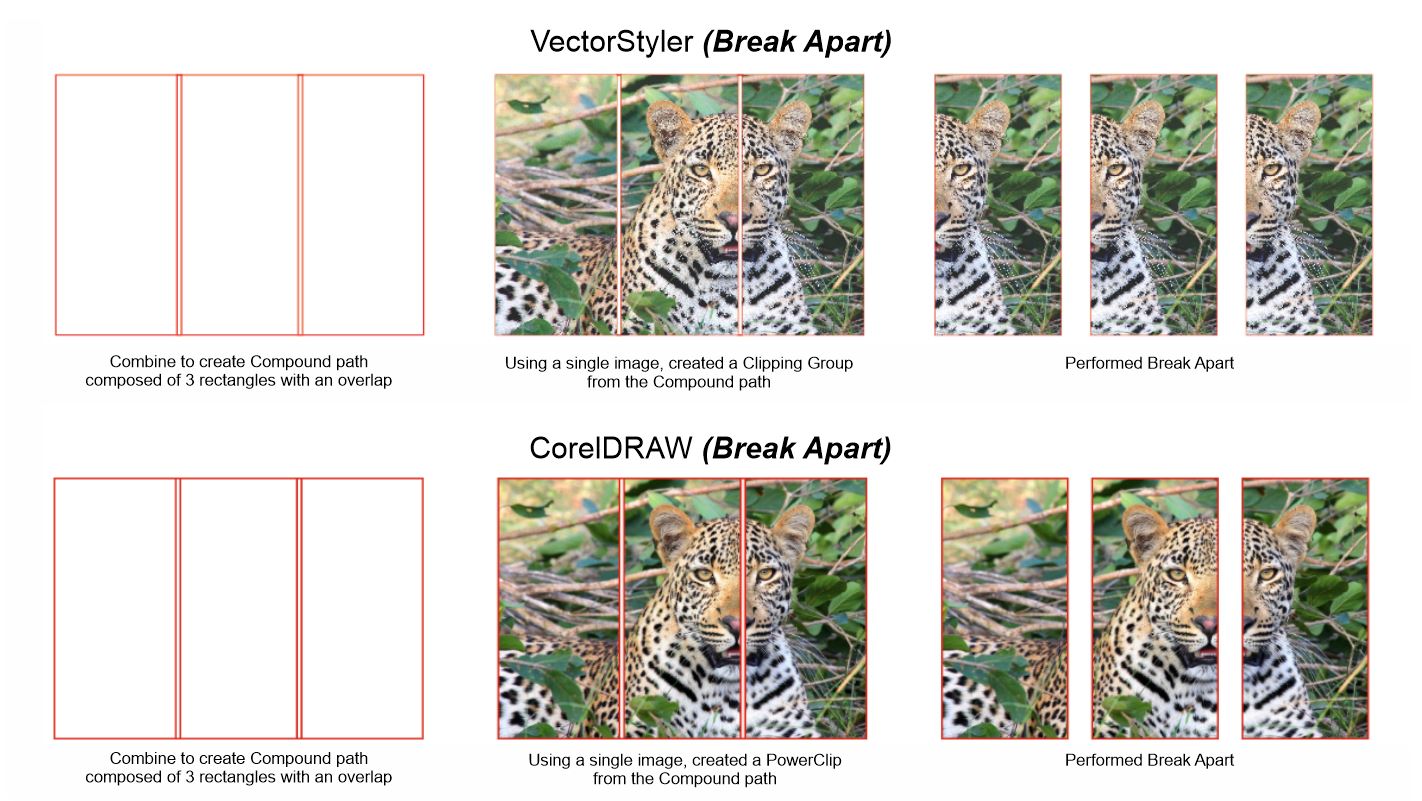
      @William-Kansepa Added this to the backlog, and will try to improve it.

      For now, breaking a shape apart will create separate objects, where in each the image is positioned locally (so it will not work).

      The only way to have this is to keep the shapes combined.

      F 1 Reply Last reply Reply Quote 1
      • F Offline
        fde101 Global Moderator @VectorStyler
        last edited by

        @VectorStyler consider in cases of a raster fill like this, having the command duplicate the object, then add a mask to clip each duplicate to the relevant area?

        1 Reply Last reply Reply Quote 1
        • S Offline
          Subpath @William Kansepa
          last edited by Subpath

          @William-Kansepa

          I know you dont want to do this manually
          but take it so much time to use "Paste Inside"
          to create a clipping Object ?

          I use separat Boxes (no combine)
          an did a Paste Inside on every Box.
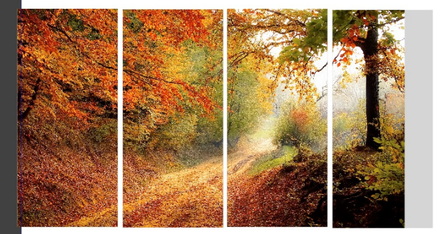
          See Video here

          0_1678979469346_Break Apart Workaround.png

          Win 11
          CPU: AMD Ryzen 5 9600X, 6-core.
          GPU: Nvidia Geforce RTX 5070.

          b77B W 2 Replies Last reply Reply Quote 0
          • b77B Offline
            b77 @Subpath
            last edited by b77

            @Subpath
            It would be nice if 'Paste Inside' would paste the image or object(s) inside multiple objects directly.
            I think this was requested already, if I'm not mistaken, @VectorStyler?

            MacBook Pro (Intel) running Monterey 12.6.4

            VectorStylerV S 2 Replies Last reply Reply Quote 2
            • VectorStylerV Offline
              VectorStyler @b77
              last edited by

              @b77 said in Break Apart in VS vs CorelDRAW vs Illustrator:

              I think this was requested already, if I'm not mistaken, @VectorStyler?

              Not in this form. I added this to the backlog. The main thing here is to have the multiple images aligned to the same position.

              1 Reply Last reply Reply Quote 0
              • S Offline
                Subpath @b77
                last edited by

                @b77 said in Break Apart in VS vs CorelDRAW vs Illustrator:

                It would be nice if 'Paste Inside' would paste the image or object(s) inside multiple objects directly.

                Good idea 👍
                I have never thought of this before
                That would offer some cool possibilities

                Here is a simple example

                0_1678986786313_Paste inside multiple.png

                Win 11
                CPU: AMD Ryzen 5 9600X, 6-core.
                GPU: Nvidia Geforce RTX 5070.

                1 Reply Last reply Reply Quote 0
                • W Online
                  William Kansepa @Subpath
                  last edited by

                  @Subpath Thank you for your response. I am already aware of the Paste Inside method in VS. Illustrator also has a Paste Inside command, but this method is not the most efficient way I would prefer. I have already condemned it and have already pointed out that I don't want to repeatedly paste artwork inside. Suppose you have 15 or more tiles that need to be applied separately, you will understand how tedious it is.
                  In this particular scenario the CorelDRAW method I described earlier is the most efficient and painless way to achieve this (Note that I only you a single image / artwork instance in CorelDRAW). VectorStyler, unlike Illustrator is achieving the closest result similar to CorelDRAW's. It's already encouraging that VectorStyler has said that he will look into ways to make some improvements in this regard.

                  HP•Windows 11 Pro•11th Gen Intel(R) Core(TM) i7-1165G7 @ 2.80GHz 2.70 GHz• RAM: 16.0 GB (DDR4)

                  S 1 Reply Last reply Reply Quote 0
                  • S Offline
                    Subpath @William Kansepa
                    last edited by

                    @William-Kansepa said in Break Apart in VS vs CorelDRAW vs Illustrator:

                    you have 15 or more tiles that need to be applied separately, you will understand

                    of course i understand 🙂

                    Win 11
                    CPU: AMD Ryzen 5 9600X, 6-core.
                    GPU: Nvidia Geforce RTX 5070.

                    1 Reply Last reply Reply Quote 0
                    • B Offline
                      B-Vs-V
                      last edited by

                      It is highly likely that I do not understand all the subtleties of the problem and the query asked but wouldn't it be possible to do this in VS from artboards?

                      I just created two artboards, imported an image spanning both artboards & exported individually (File --> export artboards) and I have two images.

                      W11 Pro 25H2 - 12th Gen Intel(R) i7-12700K 3.61 GHz - RAM 64 Go - NVIDIA GF GTX 4070 Ti - Intuos - Dell UP3216Q / Eizo ColorEdge
                      W11 Pro 25H2 - 12th Gen Intel(R) i7-12700KF 3.60 GHz -RAM 64 Go - NVIDIA GF GTX 3080 - IntuosPro- ProArt PA329C

                      S W 2 Replies Last reply Reply Quote 2
                      • S Offline
                        Subpath @B-Vs-V
                        last edited by Subpath

                        @Pat

                        interesting, did not know that, but it doesn't seem to work flawless.

                        Top

                        0_1679321884751_Top-1.png
                        .
                        .
                        bottom
                        0_1679321895213_bottom-2.png

                        Win 11
                        CPU: AMD Ryzen 5 9600X, 6-core.
                        GPU: Nvidia Geforce RTX 5070.

                        1 Reply Last reply Reply Quote 0
                        • W Online
                          William Kansepa @B-Vs-V
                          last edited by

                          @Pat said in Break Apart in VS vs CorelDRAW vs Illustrator:

                          It is highly likely that I do not understand all the subtleties of the problem and the query asked but wouldn't it be possible to do this in VS from artboards?

                          I just created two artboards, imported an image spanning both artboards & exported individually (File --> export artboards) and I have two images.

                          @Pat
                          Thank you for your response to my dilemma. I have tried your prescribed method both in Illustrator and VS. I am happy to say it works.
                          I used the rectangle tool to draw the exact size of the tile that I want and used the Move command to generate copies of the rectangles (having already set the desired overlap width between of course).
                          Having completed that, I then created overlapped Artboards from these rectangles. After that, I imported a 3m x 10m artwork to share across the Artboards. I successfully exported all the Artboards as .tif with no issues.
                          I tried same method in Illustrator and the result was similar.
                          I have to point out though that Illustrator has a faster way of converting the rectangles to Artboards: 'Convert to Artboards' command. You just select all the rectangles at once and click on the command to simultaneously convert them to multiple Artboards. In VS I had to click on each rectangle one at a time to create the Artboards. Unless I am missing something, is there a function in VS similar to Illustrator's 'Convert to Artboards'?

                          Using this solution from @Pat in Illustrator is as fast as CorelDRAW's Break Apart method.

                          HP•Windows 11 Pro•11th Gen Intel(R) Core(TM) i7-1165G7 @ 2.80GHz 2.70 GHz• RAM: 16.0 GB (DDR4)

                          B 1 Reply Last reply Reply Quote 1
                          • B Offline
                            B-Vs-V @William Kansepa
                            last edited by

                            @William-Kansepa Very happy to hear that I was able to help. I had tested it and it seemed to have what you were hoping for but I wasn't too sure... As for AI, I haven't used it in a long time and I don't remember its features.

                            W11 Pro 25H2 - 12th Gen Intel(R) i7-12700K 3.61 GHz - RAM 64 Go - NVIDIA GF GTX 4070 Ti - Intuos - Dell UP3216Q / Eizo ColorEdge
                            W11 Pro 25H2 - 12th Gen Intel(R) i7-12700KF 3.60 GHz -RAM 64 Go - NVIDIA GF GTX 3080 - IntuosPro- ProArt PA329C

                            1 Reply Last reply Reply Quote 2
                            • First post
                              Last post