VectorStyler
    • Categories
    • Unread
    • Recent
    • Tags
    • Popular
    • Register
    • Login

    Adding the ability to create sub-folders for custom shapes

    Scheduled Pinned Locked Moved Features and Ideas
    9 Posts 3 Posters 10.7k Views 2 Watching
    Loading More Posts
    • Oldest to Newest
    • Newest to Oldest
    • Most Votes
    Reply
    • Reply as topic
    Log in to reply
    This topic has been deleted. Only users with topic management privileges can see it.
    • BoldlineB Online
      Boldline
      last edited by

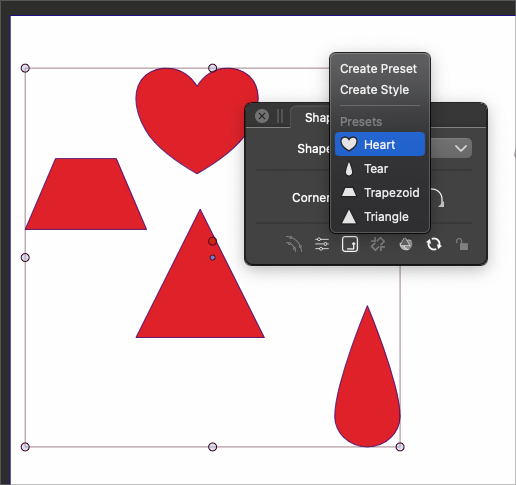
      I wanted to see about adding more organization for shape presets and styles by allowing the user to create a custom shape folder and be able to add new custom shapes there because the list of preset shapes could potentially get long.

      Perhaps the subfolders could be created using the shape panel and accessed by either the shape panel or the contextual menu?
      0_1680632222665_2e86c822-882d-42b4-8e22-dc24abbea899-BLD 2023-04-04 at 14.13.05.png

      🍎 macOS Tahoe 26.2, Mac mini (M1, 2020), Chip Apple M1, Memory 16 GB
      Cintiq 27QHD Display and LG Ultra HD Display

      b77B 1 Reply Last reply Reply Quote 1
      • b77B Offline
        b77 @Boldline
        last edited by b77

        @Boldline You can select multiple symbol presets from the Presets panel and
        use 'Group Selected…' from the panel's menu to place them into a folder.

        MacBook Pro (Intel) running Monterey 12.6.4

        BoldlineB 1 Reply Last reply Reply Quote 2
        • BoldlineB Online
          Boldline @b77
          last edited by

          @b77 thanks - I was thinking of the shapes panel as the "central hub" for organizing folders and the like. The presets folder is actually more like a collection of all presets used in VS.
          Maybe I am just going to need to train myself to think that way because my natural inclination was to organize in the shape panel

          🍎 macOS Tahoe 26.2, Mac mini (M1, 2020), Chip Apple M1, Memory 16 GB
          Cintiq 27QHD Display and LG Ultra HD Display

          b77B 1 Reply Last reply Reply Quote 0
          • b77B Offline
            b77 @Boldline
            last edited by

            @Boldline Oh, you meant shape presets… 🙂

            But anyway, these operations (grouping, renaming…) can be done in the Presets panel.

            MacBook Pro (Intel) running Monterey 12.6.4

            BoldlineB 1 Reply Last reply Reply Quote 1
            • BoldlineB Online
              Boldline @b77
              last edited by

              @b77 said in Adding the ability to create sub-folders for custom shapes:

              @Boldline Oh, you meant shape presets… 🙂

              But anyway, these operations (grouping, renaming…) can be done in the Presets panel.

              yes, SHAPE presets 🙂

              🍎 macOS Tahoe 26.2, Mac mini (M1, 2020), Chip Apple M1, Memory 16 GB
              Cintiq 27QHD Display and LG Ultra HD Display

              b77B 1 Reply Last reply Reply Quote 1
              • b77B Offline
                b77 @Boldline
                last edited by

                …or in the Preset Manager (see the Styles menu). 👍

                MacBook Pro (Intel) running Monterey 12.6.4

                1 Reply Last reply Reply Quote 0
                • S Offline
                  Subpath
                  last edited by Subpath

                  To be honest, I haven't really explored the possibilities
                  VS offers for Shape Presets. What I have read about it
                  so far did not attract me that much.

                  One way I like it is the way the "Concepts" app (Ipad)
                  handles this. Where you can easily create your library
                  and have it by your side if you need it.

                  Transposed to VS, my idea goes in the direction of a Panel.
                  Similar to the Symbol Panel. Where you could put your shapes
                  in and out if you want them.

                  Here a Pic from the Concept Shape library:

                  0_1680639200880_Concepts-Shape-Presets-1.png

                  Win 11
                  CPU: AMD Ryzen 5 9600X, 6-core.
                  GPU: Nvidia Geforce RTX 5070.

                  BoldlineB 1 Reply Last reply Reply Quote 0
                  • BoldlineB Online
                    Boldline @Subpath
                    last edited by

                    @Subpath I like the options to save and re-use customized shapes in Vectorstyler and I'm beginning to understand better the hierarchy and focus of presets>shape. I was reading in the VS manual more about the topic and the first two lines stood out to me; "In a VectorStyler document, the shape of objects can be modified, edited, replaced, reused and styled, at any moment of the creation of an illustration. The shape of an object is an attribute of the object (just like color, or outline style)."

                    It opens my eyes to more possibilities in how I can utilize the shape aspect of vectors in my work.

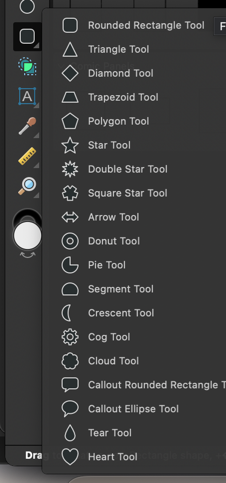
                    I understand your suggestion about imitating the concept shape library. That reminds me of the options Affinity makes available from the pullout tab in their toolbox. I included a screenshot below.
                    This topic was covered last year on the forum

                    @VectorStyler had shared, "But those shapes in the attached screenshot are parametric (live), they have some option that can be dynamically adjusted by the user. This would require code, but it is not technically difficult to do. A set of new shapes might be added, but only after 1.2"

                    I don't think every shape offered in Affinity or Concepts is necessary as a dedicated shape in the toolbox in VS, but it will be great to be able to add parametric abilities through scripting eventually
                    0_1680786665079_8610487e-ae09-43ad-8197-50add402e752-CleanShot 2023-04-06 at 09.08.50.png

                    🍎 macOS Tahoe 26.2, Mac mini (M1, 2020), Chip Apple M1, Memory 16 GB
                    Cintiq 27QHD Display and LG Ultra HD Display

                    S 1 Reply Last reply Reply Quote 3
                    • S Offline
                      Subpath @Boldline
                      last edited by Subpath

                      @Boldline

                      Will have a look at the manual regarding this.

                      What I miss is a kind of a simple and easy to use User Shape library Panel in VS.
                      Where i could put shapes in and out (drag and drop) without the
                      need of to give them Names or define a Style.

                      Don't get me wrong, found names and styles useful
                      and I appreciate having them.

                      But just a simple library would fit my needs in many cases.

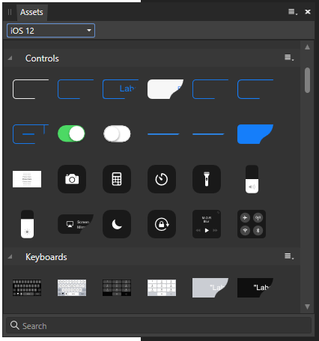
                      Affinitiy Designers "Assets" Panel is an Example.
                      Well, it has no drag and drop, "curios" if you aks me
                      you add a Shape/Asset by select them and choose
                      "add by selection"

                      The Concepts Shape Library works similar to
                      Affinity Designer Asset Panel.

                      Here a Image of Designers Asset panel
                      0_1680803062222_Asset Panel.png

                      Win 11
                      CPU: AMD Ryzen 5 9600X, 6-core.
                      GPU: Nvidia Geforce RTX 5070.

                      1 Reply Last reply Reply Quote 0
                      • First post
                        Last post