Easy option to return to default toolbar if accidentally modified directly?
-
Months ago, I installed VS on a computer my kids use and encouraged them to learn it . My son was attempting to create his own custom toolbar and somehow jumped right into editing the default one and closed out the toolbar customization panel - essentially confirming the edits.
I had to fiddle around with things to get the original toolbar to return.Would it make sense to have an easy way to return to the "default" toolbar? Maybe also have new custom toolbars be stored in a subfolder so they are easy to find and not confused with the primary default bar?
🍎 macOS Tahoe 26.2, Mac mini (M1, 2020), Chip Apple M1, Memory 16 GB
Cintiq 27QHD Display and LG Ultra HD Display -
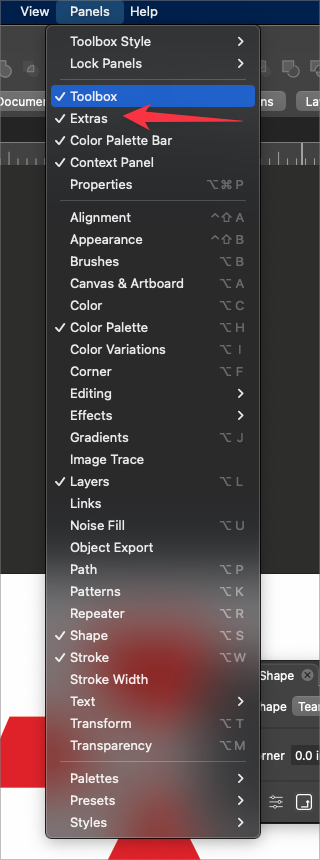
When I look under the panel options, particularly for the toolbox , it's easy to add new custom toolboxes and later on not know what they are for. in this case, I made a custom toolbox and had just called it "Extras". Perhaps it's better if I had "Toolbox" to the end of the name and that solves it.
if I don't add "toolbox" to the end of the name, it would not be apparent to me that the title right below the default "toolbox" is another toolbox. I'm trying to avoid future confusion for myself and users.Going back to the potential accidental overwrite of the default toolbox, perhaps a block could be added on naming any new custom toolbox as "toolbox"? It blocks you from completing the task and gives a pop-up to choose a different name?
🍎 macOS Tahoe 26.2, Mac mini (M1, 2020), Chip Apple M1, Memory 16 GB
Cintiq 27QHD Display and LG Ultra HD Display -
@Boldline 'Restore Defaults…' from the app's VectorStyler menu > Workspaces should
revert the panels to default.I have a custom toolbox(?) where I moved all the buttons of the Context panel's first row
and I named it 'Quick Panel', not 'toolbox', to avoid confusion with the toolbox on the left. -
@b77 said in Easy option to return to default toolbar if accidentally modified directly?:
Restore Defaults…' from the app's VectorStyler menu > Workspaces should
revert the panels to default.ok that makes sense. That's probably what I eventually did when fixing the problem.
I'm still thinking a name-block on "toolbox" would also help avoid an accidental overwrite.
-
@Boldline One thing I will try to do in the future is to have the toolbar (and toolbox) customization saved in a separate file (not in the workspace) so it can be reset individually.
-
made me a little Toolbox once
with only one tool "Colorize" so fari found out that the Tooltip is helpful
to recognize it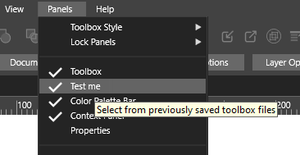
-
@Subpath that's a really good idea! thanks for sharing.


