VectorStyler
    • Categories
    • Unread
    • Recent
    • Tags
    • Popular
    • Register
    • Login

    Rotation indicator when rotating objects

    Scheduled Pinned Locked Moved Features and Ideas
    4 Posts 3 Posters 4.4k Views 2 Watching
    Loading More Posts
    • Oldest to Newest
    • Newest to Oldest
    • Most Votes
    Reply
    • Reply as topic
    Log in to reply
    This topic has been deleted. Only users with topic management privileges can see it.
    • BoldlineB Online
      Boldline
      last edited by

      Currently when objects are rotated with the transform tool, there is an "X" in the center of the shape.
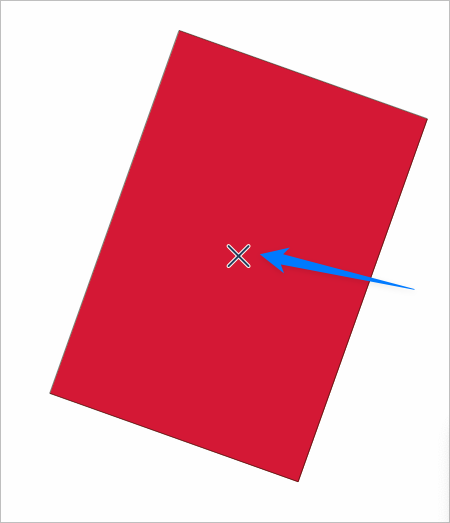
      0_1683064493145_ae1d9eed-9a67-4a09-bac3-9525fcf0858a-BLD 2023-05-02 at 17.54.28.png

      Affinity has a real-time tool in the center that shows how far of a rotation has occurred. Would love to see this added in VS
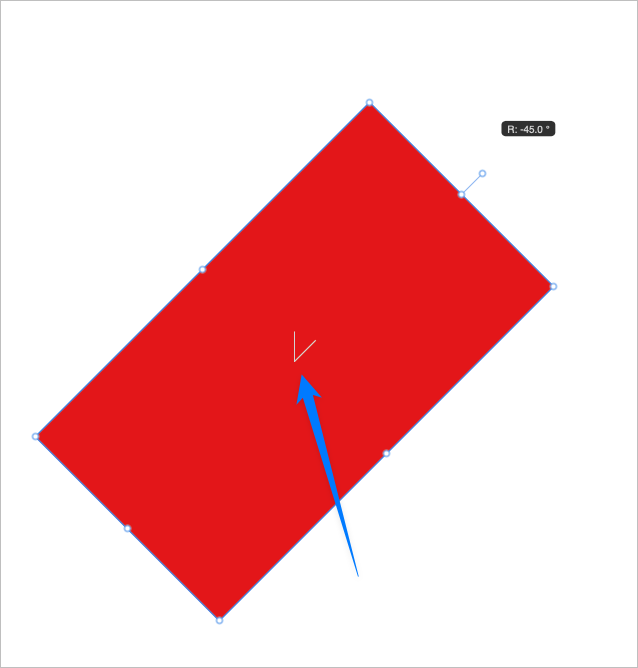
      0_1683064619951_82e2e688-22e4-4c3c-8cae-b59a5e690130-BLD 2023-05-02 at 17.56.01.png

      🍎 macOS Tahoe 26.2, Mac mini (M1, 2020), Chip Apple M1, Memory 16 GB
      Cintiq 27QHD Display and LG Ultra HD Display

      b77B 1 Reply Last reply Reply Quote 2
      • b77B Offline
        b77 @Boldline
        last edited by

        @Boldline Btw, 'Show Editor Popups' in Prefs > Editing Options 2 should display the angle.

        Is this angle readout visible by default in AD?

        MacBook Pro (Intel) running Monterey 12.6.4

        BoldlineB 1 Reply Last reply Reply Quote 1
        • BoldlineB Online
          Boldline @b77
          last edited by

          @b77 Thanks, yes I could turn on the "Show Editor Popups" option and get the angle but that turns on the popups for a lot of other things and gets in the way for me. (I would love an option to turn on some and not other editor popups because I'd get more use out of that option)

          Affinity has it on by default in the Designer 2 Beta. As an artist, I liked the visual representation it gave alongside the popup with the exact angle. Right now the VS version does not show the visual representation and has a large "x" there instead.

          🍎 macOS Tahoe 26.2, Mac mini (M1, 2020), Chip Apple M1, Memory 16 GB
          Cintiq 27QHD Display and LG Ultra HD Display

          VectorStylerV 1 Reply Last reply Reply Quote 1
          • VectorStylerV Offline
            VectorStyler @Boldline
            last edited by

            @Boldline Added to the backlog of features for the future

            1 Reply Last reply Reply Quote 0
            • First post
              Last post
