VectorStyler
    • Categories
    • Unread
    • Recent
    • Tags
    • Popular
    • Register
    • Login

    How I can cut a selected Path into two piece
    Scheduled Pinned Locked Moved Questions and Support
    13 Posts 6 Posters 10.3k Views 5 Watching
    Loading More Posts
    • Oldest to Newest
    • Newest to Oldest
    • Most Votes
    Reply
    • Reply as topic
    Log in to reply
    This topic has been deleted. Only users with topic management privileges can see it.
    • B Offline
      Buntstift
      last edited by

      How I can cut a selected Path into two pieces (marked with red line)? The knife tool is not working (a quite common way in all other vector programms)?
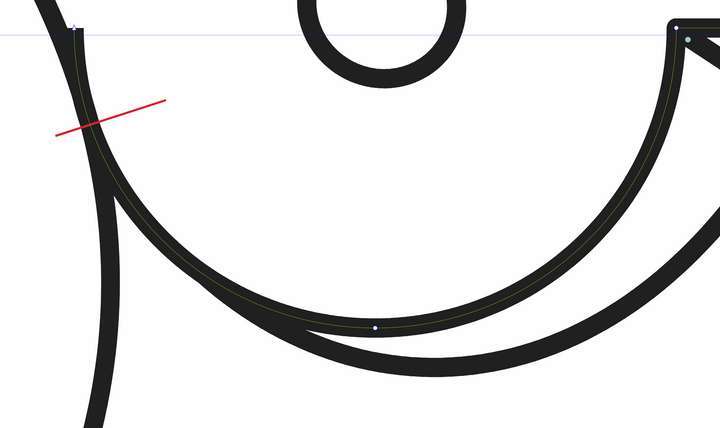
      0_1683103987456_1683054432939-vectorstyler-knife-resized.jpg

      b77B S VectorStylerV 4 Replies Last reply Reply Quote 0
      • b77B Offline
        b77 @Buntstift
        last edited by

        @Buntstift Double-click the path with the Shape Editor tool (A) where you need
        the split to be, then click the node with the Scissors tool.
        This will result in two separate shapes.

        If you just want to add a split in the path, use 'Break Shape' from the context
        menu after adding the node.

        MacBook Pro (Intel) running Monterey 12.6.4

        1 Reply Last reply Reply Quote 0
        • b77B Offline
          b77 @Buntstift
          last edited by

          …but I agree that the Knife tool should also work on open paths.

          MacBook Pro (Intel) running Monterey 12.6.4

          1 Reply Last reply Reply Quote 1
          • B Offline
            Buntstift
            last edited by

            Sometimes Vectorstyler drives me crazy because simple things are solved quite awkwardly. Even Belight's Amadine has a sharp cutting tool for paths. I'm always on the verge of buying CreativSuite again. Thanks for the help.

            VectorStylerV BoldlineB 2 Replies Last reply Reply Quote 0
            • VectorStylerV Offline
              VectorStyler @Buntstift
              last edited by

              @Buntstift This seems to be a bug. Fix will be in the next build.

              1 Reply Last reply Reply Quote 2
              • BoldlineB Offline
                Boldline @Buntstift
                last edited by

                @Buntstift I can understand the occasional frustration that comes with using Vectorstyler, but I've also experienced issues with other vector editing programs like Amadine, Affinity, and Illustrator. However, the developer seems to have heard the community's request for a knife tool to segment open paths (he liked the post mentioning it in your thread). Despite occasional frustrations, Vectorstyler still offers many superior features, and the developer actively listens to and implements suggestions from the forum community. I'd encourage you to share all of the examples of simple tasks that you feel are solved awkwardly in Vectorstyler on the forum so they can be addressed in future updates. The more we contribute, the faster Vectorstyler can improve and become the best vector editing program

                🍎 macOS Sequoia 15.3, Mac mini (M1, 2020), Chip Apple M1, Memory 16 GB
                Cintiq 27QHD Display and LG Ultra HD Display

                1 Reply Last reply Reply Quote 1
                • S Offline
                  Subpath @Buntstift
                  last edited by

                  @Buntstift

                  maybe "Trim" could be a workaround in some cases

                  Here a Video

                  0_1683127042284_Trim-1.png

                  Win 11
                  CPU: AMD Ryzen 5 9600X, 6-core.
                  GPU: Nvidia Geforce RTX 5070.

                  1 Reply Last reply Reply Quote 0
                  • S Offline
                    Subpath
                    last edited by Subpath

                    Every tool has its light and dark sides.
                    But despite all quirks and bugs vectorstyler is
                    is still my favorite vector program.

                    Thus, no one can attract me with Affinity and Co.

                    If some one miss Tool, know a way to make Things better
                    the Forum Section " Features and Ideas" is open all the time.

                    Win 11
                    CPU: AMD Ryzen 5 9600X, 6-core.
                    GPU: Nvidia Geforce RTX 5070.

                    1 Reply Last reply Reply Quote 1
                    • S Offline
                      Subpath
                      last edited by Subpath

                      @Buntstift

                      another workaround may, to use the "Eraser Tool"
                      and choose a tiny Brush size
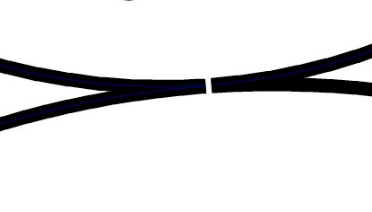
                      Here also a video

                      0_1683129461823_eraser-tool.png

                      Win 11
                      CPU: AMD Ryzen 5 9600X, 6-core.
                      GPU: Nvidia Geforce RTX 5070.

                      1 Reply Last reply Reply Quote 0
                      • VectorStylerV Offline
                        VectorStyler @Buntstift
                        last edited by

                        @Buntstift New build with knife tool improvements is available for download.

                        b77B 1 Reply Last reply Reply Quote 2
                        • b77B Offline
                          b77 @VectorStyler
                          last edited by b77

                          @VectorStyler
                          A suggestion I have for the Knife tool is making it
                          cut AND split the path in two separate objects.

                          Not by default, but maybe with Shift?

                          MacBook Pro (Intel) running Monterey 12.6.4

                          IgullI VectorStylerV 2 Replies Last reply Reply Quote 1
                          • IgullI Offline
                            Igull @b77
                            last edited by

                            @b77 said in How I can cut a selected Path into two piece:

                            Noot by default, but maybe with Shift?

                            Not ANOTHER modifier LOL 🙂 🙂 🙂

                            Neil

                            iMac 27" 2015 Catalina 32Gb, MacBook Pro 13" 2016 Monterey 8Gb, Mac Mini M2 2023 8Gb

                            1 Reply Last reply Reply Quote 0
                            • VectorStylerV Offline
                              VectorStyler @b77
                              last edited by

                              @b77 said in How I can cut a selected Path into two piece:

                              A suggestion I have for the Knife tool is making it cut AND split the path in two separate objects.

                              This exists, but there seems to be a regression with the new intersection mode and separate does not work when the margins / nodes are overlapping.


                              1 Reply Last reply Reply Quote 0
                              • First post
                                Last post