VectorStyler
    • Categories
    • Unread
    • Recent
    • Tags
    • Popular
    • Register
    • Login

    Default palette seems to be missing reg black and "no color" swatches

    Scheduled Pinned Locked Moved Questions and Support
    5 Posts 3 Posters 5.0k Views 2 Watching
    Loading More Posts
    • Oldest to Newest
    • Newest to Oldest
    • Most Votes
    Reply
    • Reply as topic
    Log in to reply
    This topic has been deleted. Only users with topic management privileges can see it.
    • BoldlineB Online
      Boldline
      last edited by

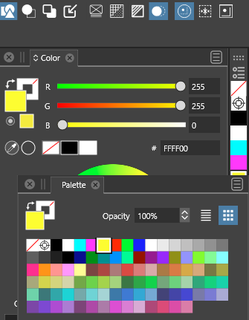
      I noticed because I was not using a custom palette as my default, that the current default palette in VS seems to be missing the "no color" and the reg black swatches. could those be added back in?

      🍎 macOS Tahoe 26.2, Mac mini (M1, 2020), Chip Apple M1, Memory 16 GB
      Cintiq 27QHD Display and LG Ultra HD Display

      S 1 Reply Last reply Reply Quote 0
      • S Offline
        Subpath @Boldline
        last edited by

        @Boldline

        dont know if we mean the same thing
        but for me everthing is fine here

        0_1684174830570_color.png

        Win 11
        CPU: AMD Ryzen 5 9600X, 6-core.
        GPU: Nvidia Geforce RTX 5070.

        BoldlineB 1 Reply Last reply Reply Quote 1
        • BoldlineB Online
          Boldline @Subpath
          last edited by

          @Subpath ok that's good - I wonder what the issue is here. I'll play around with it a little more and see if I can refresh things and get it to fix itself.

          🍎 macOS Tahoe 26.2, Mac mini (M1, 2020), Chip Apple M1, Memory 16 GB
          Cintiq 27QHD Display and LG Ultra HD Display

          1 Reply Last reply Reply Quote 0
          • BoldlineB Online
            Boldline
            last edited by

            If I open up the default "color palette" it is showing correctly. Maybe I had something else opening as "palette" that was missing those options

            🍎 macOS Tahoe 26.2, Mac mini (M1, 2020), Chip Apple M1, Memory 16 GB
            Cintiq 27QHD Display and LG Ultra HD Display

            VectorStylerV 1 Reply Last reply Reply Quote 1
            • VectorStylerV Offline
              VectorStyler @Boldline
              last edited by

              @Boldline said in Default palette seems to be missing reg black and "no color" swatches:

              If I open up the default "color palette" it is showing correctly. Maybe I had something else opening as "palette" that was missing those options

              The "Palette" mode shows the current document palette, not the default palette.
              You have to create a new document with a Default RGB/CMYK palette to show the actual default.

              1 Reply Last reply Reply Quote 0
              • First post
                Last post