What is different about adding a spot color via the artboard tool compared to manually using the plus sign icon in the palette panel?
-
I am trying to figure out why adding a color via the plus sign icon in the palette panel adds a spot color sans the white circle within a black triangle. but if I do the same with the artboard tool by clicking on the artboard and then clicking on the spot color from a secondary palette, it adds it to the main palette automatically and with the white circle within a black triangle.
On a side note, I noticed when I manually added the spot color using the plus sign icon option, it added it to the very top of the swatches next to the null and reg black and not where I'd expect it to be, at the bottom. Moving it down there was only semi-successful
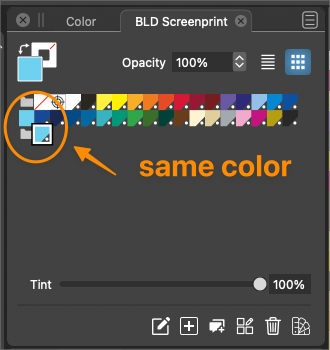
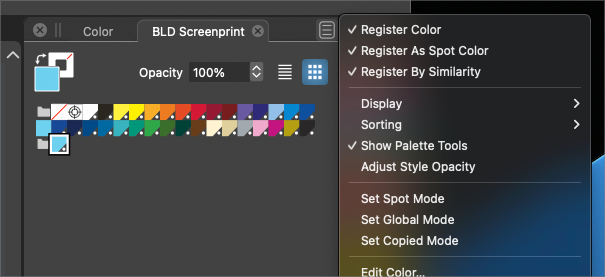
These are my settings for the default palette panel:
-
The "+" button does not seem to add the color as a spot color.
Try selecting it and hit the Edit Color (pencil icon) button, then look at the "Mode:" - suspect it is set to "Copy" rather than "Spot".
-
@fde101 thanks - yes it was set to "copy" and when I swapped it to "spot", it added it as a spot color.
@VectorStyler is there a reason adding a color would not keep it a spot color if it was one already? I'm open to learning better ways to do things
-
@Boldline said in What is different about adding a spot color via the artboard tool compared to manually using the plus sign icon in the palette panel?:
is there a reason adding a color would not keep it a spot color if it was one already?
If a spot color already exists, and it has been applied on an object with a tint, then adding it again might result in some problems.
Some of these problems will have a fix in the next build.
EDIT: in the current build, the when a spot color is added to the palette again, it will get expanded.
-
@VectorStyler said:
EDIT: in the current build, the when a spot color is added to the palette again, it will get expanded.
Expanded to RGB or CMYK color mode, depending on the document color mode?
-
@b77 said in What is different about adding a spot color via the artboard tool compared to manually using the plus sign icon in the palette panel?:
Expanded to RGB or CMYK color mode, depending on the document color mode?
Expanded to the color mode of the original spot color.


