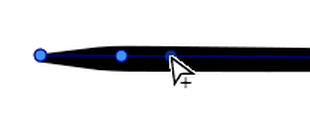
Set new Width Nodes Indicator Idea
-
When I tried out how the Width Nodes now work in the new version.
Came to me the idea that maybe indicator would be quite helpful,
showing when it is possible to set a new width node.
Because it is a kind of trial and error.Maybe a small + sign could give a hint when it should
be possible to set a new width node. But i am open for other ideas. -
Does the Stroke Width tool even work on the Mac version?
I have been trying and no matter where I click on a closed path created with the pen tool I cannot get it to adjust the width anywhere or to add a new node. If I adjust the stroke width using the context toolbar, appearance panel or even the stroke width panel, clicking anywhere along the stroke just snaps it back to "Hairline" for the entire shape and does not add a new node.
For an open path I can sometimes add one node, but then when I try to adjust the width at that node or to add another node along the path, it seems to only allow me to move the node along the path, and not adjust its width. I did discover that in some cases I can add a second node if I first select one on an end, and that I can adjust the width of the ends sometimes but not others... did I miss a tutorial somewhere to explain this or is the tool just bugged?
It does not currently behave at all like I would expect...
-
@fde101 It doesn't work with Hairline because it is a special stroke width?
-
@fde101 said in Set new Width Nodes Indicator Idea:
Does the Stroke Width tool even work on the Mac version?
Should be working. Send me a file with a shape where there are issues.
-
@b77 interesting, it looks like this might have been it.
The strange thing is that I had changed the width from Hairline earlier and it still was not working. It is now.
Not sure if something had the app in a broken state and restarting the app fixed it, but will try to keep an eye on it for a while.
-
I just like to say how much I appreciate the little + sign
that now indicates when it is possible to set a Width Nodemuch more better than before