VectorStyler
    • Categories
    • Unread
    • Recent
    • Tags
    • Popular
    • Register
    • Login

    Paragraph styles panel
    Scheduled Pinned Locked Moved Features and Ideas
    14 Posts 2 Posters 12.2k Views 2 Watching
    Loading More Posts
    • Oldest to Newest
    • Newest to Oldest
    • Most Votes
    Reply
    • Reply as topic
    Log in to reply
    This topic has been deleted. Only users with topic management privileges can see it.
    • B Offline
      B-Vs-V @VectorStyler
      last edited by

      @VectorStyler That's the idea of styles: it would be inconceivable to work on a document layout without using styles, at least for text formatting (headings, subheadings, text, table of contents, footnotes and endnotes, etc.).

      I used to work on the text formatting in the document, create a style straight away and then make modifications to adjust all the formatting parameters. Then, in InDesign or Affinity Publisher, all you had to do was click on a button to re-edit the style... as simple as that!

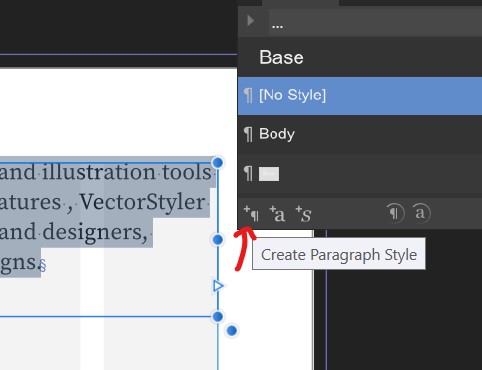
      In APub:

      1. Create a paragraph style:

      0_1686481613468_P1.jpg

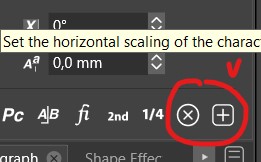
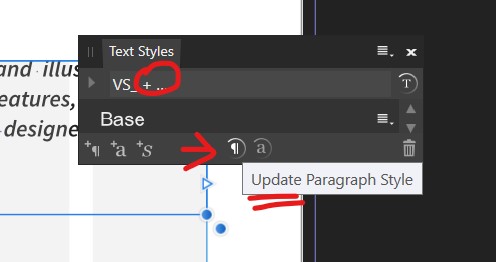
      1. Update a preexisting style after any modification:
      0_1686481646370_P2.jpg

      W11 Pro 25H2 - 12th Gen Intel(R) i7-12700K 3.61 GHz - RAM 64 Go - NVIDIA GF GTX 4070 Ti - Intuos - Dell UP3216Q / Eizo ColorEdge
      W11 Pro 25H2 - 12th Gen Intel(R) i7-12700KF 3.60 GHz -RAM 64 Go - NVIDIA GF GTX 3080 - IntuosPro- ProArt PA329C

      1 Reply Last reply Reply Quote 1
      • B Offline
        B-Vs-V @VectorStyler
        last edited by B-Vs-V

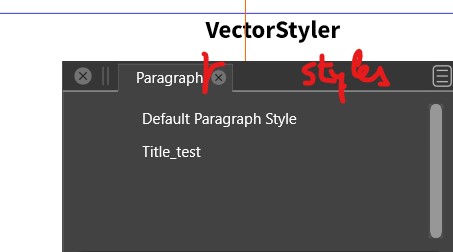
        @VectorStyler I'm just testing the paragraph styles. I did a style for the title. The font used is Source Sans Pro. When I check the style in the Paragraph (styles) panel, it says 'Times New Roman'. These data should be identical:

        0_1686724849579_PSt.jpg

        W11 Pro 25H2 - 12th Gen Intel(R) i7-12700K 3.61 GHz - RAM 64 Go - NVIDIA GF GTX 4070 Ti - Intuos - Dell UP3216Q / Eizo ColorEdge
        W11 Pro 25H2 - 12th Gen Intel(R) i7-12700KF 3.60 GHz -RAM 64 Go - NVIDIA GF GTX 3080 - IntuosPro- ProArt PA329C

        VectorStylerV B 2 Replies Last reply Reply Quote 1
        • VectorStylerV Offline
          VectorStyler @B-Vs-V
          last edited by

          @Pat Send me the file where this occurs.

          B 2 Replies Last reply Reply Quote 0
          • B Offline
            B-Vs-V @VectorStyler
            last edited by

            @VectorStyler Done, thanks ☺

            W11 Pro 25H2 - 12th Gen Intel(R) i7-12700K 3.61 GHz - RAM 64 Go - NVIDIA GF GTX 4070 Ti - Intuos - Dell UP3216Q / Eizo ColorEdge
            W11 Pro 25H2 - 12th Gen Intel(R) i7-12700KF 3.60 GHz -RAM 64 Go - NVIDIA GF GTX 3080 - IntuosPro- ProArt PA329C

            1 Reply Last reply Reply Quote 1
            • B Offline
              B-Vs-V @VectorStyler
              last edited by

              @VectorStyler I wasn't clear in my request here (I tested v.1.1.088).

              For a document layout, there should be perfect synchronisation between the styles in the styles panel and the parts of text that are formatted by these styles.

              First, when a style is created and applied to a piece of text, any changes to the style should be reflected in the text.

              Second, a change could be made directly in the body of the text. These changes (font, size, spacing, etc.) should therefore be indicated in the styles panel by a sign (e.g., "+") which means "attention" the text no longer corresponds to the style previously defined.

              It should therefore be possible to update the style with the new characteristics of the text without having to create a new style. In the 'Paragraph Styles' panel, it would therefore be appropriate/essential to have a function that allows you to update the style in question.

              Thanks ☺

              PS: it may already be possible, but I can't find a way to update the style after modifying the text.

              W11 Pro 25H2 - 12th Gen Intel(R) i7-12700K 3.61 GHz - RAM 64 Go - NVIDIA GF GTX 4070 Ti - Intuos - Dell UP3216Q / Eizo ColorEdge
              W11 Pro 25H2 - 12th Gen Intel(R) i7-12700KF 3.60 GHz -RAM 64 Go - NVIDIA GF GTX 3080 - IntuosPro- ProArt PA329C

              VectorStylerV 1 Reply Last reply Reply Quote 0
              • VectorStylerV Offline
                VectorStyler @B-Vs-V
                last edited by

                @Pat said in Paragraph styles panel:

                First, when a style is created and applied to a piece of text, any changes to the style should be reflected in the text.

                This should work.

                Second, a change could be made directly in the body of the text. These changes (font, size, spacing, etc.) should therefore be indicated in the styles panel by a sign (e.g., "+") which means "attention" the text no longer corresponds to the style previously defined.

                This was added in the last build.

                It should therefore be possible to update the style with the new characteristics of the text without having to create a new style. In the 'Paragraph Styles' panel, it would therefore be appropriate/essential to have a function that allows you to update the style in question.

                There is a bug with this one, fix will be in the next build.

                1 Reply Last reply Reply Quote 0
                • B Offline
                  B-Vs-V @B-Vs-V
                  last edited by B-Vs-V

                  in Paragraph styles panel:

                  @VectorStyler I'm just testing the paragraph styles. I did a style for the title. The font used is Source Sans Pro. When I check the style in the Paragraph (styles) panel, it says 'Times New Roman'. These data should be identical:

                  0_1686724849579_PSt.jpg

                  The issue is still in v. 1.1.088.

                  W11 Pro 25H2 - 12th Gen Intel(R) i7-12700K 3.61 GHz - RAM 64 Go - NVIDIA GF GTX 4070 Ti - Intuos - Dell UP3216Q / Eizo ColorEdge
                  W11 Pro 25H2 - 12th Gen Intel(R) i7-12700KF 3.60 GHz -RAM 64 Go - NVIDIA GF GTX 3080 - IntuosPro- ProArt PA329C

                  VectorStylerV 1 Reply Last reply Reply Quote 0
                  • VectorStylerV Offline
                    VectorStyler @B-Vs-V
                    last edited by

                    @Pat said in Paragraph styles panel:

                    The issue is still in v. 1.1.088.

                    About the font name: when editing the paragraph style, it will edit the style definition, and not what the text is formatted with.
                    In this case there is an extra character override, with a font type and size on the selected text.

                    B 2 Replies Last reply Reply Quote 0
                    • B Offline
                      B-Vs-V @VectorStyler
                      last edited by B-Vs-V

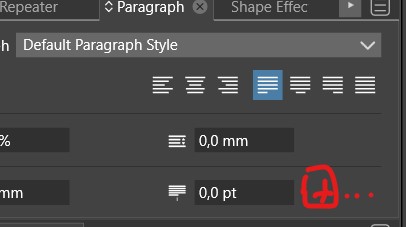
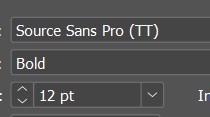
                      @VectorStyler I did not create any character style or override anything: I've just selected a font. It is not like this in layout apps. In InDesign (or APublisher), once a font is selected & a style defined, the correct font appears well in the "paragraph style edit":
                      ID, paragraph style
                      0_1687023310212_ID.jpg

                      W11 Pro 25H2 - 12th Gen Intel(R) i7-12700K 3.61 GHz - RAM 64 Go - NVIDIA GF GTX 4070 Ti - Intuos - Dell UP3216Q / Eizo ColorEdge
                      W11 Pro 25H2 - 12th Gen Intel(R) i7-12700KF 3.60 GHz -RAM 64 Go - NVIDIA GF GTX 3080 - IntuosPro- ProArt PA329C

                      1 Reply Last reply Reply Quote 1
                      • B Offline
                        B-Vs-V @VectorStyler
                        last edited by B-Vs-V

                        @VectorStyler I've just tried out text styles again in VS and so far it's difficult to use them for a page layout.

                        In a DP app, the style of a paragraph includes, of course, the specifications of the paragraph but also the font and its characteristics (light, bold, regular, size, etc.)

                        In VS, unfortunately, it seems that the font itself is considered to be an override of the paragraph style. This should not be the case. Only a defined character style should be considered an override.

                        W11 Pro 25H2 - 12th Gen Intel(R) i7-12700K 3.61 GHz - RAM 64 Go - NVIDIA GF GTX 4070 Ti - Intuos - Dell UP3216Q / Eizo ColorEdge
                        W11 Pro 25H2 - 12th Gen Intel(R) i7-12700KF 3.60 GHz -RAM 64 Go - NVIDIA GF GTX 3080 - IntuosPro- ProArt PA329C

                        1 Reply Last reply Reply Quote 1
                        • First post
                          Last post