VectorStyler
    • Categories
    • Unread
    • Recent
    • Tags
    • Popular
    • Register
    • Login

    Copy-paste when the...

    Scheduled Pinned Locked Moved Features and Ideas
    7 Posts 3 Posters 7.4k Views 3 Watching
    Loading More Posts
    • Oldest to Newest
    • Newest to Oldest
    • Most Votes
    Reply
    • Reply as topic
    Log in to reply
    This topic has been deleted. Only users with topic management privileges can see it.
    • B Offline
      B-Vs-V
      last edited by B-Vs-V

      It would be nice to be able to copy-paste using CtrlC-CtrlV when the Shape editor tool is selected. I always have to go through the menu. Thanks ☺

      W11 Pro 25H2 - 12th Gen Intel(R) i7-12700K 3.61 GHz - RAM 64 Go - NVIDIA GF GTX 4070 Ti - Intuos - Dell UP3216Q / Eizo ColorEdge
      W11 Pro 25H2 - 12th Gen Intel(R) i7-12700KF 3.60 GHz -RAM 64 Go - NVIDIA GF GTX 3080 - IntuosPro- ProArt PA329C

      S VectorStylerV 2 Replies Last reply Reply Quote 0
      • S Offline
        Subpath @B-Vs-V
        last edited by Subpath

        @Pat

        what do you like to copy and paste ?
        the complete Shape ?

        or a part of a Path ?

        copy a part of a Path should work
        but with open Paths only

        see video here

        Win 11
        CPU: AMD Ryzen 5 9600X, 6-core.
        GPU: Nvidia Geforce RTX 5070.

        1 Reply Last reply Reply Quote 0
        • VectorStylerV Offline
          VectorStyler @B-Vs-V
          last edited by

          @Pat said in Copy-paste when the...:

          It would be nice to be able to copy-paste using CtrlC-CtrlV when the Shape editor tool is selected.

          Currently, in the shape editor, the copy / paste will work on the selected path section.
          But if that cannot happen, maybe it should fall back to the object copy / paste.
          I will try to do that.

          B 1 Reply Last reply Reply Quote 1
          • B Offline
            B-Vs-V
            last edited by B-Vs-V

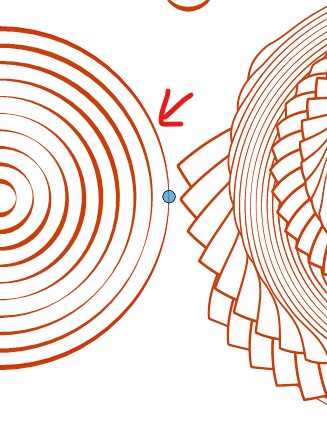
            I wanted to copy a circle (parametric shape) as a whole:
            0_1687671834101_cp.jpg

            W11 Pro 25H2 - 12th Gen Intel(R) i7-12700K 3.61 GHz - RAM 64 Go - NVIDIA GF GTX 4070 Ti - Intuos - Dell UP3216Q / Eizo ColorEdge
            W11 Pro 25H2 - 12th Gen Intel(R) i7-12700KF 3.60 GHz -RAM 64 Go - NVIDIA GF GTX 3080 - IntuosPro- ProArt PA329C

            S 1 Reply Last reply Reply Quote 2
            • S Offline
              Subpath @B-Vs-V
              last edited by Subpath

              @Pat

              That copy and paste problem occurs only with Smart Shapes
              because the Shape Object cannot be selected with
              the Shape Editor Tool.
              .
              .
              But you still have two options here

              first one
              While have the smart shape and the Shape Editor tool selected.
              Press and hold down the CTRL-Key + the ALT-key.

              Then drag the Shape a little distance, while holding the left Mousebutton down.
              This will create a copy of the smart shape object.
              .
              .
              second one
              While have the smart shape and the Shape Editor tool are selected.

              The smart shape will also be shown as selected in the layer panel.
              Hold down the Alt-Key and in the Layer Panel grap your
              smart Shape Object with the left Mousebutton, drag it below
              and a copy of it will be created

              the video her shows both options

              Win 11
              CPU: AMD Ryzen 5 9600X, 6-core.
              GPU: Nvidia Geforce RTX 5070.

              1 Reply Last reply Reply Quote 1
              • B Offline
                B-Vs-V @VectorStyler
                last edited by B-Vs-V

                @VectorStyler It would also be interesting to be able to CtrlC-CtrlV any object selected through the Layer panel (meaning no node selected) after having converted those objects to curves when the Shape editor is selected ☺

                W11 Pro 25H2 - 12th Gen Intel(R) i7-12700K 3.61 GHz - RAM 64 Go - NVIDIA GF GTX 4070 Ti - Intuos - Dell UP3216Q / Eizo ColorEdge
                W11 Pro 25H2 - 12th Gen Intel(R) i7-12700KF 3.60 GHz -RAM 64 Go - NVIDIA GF GTX 3080 - IntuosPro- ProArt PA329C

                VectorStylerV 1 Reply Last reply Reply Quote 0
                • VectorStylerV Offline
                  VectorStyler @B-Vs-V
                  last edited by

                  @Pat said in Copy-paste when the...:

                  It would also be interesting to be able to CtrlC-CtrlV any object selected through the Layer panel

                  In the Layers panel menu -> Panel Options (last item) enable the Object Pasteboard option.

                  By default, the layers panel ctrl+c/ctrl+v is to copy / paste the object name (think of batch renaming from a text editor).
                  But object copy/paste can also be enabled.

                  1 Reply Last reply Reply Quote 2
                  • First post
                    Last post