VectorStyler
    • Categories
    • Unread
    • Recent
    • Tags
    • Popular
    • Register
    • Login

    Show the last colours used in the 'color' panel

    Scheduled Pinned Locked Moved Features and Ideas
    12 Posts 4 Posters 11.1k Views 4 Watching
    Loading More Posts
    • Oldest to Newest
    • Newest to Oldest
    • Most Votes
    Reply
    • Reply as topic
    Log in to reply
    This topic has been deleted. Only users with topic management privileges can see it.
    • B Offline
      B-Vs-V
      last edited by B-Vs-V

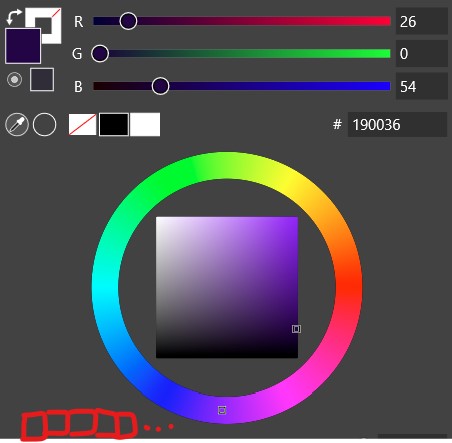
      This may already have been requested. I like to use the 'color' panel: would it be possible to save in this panel the last colours used? Thanks ☺

      0_1688659782555_colours.jpg

      W11 Pro 25H2 - 12th Gen Intel(R) i7-12700K 3.61 GHz - RAM 64 Go - NVIDIA GF GTX 4070 Ti - Intuos - Dell UP3216Q / Eizo ColorEdge
      W11 Pro 25H2 - 12th Gen Intel(R) i7-12700KF 3.60 GHz -RAM 64 Go - NVIDIA GF GTX 3080 - IntuosPro- ProArt PA329C

      VectorStylerV 1 Reply Last reply Reply Quote 2
      • VectorStylerV Offline
        VectorStyler @B-Vs-V
        last edited by

        @Pat I had a similar feature in the backlog but decided against it.
        The problem is that it is difficult to know what the last color used is.
        Sometimes a color is selected with multiple clicks until a desired result is reached. and in this case there can be several "last" colors.

        b77B 1 Reply Last reply Reply Quote 1
        • S Offline
          Subpath
          last edited by

          How about a kind of historie color palette ?
          The last ten or twenty ?
          Just a though that came to my mind

          Win 11
          CPU: AMD Ryzen 5 9600X, 6-core.
          GPU: Nvidia Geforce RTX 5070.

          VectorStylerV B 2 Replies Last reply Reply Quote 2
          • VectorStylerV Offline
            VectorStyler @Subpath
            last edited by

            @Subpath said in Show the last colours used in the 'color' panel:

            How about a kind of historie color palette ?

            Yes, that would be the idea.

            One thing to clarify: what happens when the user clicks several times on the color wheel to find a desired color?
            Are all these choices recorded?

            Another way is to have a [+] icon for this.

            S 1 Reply Last reply Reply Quote 2
            • S Offline
              Subpath @VectorStyler
              last edited by Subpath

              @VectorStyler

              I would just repeat the clicks and when they reach
              the limit it would overwrite the old clicks
              (I think everyone who uses it will notice this)

              but maybe it would be possible to let the user
              choose a limit via a slider or a few values?

              Win 11
              CPU: AMD Ryzen 5 9600X, 6-core.
              GPU: Nvidia Geforce RTX 5070.

              1 Reply Last reply Reply Quote 1
              • B Offline
                B-Vs-V @Subpath
                last edited by

                @Subpath said in Show the last colours used in the 'color' panel:

                How about a kind of historie color palette ?
                The last ten or twenty ?
                Just a though that came to my mind

                @VectorStyler I was thinking the same. Isn't it how it works in Affinity apps ? I'll check asap.

                I recall -but don't have it- a plugin for Photoshop called 'Coolorus' (or something similar) that seems very powerful for colors management & maybe this could be a source of inspiration for colors in VS. There are certainly more plugins that I'm not aware of.

                W11 Pro 25H2 - 12th Gen Intel(R) i7-12700K 3.61 GHz - RAM 64 Go - NVIDIA GF GTX 4070 Ti - Intuos - Dell UP3216Q / Eizo ColorEdge
                W11 Pro 25H2 - 12th Gen Intel(R) i7-12700KF 3.60 GHz -RAM 64 Go - NVIDIA GF GTX 3080 - IntuosPro- ProArt PA329C

                1 Reply Last reply Reply Quote 2
                • b77B Offline
                  b77 @VectorStyler
                  last edited by b77

                  A Recent Colors list would be nice, although trying to cram it into the Color panel is not ideal.

                  Maybe have it in the right-click menu — colors, gradients and patterns?
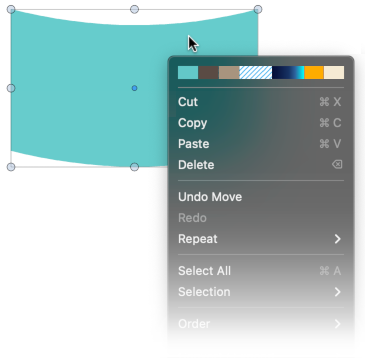
                  0_1688765669528_Recent_Colors.png

                  @VectorStyler said in Show the last colours used in the 'color' panel:

                  @Pat I had a similar feature in the backlog but decided against it.
                  The problem is that it is difficult to know what the last color used is.
                  Sometimes a color is selected with multiple clicks until a desired result is reached. and in this case there can be several "last" colors.

                  When the user does something else — transforms the object, selects another one, switches to
                  a different tool, picks a command from a menu or clicks a button/checkbox, etc — you can use
                  the last color adjustment before that as the final color to be added to the Recent Colors list.

                  Unless detecting all that is the difficult part?

                  MacBook Pro (Intel) running Monterey 12.6.4

                  S 1 Reply Last reply Reply Quote 1
                  • S Offline
                    Subpath @b77
                    last edited by

                    @b77 said in Show the last colours used in the 'color' panel:

                    Maybe have it in the right-click menu — colors, gradients and patterns?

                    I'm not sure with that, think I'm more on the palette side

                    maybe not directly the right click menu,
                    but something that could appear below the cursor?

                    Win 11
                    CPU: AMD Ryzen 5 9600X, 6-core.
                    GPU: Nvidia Geforce RTX 5070.

                    b77B 1 Reply Last reply Reply Quote 1
                    • b77B Offline
                      b77 @Subpath
                      last edited by b77

                      @Subpath Make it appear below the cursor when doing/pressing what?

                      MacBook Pro (Intel) running Monterey 12.6.4

                      S 1 Reply Last reply Reply Quote 1
                      • S Offline
                        Subpath @b77
                        last edited by Subpath

                        @b77 said in Show the last colours used in the 'color' panel:

                        @Subpath Make it appear below the cursor when doing/pressing what?

                        good question 🙂
                        but i dont know
                        a key i guess ?

                        i was am thinking of something that appears separat
                        because if it is in the right click menu it may appear
                        no matter if you want/need it or not
                        and it look a bit cramped in my eyes

                        Win 11
                        CPU: AMD Ryzen 5 9600X, 6-core.
                        GPU: Nvidia Geforce RTX 5070.

                        B 1 Reply Last reply Reply Quote 0
                        • B Offline
                          B-Vs-V @Subpath
                          last edited by

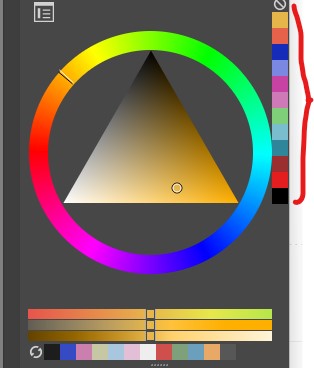
                          @Subpath Here's an example...

                          0_1688986733693_k.jpg

                          this would be very useful in VS if available in each sub-panel because so far the color picker doesn't allow saving a colour from the artboard graphics.

                          W11 Pro 25H2 - 12th Gen Intel(R) i7-12700K 3.61 GHz - RAM 64 Go - NVIDIA GF GTX 4070 Ti - Intuos - Dell UP3216Q / Eizo ColorEdge
                          W11 Pro 25H2 - 12th Gen Intel(R) i7-12700KF 3.60 GHz -RAM 64 Go - NVIDIA GF GTX 3080 - IntuosPro- ProArt PA329C

                          S 1 Reply Last reply Reply Quote 1
                          • S Offline
                            Subpath @B-Vs-V
                            last edited by Subpath

                            @Pat

                            would choose something small
                            like in this direction
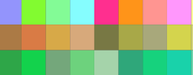
                            0_1688988094443_Last-Colors-1b.png

                            Win 11
                            CPU: AMD Ryzen 5 9600X, 6-core.
                            GPU: Nvidia Geforce RTX 5070.

                            1 Reply Last reply Reply Quote 1
                            • First post
                              Last post