VectorStyler
    • Categories
    • Unread
    • Recent
    • Tags
    • Popular
    • Register
    • Login

    Cannot delete actions. Cannot create new action folder.

    Scheduled Pinned Locked Moved Questions and Support
    13 Posts 3 Posters 12.8k Views 3 Watching
    Loading More Posts
    • Oldest to Newest
    • Newest to Oldest
    • Most Votes
    Reply
    • Reply as topic
    Log in to reply
    This topic has been deleted. Only users with topic management privileges can see it.
    • b77B Offline
      b77 @pentool
      last edited by

      @pentool I cannot replicate the issue here. Did you use 'Save Selected' or 'Export to Group'?

      Btw, there's also a Preset Manager in the Styles menu — can you try deleting them there?

      MacBook Pro (Intel) running Monterey 12.6.4

      1 Reply Last reply Reply Quote 0
      • P Offline
        pentool
        last edited by

        I used "Save..." in the Action Panel's menu to save all of them.

        But that still doesn't explain why I no longer can create an action folder.

        MacBook Pro 13" early 2015 8G | Intel Iris Graphics 6100 1536 MB | macOS Monterey 12.7.6

        b77B 1 Reply Last reply Reply Quote 0
        • b77B Offline
          b77 @pentool
          last edited by b77

          @pentool Now that you uploaded the actions in the other thread, I downloaded and opened
          them here. They are displayed in a separate tab, they work and I can also delete them.

          MacBook Pro (Intel) running Monterey 12.6.4

          1 Reply Last reply Reply Quote 0
          • P Offline
            pentool
            last edited by

            Well, that's nice, but they are still there if you delete them, quit the app, and restart. Also, as I was saying earlier, i am not able to create a new action folder. have you tried that?

            MacBook Pro 13" early 2015 8G | Intel Iris Graphics 6100 1536 MB | macOS Monterey 12.7.6

            1 Reply Last reply Reply Quote 0
            • b77B Offline
              b77 @pentool
              last edited by

              @pentool OK, I replicated the issue with a new folder and two actions I made — I cannot delete
              the folder directly (it will be still there in the Actions panel after restart) but if I delete the actions
              inside it before deleting the folder, it gets deleted as it should.

              MacBook Pro (Intel) running Monterey 12.6.4

              1 Reply Last reply Reply Quote 0
              • P Offline
                pentool
                last edited by

                That is not working for me. For example, if I delete all actions from the ISO folder (left/right/top) and then delete the ISO folder, when I restart the app the ISO folder and all actions are still in it.

                MacBook Pro 13" early 2015 8G | Intel Iris Graphics 6100 1536 MB | macOS Monterey 12.7.6

                1 Reply Last reply Reply Quote 0
                • P Offline
                  pentool
                  last edited by

                  I'm thinking that since the actions were originally imported from a file, the app is maybe linking to the file and even if you delete the actions and everything around it, upon restarting the app it will read all the actions from the file again. But that's just a guess.

                  MacBook Pro 13" early 2015 8G | Intel Iris Graphics 6100 1536 MB | macOS Monterey 12.7.6

                  b77B 1 Reply Last reply Reply Quote 0
                  • b77B Offline
                    b77 @pentool
                    last edited by b77

                    @pentool Let's see if the developer can replicate the issue tomorrow morning.
                    It doesn't sound like something that will take long to fix.

                    MacBook Pro (Intel) running Monterey 12.6.4

                    1 Reply Last reply Reply Quote 0
                    • P Offline
                      pentool
                      last edited by pentool

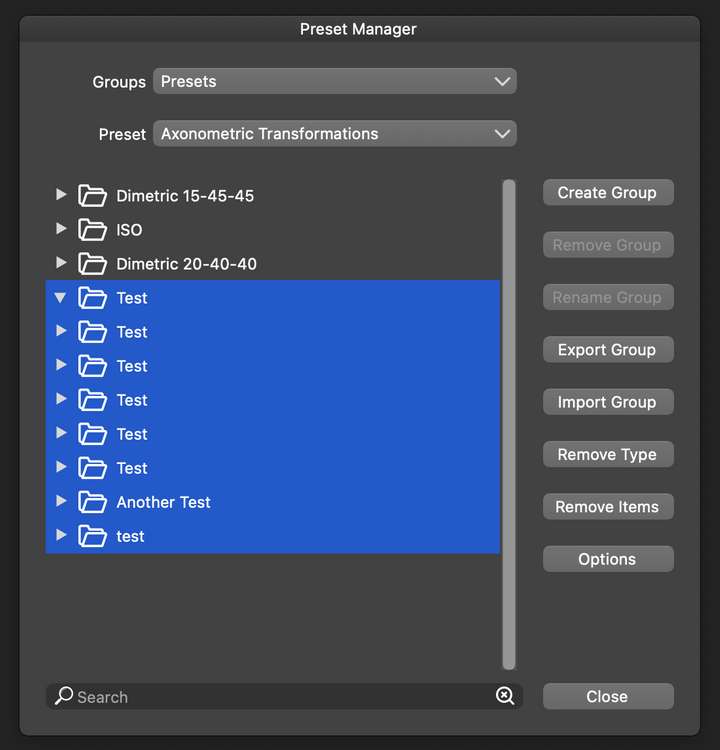
                      Ok, so I found all of my "Test" folders I was creating in the Actions panel under the "Preset Manager". I don't understand why are they showing up here and not in the Action panel where I created them originally.

                      All of them are under the "Axonometric Transformations" title, yet only the ISO, Dimetric, and Trimetric showing up in the actions panel. All the "Test" ones are not.
                      0_1690763248156_Screen Shot 2023-07-31 at 2.25.52 AM.png

                      MacBook Pro 13" early 2015 8G | Intel Iris Graphics 6100 1536 MB | macOS Monterey 12.7.6

                      1 Reply Last reply Reply Quote 0
                      • P Offline
                        pentool
                        last edited by

                        I'm also somewhat hazy on the fact that under the Panels menu there are clearly two menu items:

                        • Presets...and
                        • Styles

                        But there's a Style menu, under which you find the Preset Manager. Somehow that's a tad confusing. If Presets and Styles are two different entities then why is the Preset Manager is under Styles?

                        MacBook Pro 13" early 2015 8G | Intel Iris Graphics 6100 1536 MB | macOS Monterey 12.7.6

                        1 Reply Last reply Reply Quote 0
                        • P Offline
                          pentool
                          last edited by pentool

                          So to add to this story...

                          ...I have deleted all of the "Axonometric Transformations" actions from Styles > Preset Manager. However, the preset type (or whatever is the correct terminology) cannot be deleted. In other words, the action folder names "Axonometric Transformations" cannot be deleted from the Preset Manager.

                          Also, when I open the Actions panel (Panels > Presets > Action) and create a new action folder, it does show up in the Preset Manager under "Axonometric Transformations > Folder". However, this folder is not showing up in the Axonometric Transformation action panel itself.

                          Sorry, I know it's confusing, lemme try to illustrate all this with the usual video.
                          https://www.youtube.com/watch?v=ShjejcTa_pw

                          VS 1.1.094

                          MacBook Pro 13" early 2015 8G | Intel Iris Graphics 6100 1536 MB | macOS Monterey 12.7.6

                          1 Reply Last reply Reply Quote 0
                          • VectorStylerV Offline
                            VectorStyler @pentool
                            last edited by

                            @pentool I will try to replicate this. It might be a bug in how custom actions files are handled.

                            1 Reply Last reply Reply Quote 0
                            • First post
                              Last post
