VectorStyler
    • Categories
    • Unread
    • Recent
    • Tags
    • Popular
    • Register
    • Login

    Collision snap incorrect

    Scheduled Pinned Locked Moved Questions and Support
    2 Posts 2 Posters 2.7k Views 2 Watching
    Loading More Posts
    • Oldest to Newest
    • Newest to Oldest
    • Most Votes
    Reply
    • Reply as topic
    Log in to reply
    This topic has been deleted. Only users with topic management privileges can see it.
    • P Offline
      pentool
      last edited by pentool

      I attached a file. It has 2 ovals and 2 lines (labelled A and B).

      The goal is to use Collision Snapping to snap the line(s) against the ovals.

      1. Switch to Outline Preview mode
      2. Activate Collision Snapping (and only this)
      3. Zoom in close to the A oval and try to snap the line against the oval. You will see there's a gap. So the line doesn't correctly snap to the oval. (See screenshot below.)
      4. Now do the same for B. You will see collision snapping works correctly in this case. For the life of me I can't figure out why B works but A doesn't.

      Thanks for any pointers.

      File
      0_1691758962708_collision-snap.vstyler
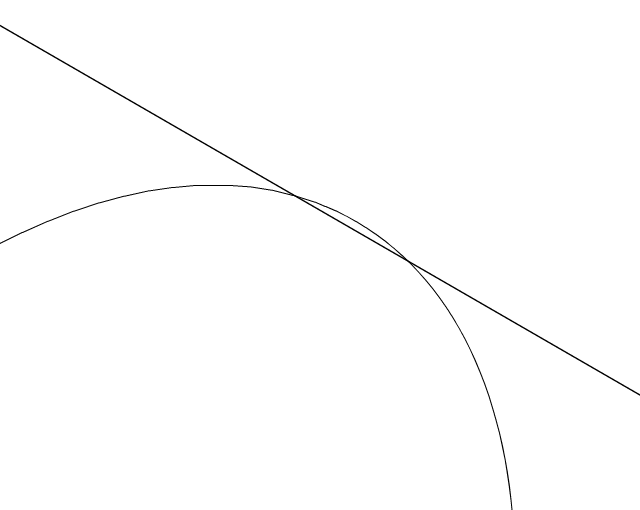
      0_1691758950757_Screen Shot 2023-08-11 at 2.58.31 PM.png

      MacBook Pro 13" early 2015 8G | Intel Iris Graphics 6100 1536 MB | macOS Monterey 12.7.6

      VectorStylerV 1 Reply Last reply Reply Quote 0
      • VectorStylerV Offline
        VectorStyler @pentool
        last edited by

        @pentool Replicated here also, there seems to be a precision issue in this case. I will try to fix this ASAP.

        1 Reply Last reply Reply Quote 1
        • First post
          Last post