VectorStyler
    • Categories
    • Unread
    • Recent
    • Tags
    • Popular
    • Register
    • Login

    No editing handle visible for spiral gradients
    Scheduled Pinned Locked Moved Questions and Support
    7 Posts 3 Posters 5.9k Views 3 Watching
    Loading More Posts
    • Oldest to Newest
    • Newest to Oldest
    • Most Votes
    Reply
    • Reply as topic
    Log in to reply
    This topic has been deleted. Only users with topic management privileges can see it.
    • P Offline
      pentool
      last edited by pentool

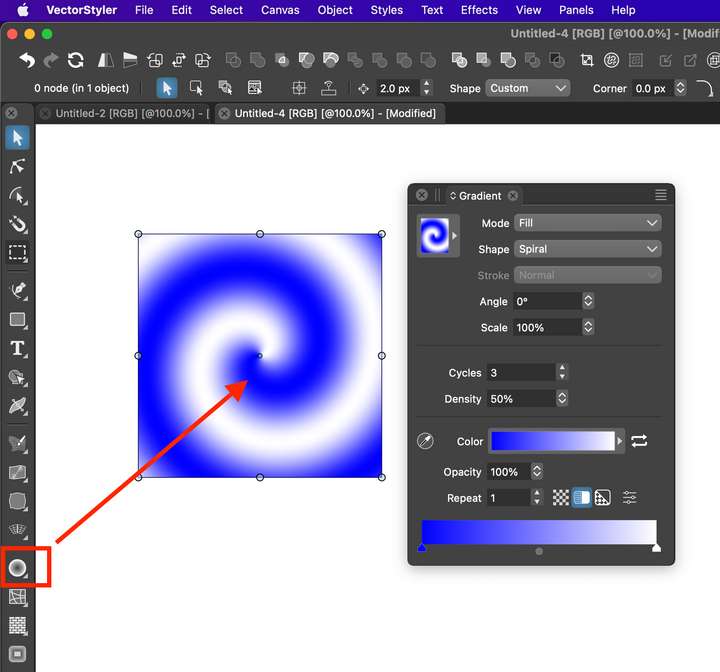
      I am reading the docs regarding spiral gradients. The section shows the various editing handles for the spiral gradient. However, they are not visible.
      https://www.vectorstyler.com/documentation/gradients/tool/#editing-spiral-gradients

      When you assign a different gradient shape (eg conical, linear, concentric) the editing handles are visible. Am I missing something or is this a bug?

      (The screenshot here is somewhat misleading. It shows the Pointer tool is active and the rectangle shape is selected. But this is only because when I press the key combo for making the screenshot, the keys temporarily engage the pointer tool. In reality, the Gradient Shape Editing tool was active (circled in red).)
      0_1692399823801_Screen Shot 2023-08-19 at 1.00.14 AM.png

      VS 1.1.100

      MacBook Pro 13" early 2015 8G | Intel Iris Graphics 6100 1536 MB | macOS Monterey 12.7.6

      b77B VectorStylerV 2 Replies Last reply Reply Quote 0
      • b77B Offline
        b77 @pentool
        last edited by b77

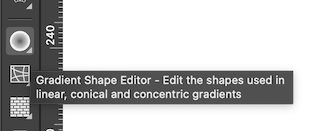
        @pentool All gradients can be edited with the Gradient tool (shortcut: G)

        The Gradient Shape Editor can edit only the shapes used in linear, conical and
        concentric gradients, not spiral shapes in spiral gradients:
        0_1692402013005_Screenshot 2023-08-19 at 02.19.14.png

        More info here: https://www.vectorstyler.com/documentation/gradients/shapes/

        Editing a conical gradient's shape:

        alt text

        Another example with concentric:

        alt text

        MacBook Pro (Intel) running Monterey 12.6.4

        1 Reply Last reply Reply Quote 1
        • P Offline
          pentool
          last edited by pentool

          Thanks, but did you look at the link I posted to the documentation? It shows a small screenshot/illustration of the spiral gradient with the editing handles, also explaining which handle does what.

          So the tooltip contradicts the documentation - or vice versa.

          MacBook Pro 13" early 2015 8G | Intel Iris Graphics 6100 1536 MB | macOS Monterey 12.7.6

          b77B 1 Reply Last reply Reply Quote 0
          • b77B Offline
            b77 @pentool
            last edited by b77

            @pentool Yes, I did look at the link. 👍
            The Gradient Editor gizmo (G) is shown in that image, not the Gradient Shape Editor.

            MacBook Pro (Intel) running Monterey 12.6.4

            1 Reply Last reply Reply Quote 0
            • P Offline
              pentool
              last edited by

              Ah, maaaaaaaaaaaaaaaaan! What the heck is wrong with me!? I spent all this time... and didn't realize this. Sheesh....

              Anyhow... thanks for making me realize I need glasses... 😖 😬 👓

              MacBook Pro 13" early 2015 8G | Intel Iris Graphics 6100 1536 MB | macOS Monterey 12.7.6

              b77B 1 Reply Last reply Reply Quote 0
              • b77B Offline
                b77 @pentool
                last edited by b77

                @pentool No problem. 👍

                VS lets you create custom shapes for the gradients AND lets you edit the gradient shape
                itself (its nodes) with this Gradient Shape Editor.

                Here's a quick video: https://i.imgur.com/TgqkFt5.gif

                MacBook Pro (Intel) running Monterey 12.6.4

                1 Reply Last reply Reply Quote 0
                • VectorStylerV Offline
                  VectorStyler @pentool
                  last edited by

                  @pentool The spiral gradient shape cannot be edited as a shape, you need the concentric or axial modes for that.


                  1 Reply Last reply Reply Quote 0
                  • First post
                    Last post