VectorStyler
    • Categories
    • Unread
    • Recent
    • Tags
    • Popular
    • Register
    • Login

    Why edit corner point is off?
    Scheduled Pinned Locked Moved Questions and Support
    5 Posts 2 Posters 4.7k Views 2 Watching
    Loading More Posts
    • Oldest to Newest
    • Newest to Oldest
    • Most Votes
    Reply
    • Reply as topic
    Log in to reply
    This topic has been deleted. Only users with topic management privileges can see it.
    • P Offline
      pentool
      last edited by

      For the life of me I can't figure out why the corner edit point is off on this thing. It has 3 vertices (nodes... whatever). I want to create a corner at the top vertex. When you switch to the Corner Editor Tool you can see the corner point is off. Can't figure out why?

      Thanks for any pointers!
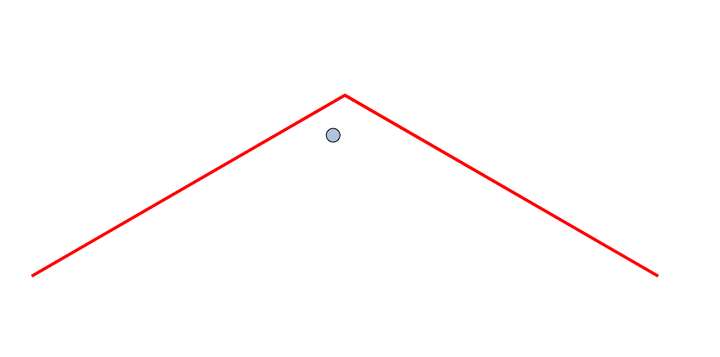
      0_1692443373364_Screen Shot 2023-08-19 at 1.07.15 PM.png

      File:
      0_1692443398351_corner-off.vstyler

      MacBook Pro 13" early 2015 8G | Intel Iris Graphics 6100 1536 MB | macOS Monterey 12.7.6

      VectorStylerV 1 Reply Last reply Reply Quote 0
      • VectorStylerV Offline
        VectorStyler @pentool
        last edited by

        @pentool Is there a scaling on the curve (check in the Shape Effect panel, if it has a Transform)?
        If so, convert to curve first, and then add the corner.

        In VS, corners are added to the path before the shape effects are applied, and scaling is treated as a shape effect.

        1 Reply Last reply Reply Quote 0
        • P Offline
          pentool
          last edited by

          No, there was no scaling or any transformation applied. I did try to reset the transform previously but didn't have any effect. Oh well. Will go about it another way...

          MacBook Pro 13" early 2015 8G | Intel Iris Graphics 6100 1536 MB | macOS Monterey 12.7.6

          VectorStylerV 1 Reply Last reply Reply Quote 0
          • VectorStylerV Offline
            VectorStyler @pentool
            last edited by

            @pentool I tested with the attached file and after you convert to curves, the corner knob should be centered.

            1 Reply Last reply Reply Quote 1
            • P Offline
              pentool
              last edited by

              Thanks, yeah, I did not convert it to curves, maybe that was the issue.

              MacBook Pro 13" early 2015 8G | Intel Iris Graphics 6100 1536 MB | macOS Monterey 12.7.6

              1 Reply Last reply Reply Quote 0
              • First post
                Last post