VectorStyler
    • Categories
    • Unread
    • Recent
    • Tags
    • Popular
    • Register
    • Login

    New computer: Vectorstyler does not accept license key.

    Scheduled Pinned Locked Moved Questions and Support
    22 Posts 3 Posters 30.9k Views 3 Watching
    Loading More Posts
    • Oldest to Newest
    • Newest to Oldest
    • Most Votes
    Reply
    • Reply as topic
    Log in to reply
    This topic has been deleted. Only users with topic management privileges can see it.
    • VectorStylerV Offline
      VectorStyler @Gremriel
      last edited by

      @Gremriel there might still be issues. Change some options in the preferences and move some panels around, exit and restart. Are the panel positions and the preferences kept?

      G 1 Reply Last reply Reply Quote 0
      • G Online
        Gremriel @VectorStyler
        last edited by

        @VectorStyler

        No, settings and panels are not kept between restarting (launching the app as normal user). I'm currently battling the transition from win10 to win11, so I'm not sure what to do.

        WIndows 11

        VectorStylerV 1 Reply Last reply Reply Quote 0
        • VectorStylerV Offline
          VectorStyler @Gremriel
          last edited by

          @Gremriel are you running it now on Windows 11?

          G 1 Reply Last reply Reply Quote 0
          • G Online
            Gremriel @VectorStyler
            last edited by

            @VectorStyler Yes, should have mentioned that in my first post.

            WIndows 11

            VectorStylerV 1 Reply Last reply Reply Quote 0
            • VectorStylerV Offline
              VectorStyler @Gremriel
              last edited by

              @Gremriel This seems to be an old issue with Windows (maybe in some cases):

              https://answers.microsoft.com/en-us/windows/forum/all/programs-cannot-write-to-appdata/7bc6d7ef-3d45-4d2a-8811-7ba5be9c6c6e

              and here: https://github.com/processing/processing/issues/449

              As a temporary workaround, try running it as Admin.

              I will try to find a solution for this.

              G 1 Reply Last reply Reply Quote 0
              • G Online
                Gremriel @VectorStyler
                last edited by Gremriel

                @VectorStyler Thank you.

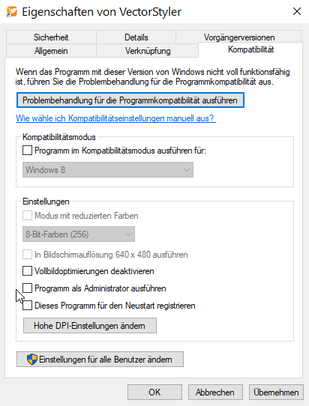
                It seems run as Admin is not available if you right-click on the desktop shortcut. That only is available if you run it from the start menu, which is kind of a hassle, but I guess I can live with that for now.

                WIndows 11

                S 1 Reply Last reply Reply Quote 0
                • S Offline
                  Subpath @Gremriel
                  last edited by

                  @Gremriel

                  No problem here on Win 10

                  0_1693041003629_run as admin.png

                  Win 11
                  CPU: AMD Ryzen 5 9600X, 6-core.
                  GPU: Nvidia Geforce RTX 5070.

                  G 1 Reply Last reply Reply Quote 1
                  • G Online
                    Gremriel @Subpath
                    last edited by

                    @Subpath Yeah, it worked fine on my win10 machine. But I got a new PC, and you can't order a new PC with Win10 anymore, so I'm stuck with that.

                    WIndows 11

                    S 1 Reply Last reply Reply Quote 1
                    • S Offline
                      Subpath @Gremriel
                      last edited by

                      @Gremriel said in New computer: Vectorstyler does not accept license key.:

                      @Subpath Yeah, it worked fine on my win10 machine. But I got a new PC, and you can't order a new PC with Win10 anymore, so I'm stuck with that.

                      yes, i know new PCs have only Win 11
                      but i found it strange that this setting are gone now
                      Ìts maybe on another place

                      Win 11
                      CPU: AMD Ryzen 5 9600X, 6-core.
                      GPU: Nvidia Geforce RTX 5070.

                      G 1 Reply Last reply Reply Quote 0
                      • G Online
                        Gremriel @Subpath
                        last edited by

                        @Subpath It's only the Vectorstyler desktop icon that doesn't have the run as Admin option.

                        WIndows 11

                        VectorStylerV 1 Reply Last reply Reply Quote 0
                        • VectorStylerV Offline
                          VectorStyler @Gremriel
                          last edited by

                          @Gremriel There is a new build available with some (attempted) fix for this issue.
                          Should not require the admin mode.
                          Let me know if it works better now.

                          G 1 Reply Last reply Reply Quote 0
                          • G Online
                            Gremriel @VectorStyler
                            last edited by Gremriel

                            @VectorStyler A quick test shows VS now remembers settings and panels. Thanks!

                            The desktop shortcut still doesn't have the Run as Admin, option, though.

                            WIndows 11

                            S VectorStylerV 2 Replies Last reply Reply Quote 1
                            • S Offline
                              Subpath @Gremriel
                              last edited by Subpath

                              @Gremriel said in New computer: Vectorstyler does not accept license key.:

                              @VectorStyler A quick test shows VS now remembers settings and panels. Thanks!

                              The desktop shortcut still doesn't have the Run as Admin, option, though.

                              I had an idea about that, that you might try out.

                              How about checking if the .exe file have the option to "run as admin"
                              and if it does, then set it to "run as admin" and create then a
                              desktop icon from it. Maybe this could work.

                              Win 11
                              CPU: AMD Ryzen 5 9600X, 6-core.
                              GPU: Nvidia Geforce RTX 5070.

                              1 Reply Last reply Reply Quote 0
                              • VectorStylerV Offline
                                VectorStyler @Gremriel
                                last edited by

                                @Gremriel The goal is to not need to run as admin.

                                G 1 Reply Last reply Reply Quote 0
                                • G Online
                                  Gremriel @VectorStyler
                                  last edited by Gremriel

                                  @VectorStyler Yes, that is my preference as well, of course. And the latest version works as expected now. Just thought it was odd that the VS desktop icon is the only one of my desktop icons without that option. But it isn't needed anymore, so I consider this issue closed. Thanks again for the quick fix.

                                  edit* I might have been a bit premature. Although the panel positions are saved between sessions, the various options in a panel are not saved. Is this the default, or is that an option in settings somewhere?

                                  WIndows 11

                                  VectorStylerV 1 Reply Last reply Reply Quote 0
                                  • VectorStylerV Offline
                                    VectorStyler @Gremriel
                                    last edited by

                                    @Gremriel said in New computer: Vectorstyler does not accept license key.:

                                    the various options in a panel are not saved

                                    Depends on the panel and option. Most panel content reflects the attributes of the selected objects, so these are not saved.

                                    In other cases, like Layers panel menu -> Panel Options, these should be persistent after restart.

                                    G 1 Reply Last reply Reply Quote 0
                                    • G Online
                                      Gremriel @VectorStyler
                                      last edited by

                                      @VectorStyler What about the snapping options in the Snapping panel? I swear I had to only set these once on my previous machine.

                                      WIndows 11

                                      G VectorStylerV 2 Replies Last reply Reply Quote 1
                                      • G Online
                                        Gremriel @Gremriel
                                        last edited by

                                        @Gremriel Nvm, found that particular option in settings (Editing Options 2 -> Common snapping options)

                                        WIndows 11

                                        1 Reply Last reply Reply Quote 0
                                        • VectorStylerV Offline
                                          VectorStyler @Gremriel
                                          last edited by

                                          @Gremriel I added this to the backlog and will try to replicate it.

                                          1 Reply Last reply Reply Quote 0
                                          • First post
                                            Last post