VectorStyler
    • Categories
    • Unread
    • Recent
    • Tags
    • Popular
    • Register
    • Login

    Text on Path: how to make the text centered?

    Scheduled Pinned Locked Moved Questions and Support
    3 Posts 2 Posters 5.2k Views
    Loading More Posts
    • Oldest to Newest
    • Newest to Oldest
    • Most Votes
    Reply
    • Reply as topic
    Log in to reply
    This topic has been deleted. Only users with topic management privileges can see it.
    • G Offline
      Gremriel
      last edited by

      Hi,

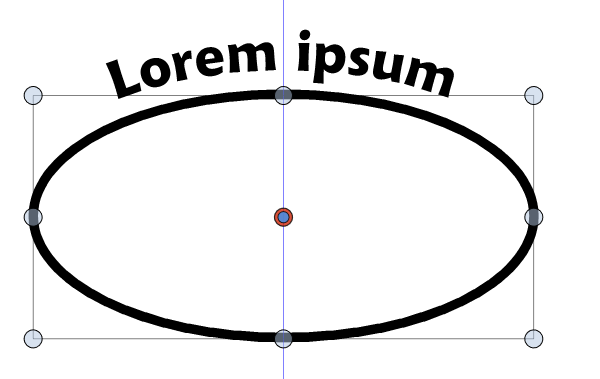
      I can't seem to find a way to make sure the text on a path is centered on a path. For example, I draw an ellipse, and put a text on it.
      0_1620368942531_VectorStyler_4qJ01yZPDy.png

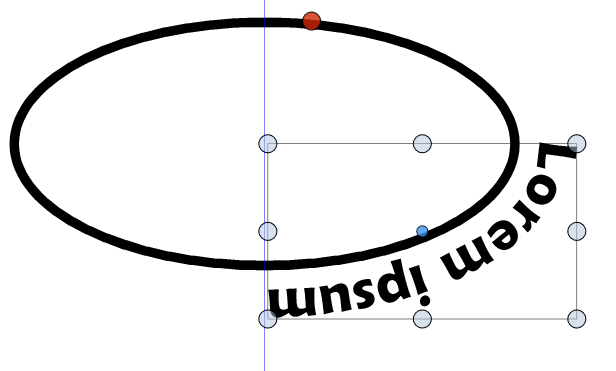
      In this case, it looks centered, but I have to eyeball it. I tried using the Align Center from the formatting context bar, but then it jumps to this position:
      0_1620369270502_VectorStyler_nfCEBg6waI.png

      WIndows 11

      VectorStylerV 1 Reply Last reply Reply Quote 0
      • VectorStylerV Offline
        VectorStyler @Gremriel
        last edited by VectorStyler

        @Gremriel If the text shape (aka point text) was created separately (not on a path with the text on path tool), then the Text -> Text on Path command will do the centering by default.

        If the text shape is created on a path with the text on path tool, then a few settings must be adjusted:

        • first align text to center, this will place it somewhere depending on the starting position, and the shape.
        • then select Text -> Text on Path command (with the text shape selected).
        • check the Radial Position and set the Position to 0, and confirm.
        1 Reply Last reply Reply Quote 0
        • G Offline
          Gremriel
          last edited by

          Thank you.

          WIndows 11

          1 Reply Last reply Reply Quote 0
          • First post
            Last post
