VectorStyler
    • Categories
    • Unread
    • Recent
    • Tags
    • Popular
    • Register
    • Login

    What does the "c" stand for in the descriptor in the upper left corner of VS?

    Scheduled Pinned Locked Moved Questions and Support
    7 Posts 3 Posters 6.5k Views 2 Watching
    Loading More Posts
    • Oldest to Newest
    • Newest to Oldest
    • Most Votes
    Reply
    • Reply as topic
    Log in to reply
    This topic has been deleted. Only users with topic management privileges can see it.
    • BoldlineB Offline
      Boldline
      last edited by

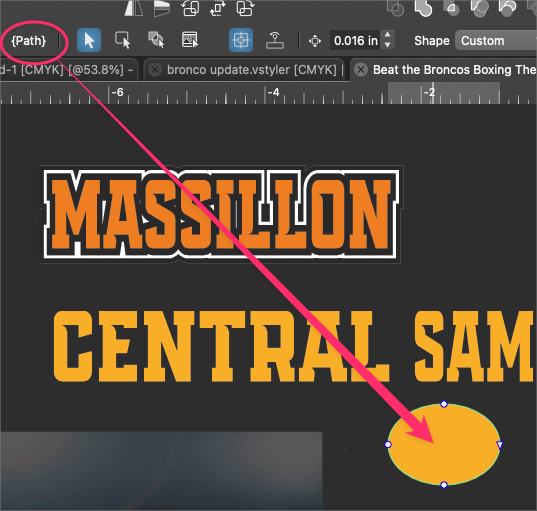
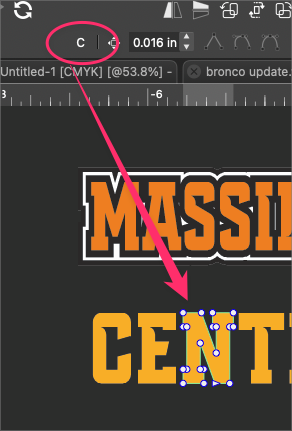
      The descriptor in the upper left corner of the program calls an expanded oval a "path", which makes sense. But if I expand text and select one of the former letters, it gives me a "c" in the descriptor section. Is this intentional or a bug? What does "C" stand for?
      0_1693622531556_4fdcf688-2cd5-4b86-81ad-c0adc7bc672f-BLD 2023-09-01 at 22.33.29.png

      0_1693622625148_b605114e-faf1-495d-ad83-4787d3b9fc58-BLD 2023-09-01 at 22.32.42.png

      🍎 macOS Tahoe 26.2, Mac mini (M1, 2020), Chip Apple M1, Memory 16 GB
      Cintiq 27QHD Display and LG Ultra HD Display

      b77B VectorStylerV 2 Replies Last reply Reply Quote 0
      • b77B Offline
        b77 @Boldline
        last edited by b77

        @Boldline It should be an 'N'… 🤔 How did you expand that text?

        MacBook Pro (Intel) running Monterey 12.6.4

        BoldlineB 1 Reply Last reply Reply Quote 0
        • VectorStylerV Offline
          VectorStyler @Boldline
          last edited by

          @Boldline Yes, that should be the name of the object, and it should be "N" in this case

          1 Reply Last reply Reply Quote 1
          • BoldlineB Offline
            Boldline @b77
            last edited by

            @b77 said in What does the "c" stand for in the descriptor in the upper left corner of VS?:

            How did you expand that text?

            I used the "merge" function. I just tried again using the new 103 build and got the same result. If I use merge to expand the live text, it will label each letter the same as the first one in the set. So it seems to only be affecting the shapes when "merge" is used to expand them

            I tried a couple different fonts and realized that was not the issue. Then I used "separate path" and off camera I tried "convert to curves" and after ungrouping, each expanded text shape displayed the proper info

            🍎 macOS Tahoe 26.2, Mac mini (M1, 2020), Chip Apple M1, Memory 16 GB
            Cintiq 27QHD Display and LG Ultra HD Display

            VectorStylerV 1 Reply Last reply Reply Quote 1
            • VectorStylerV Offline
              VectorStyler @Boldline
              last edited by

              @Boldline Then it is the name of the object. The name was probably kept from the first shape "C", when separate path was used.

              BoldlineB 1 Reply Last reply Reply Quote 0
              • BoldlineB Offline
                Boldline @VectorStyler
                last edited by

                @VectorStyler I don't think I was very clear in what I wrote earlier. It works correctly for everything EXCEPT for using "merge". Every other method for expanding assigns the new expanded shape the correct letter name. Merge does not do this

                🍎 macOS Tahoe 26.2, Mac mini (M1, 2020), Chip Apple M1, Memory 16 GB
                Cintiq 27QHD Display and LG Ultra HD Display

                VectorStylerV 1 Reply Last reply Reply Quote 0
                • VectorStylerV Offline
                  VectorStyler @Boldline
                  last edited by

                  @Boldline said in What does the "c" stand for in the descriptor in the upper left corner of VS?:

                  Merge does not do this

                  I added this to the backlog.

                  1 Reply Last reply Reply Quote 1
                  • First post
                    Last post
