VectorStyler
    • Categories
    • Unread
    • Recent
    • Tags
    • Popular
    • Register
    • Login

    blend - Color Rainbow

    Scheduled Pinned Locked Moved Questions and Support
    7 Posts 6 Posters 6.6k Views 6 Watching
    Loading More Posts
    • Oldest to Newest
    • Newest to Oldest
    • Most Votes
    Reply
    • Reply as topic
    Log in to reply
    This topic has been deleted. Only users with topic management privileges can see it.
    • F Offline
      fewerjunk
      last edited by

      I create a box, add a color from the wheel, duplicate the box, add another color from the wheel and select "Blend". What I get is a graduated shift of color from box A to box B. What I would like to get is more of a rainbow of color, such as around the wheel rather than graduated from one color to the next but not really a rainbow.

      Simple - 10 color blend.

      Is it possible?

      b77B VectorStylerV 2 Replies Last reply Reply Quote 0
      • P Offline
        pentool
        last edited by pentool

        I don't understand the question. You want a rainbow, a 2-color blend, or a 10 color blend?

        You need more than 2 colors for a rainbow. Regardless of how many colors you want, you can select the Blend object in the Layers palette, select Effects > Blend > Blend Options... and adjust the blend as needed.
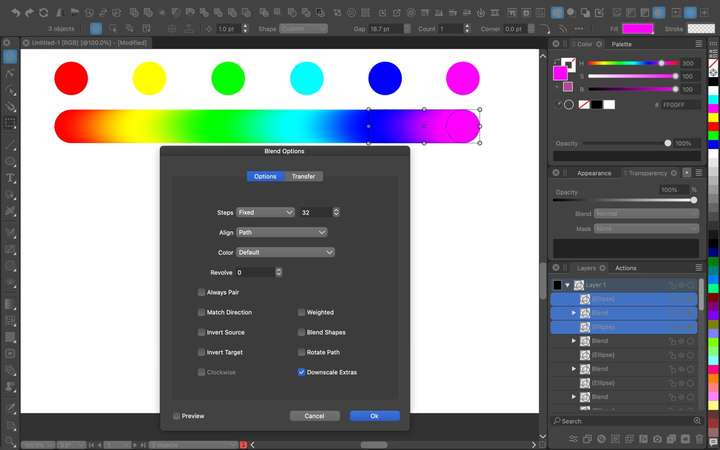
        0_1693340253208_Screen Shot 2023-08-29 at 10.16.37 PM.jpg

        MacBook Pro 13" early 2015 8G | Intel Iris Graphics 6100 1536 MB | macOS Monterey 12.7.6

        1 Reply Last reply Reply Quote 0
        • b77B Offline
          b77 @fewerjunk
          last edited by b77

          @fewerjunk I don't think something like that is implemented.

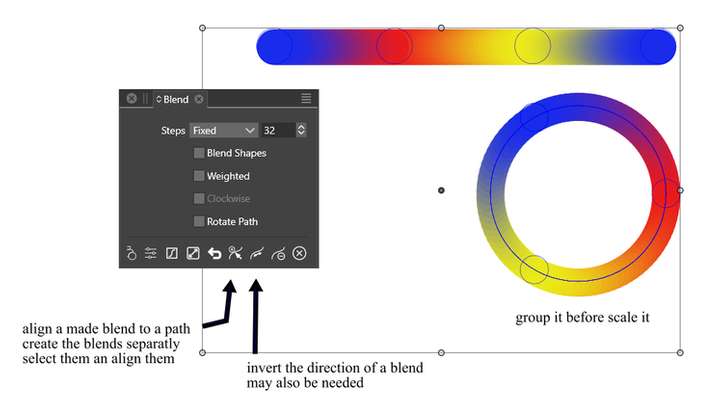
          But the app can blend more than two objects, so just draw
          5 shapes if you want 5 colors, select them all and hit W.

          You can also draw a separate path and make the blend object
          follow that path:

          alt text

          MacBook Pro (Intel) running Monterey 12.6.4

          1 Reply Last reply Reply Quote 0
          • S Offline
            Subpath
            last edited by Subpath

            Here a solution from me 🙂

            0_1693341930534_multiblend on a path.png
            .
            .
            You can even create pattern brushes with one or more blends
            as I have shown in this tutorial here
            https://www.vectorstyler.com/forum/topic/2089/playing-with-blend-in-pattern-brush

            Win 11
            CPU: AMD Ryzen 5 9600X, 6-core.
            GPU: Nvidia Geforce RTX 5070.

            1 Reply Last reply Reply Quote 0
            • VectorStylerV Offline
              VectorStyler @fewerjunk
              last edited by

              @fewerjunk Yes, it should be possible. Attached the example.

              0_1693371220981_blendcolor1.vstyler

              In the Blend panel Color drop down select HSB color mode.
              For the start/end object colors select HSB color mode but make sure the Hue angle is a bit different (0 for the start and 359 for the end in the example).
              The Clockwise checkbox in the Blend panel tells the direction in which colors blend in the Hue channel.

              S 1 Reply Last reply Reply Quote 2
              • S Offline
                STEVED @VectorStyler
                last edited by

                Can someone tell me where I can access this Hue angle thingie.
                thanks.

                VectorStylerV 1 Reply Last reply Reply Quote 0
                • VectorStylerV Offline
                  VectorStyler @STEVED
                  last edited by

                  @STEVED said in blend - Color Rainbow:

                  Can someone tell me where I can access this Hue angle thingie.

                  In the Color panel menu, select HSB Sliders, then the Hue will be the first component.

                  1 Reply Last reply Reply Quote 0
                  • First post
                    Last post