VectorStyler
    • Categories
    • Unread
    • Recent
    • Tags
    • Popular
    • Register
    • Login

    Cool ideas to add to the guides in VS

    Scheduled Pinned Locked Moved Features and Ideas
    8 Posts 4 Posters 8.2k Views 3 Watching
    Loading More Posts
    • Oldest to Newest
    • Newest to Oldest
    • Most Votes
    Reply
    • Reply as topic
    Log in to reply
    This topic has been deleted. Only users with topic management privileges can see it.
    • BoldlineB Online
      Boldline
      last edited by

      Cool ideas to add to the guides in VS

      Saw this Instagram post today and I thought it had a couple really great ideas for improving the guides options in VS (unless I missed them already)

      The ability to cut a selected guide with the knife tool and then delete one selected section of it or the other

      The ability to trim guides to the artboard by adding the guides while the artboard itself is selected

      The last one mentioned in the video is already in VS. (View->Guides->Make Guides)

      🍎 macOS Tahoe 26.2, Mac mini (M1, 2020), Chip Apple M1, Memory 16 GB
      Cintiq 27QHD Display and LG Ultra HD Display

      b77B VectorStylerV 2 Replies Last reply Reply Quote 1
      • b77B Offline
        b77 @Boldline
        last edited by

        @Boldline The second one works here — I select an artboard with
        the Artboard Editor tool (Shift-O) and any guideline I create now
        is masked by the artboard.

        MacBook Pro (Intel) running Monterey 12.6.4

        BoldlineB 1 Reply Last reply Reply Quote 0
        • BoldlineB Online
          Boldline @b77
          last edited by

          @b77 OK cool. I had tried it before writing the post and it did not work for me then.
          I tried again now and it was hit or miss - sometimes it cropped the guide to the artboard and other times it did not. For my examples, it seems like it would not correctly clip the first one, but every one after was clipped properly. If I deselected and when back to the artboard tool and tried again, the first attempt always failed before working again on subsequent attempts

          🍎 macOS Tahoe 26.2, Mac mini (M1, 2020), Chip Apple M1, Memory 16 GB
          Cintiq 27QHD Display and LG Ultra HD Display

          b77B 1 Reply Last reply Reply Quote 0
          • b77B Offline
            b77 @Boldline
            last edited by b77

            @Boldline No problems here — I just make sure the artboard is selected before
            dragging the guidelines and all of them are masked by the artboard.

            MacBook Pro (Intel) running Monterey 12.6.4

            BoldlineB 1 Reply Last reply Reply Quote 0
            • BoldlineB Online
              Boldline @b77
              last edited by Boldline

              @b77 said in Cool ideas to add to the guides in VS:

              I just make sure the artboard is selected before
              dragging the guidelines and all of them are masked by the artboard

              Yeah I've tried this on two different computers and it works sporadically at best. Sometimes it works and other times it does not.

              Here is a new video showing my attempt on a different computer. Some guides clipped and others did not and I don't know what else to do to "fix" it

              UPDATE: I think the issue was I assumed that when I pressed the artboard tool or used shift-o, it would auto selected the artboard, but there's an extra step in there to click on the artboard. This makes sense for sitautions with multiple artboards

              🍎 macOS Tahoe 26.2, Mac mini (M1, 2020), Chip Apple M1, Memory 16 GB
              Cintiq 27QHD Display and LG Ultra HD Display

              861475_VctSt8 2 Replies Last reply Reply Quote 0
              • 861475_VctSt8 Offline
                861475_VctSt @Boldline
                last edited by 861475_VctSt

                @Boldline

                I'm an outsider, but I'd like to say something.

                How about [Line Drawing] (or make some objects.)and then [View>Guides>Make Guides ( ⌥ G) ?
                You can easily do this without cutting or changing the Artboard size.
                I have been using this method exclusively since I was an Adobe Illustrator user.

                @VECTORSTYLER
                Hopefully, it would be even better if these could be managed in the Guidlines Panel.

                LIc. 0 OS10.15.7
                MacBook Air (13-inch, Mid 2012) / Intel Core i5, 8GB / Intel HD Graphics 4000
                LIc. 1 OS13.6.7
                MacBook Pro (14-inch, 2023) / Apple M2 Pro, 16GB / Apple GPU

                1 Reply Last reply Reply Quote 0
                • 861475_VctSt8 Offline
                  861475_VctSt @Boldline
                  last edited by 861475_VctSt

                  @Boldline
                  @VECTORSTYLER

                  Slightly off topic, but as a related idea.
                  If I create a guide layer and set my own style, I could do lines, objects, and even guides that transform them (though I have no use for them).
                  This is another practical way to do it.
                  ✋
                  I'm eagerly awaiting a palette to manage guide objects in a future version.
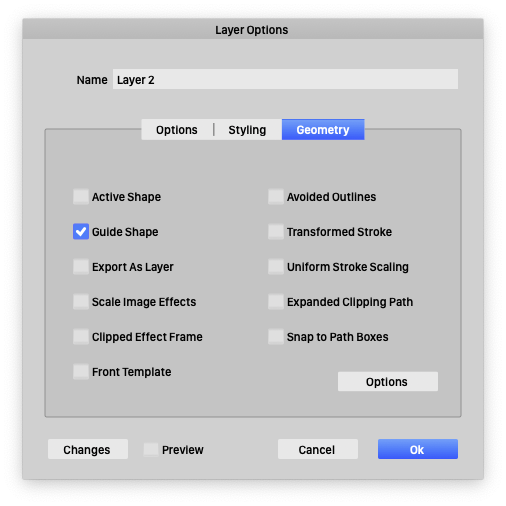
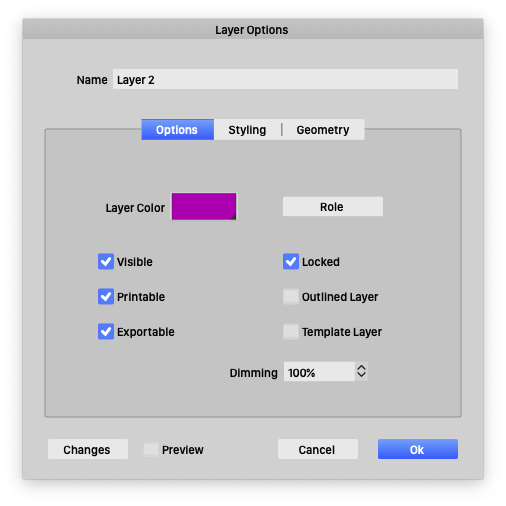
                  0_1697006855101_10-11 15.34.06.png

                  0_1697006877635_10-11 15.34.52.png

                  LIc. 0 OS10.15.7
                  MacBook Air (13-inch, Mid 2012) / Intel Core i5, 8GB / Intel HD Graphics 4000
                  LIc. 1 OS13.6.7
                  MacBook Pro (14-inch, 2023) / Apple M2 Pro, 16GB / Apple GPU

                  1 Reply Last reply Reply Quote 1
                  • VectorStylerV Offline
                    VectorStyler @Boldline
                    last edited by

                    @Boldline said in Cool ideas to add to the guides in VS:

                    The ability to cut a selected guide with the knife tool and then delete one selected section of it or the other
                    The ability to trim guides to the artboard by adding the guides while the artboard itself is selected

                    The problem in case of VS with this is that guidelines are not part of the graphics (layer) hierarchy. They are just "guides".
                    But it is possible to turn objects into guides, in which case the knife / trim tools will work

                    1 Reply Last reply Reply Quote 0
                    • First post
                      Last post
