VectorStyler
    • Categories
    • Unread
    • Recent
    • Tags
    • Popular
    • Register
    • Login

    Indicators showing while invisible

    Scheduled Pinned Locked Moved VectorStyler 1.2 beta
    7 Posts 2 Posters 6.8k Views 2 Watching
    Loading More Posts
    • Oldest to Newest
    • Newest to Oldest
    • Most Votes
    Reply
    • Reply as topic
    Log in to reply
    This topic has been deleted. Only users with topic management privileges can see it.
    • AyoA Offline
      Ayo
      last edited by

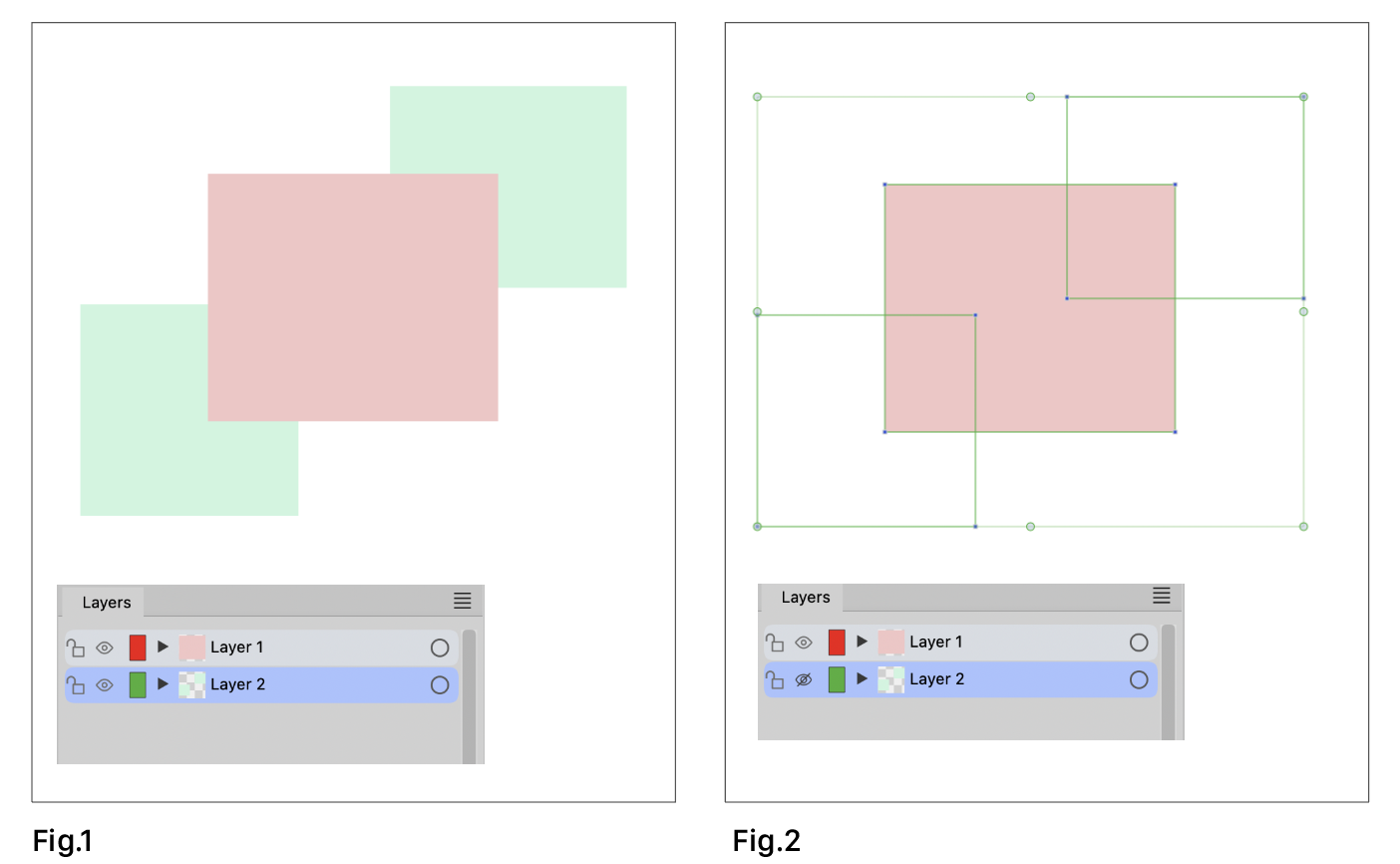
      Visible and editable while invisible

      Working with Node tool.

      • Why are objects indicators visible and editable while layer is set to invisible?
      • Red rectangle should have red color indicators (set to 'Layer')
      0_1698053600654_1e5ddf1f-fd05-4b61-ad4b-00d4dd3d80b6-image.png

      VectorStylerV 1 Reply Last reply Reply Quote 1
      • VectorStylerV Offline
        VectorStyler @Ayo
        last edited by

        @Ayo (1) is by design. If an object is not locked and is selected (in the layers panel) then it will be editable.
        (2) might be a bug, I will try to replicate it.

        AyoA 1 Reply Last reply Reply Quote 0
        • AyoA Offline
          Ayo @VectorStyler
          last edited by

          @VectorStyler
          (Fig. 2) An object should not be editable (and not visible by indicators) if it is set to invisible in my opinion. However, now it does.

          VectorStylerV 1 Reply Last reply Reply Quote 1
          • VectorStylerV Offline
            VectorStyler @Ayo
            last edited by

            @Ayo said in Indicators showing while invisible:

            An object should not be editable (and not visible by indicators) if it is set to invisible in my opinion

            I have to look into this more to better understand what is expected of invisible objects. Sometimes these can be inside groups, etc and changes will apply to them (unless locked).

            AyoA 1 Reply Last reply Reply Quote 0
            • AyoA Offline
              Ayo @VectorStyler
              last edited by

              @VectorStyler
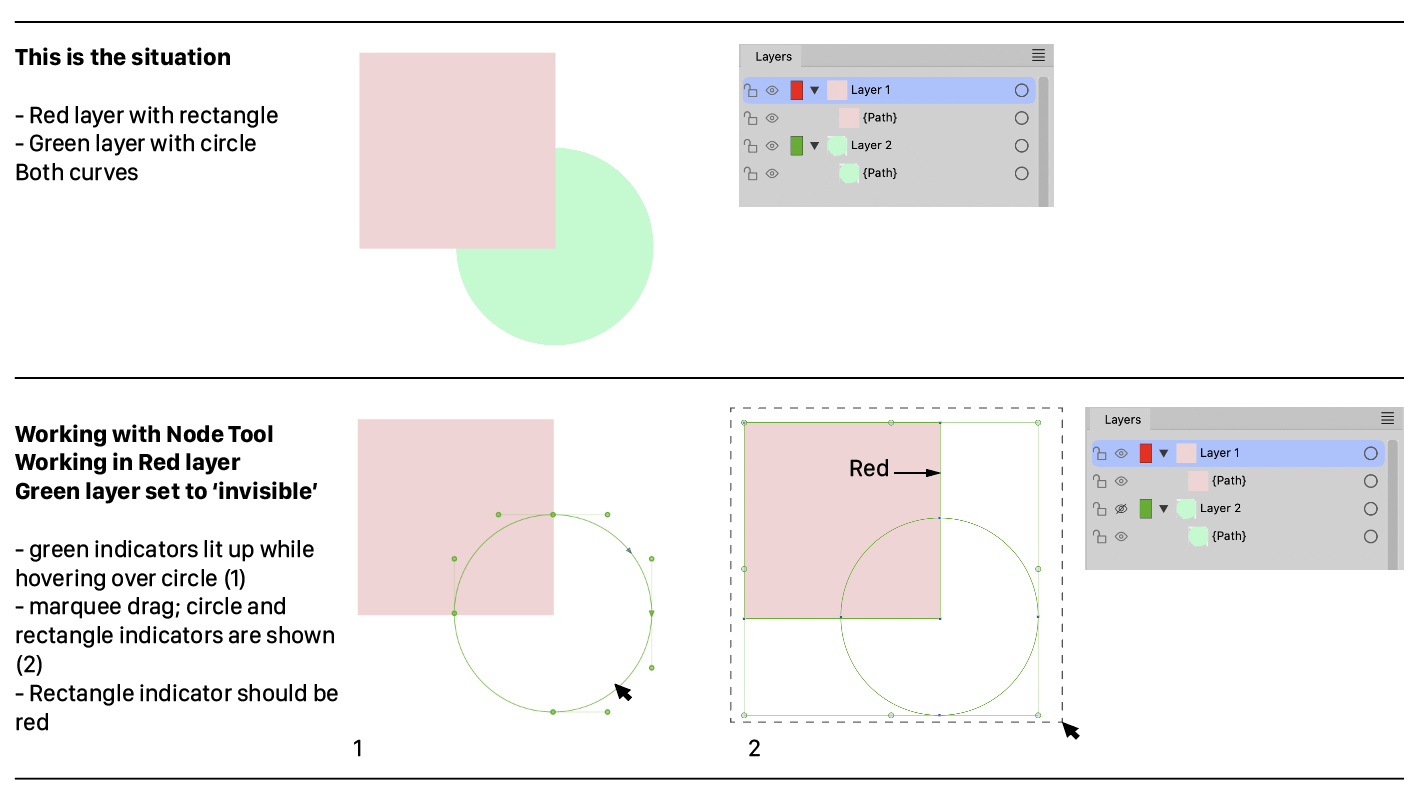
              There is nothing complex about the situation. Let me illustrate it again using the simple example below. But if a document becomes more complex, this can be very annoying.
              0_1698061101033_a3a57cea-1370-4b72-8cf7-5a606ebb5b17-image.png

              VectorStylerV 1 Reply Last reply Reply Quote 1
              • VectorStylerV Offline
                VectorStyler @Ayo
                last edited by

                @Ayo I added this to the backlog and will try to find a solution.

                AyoA 1 Reply Last reply Reply Quote 0
                • AyoA Offline
                  Ayo @VectorStyler
                  last edited by

                  @VectorStyler said in Indicators showing while invisible:

                  find a solution

                  Perhaps 'Invisible = locked too (in the background)'? Locked can be visible.

                  1 Reply Last reply Reply Quote 1
                  • First post
                    Last post
