VectorStyler
    • Categories
    • Unread
    • Recent
    • Tags
    • Popular
    • Register
    • Login

    Quite pleasantly surprised with the Extend path tool
    Scheduled Pinned Locked Moved VectorStyler 1.2 beta
    15 Posts 5 Posters 13.8k Views 4 Watching
    Loading More Posts
    • Oldest to Newest
    • Newest to Oldest
    • Most Votes
    Reply
    • Reply as topic
    Log in to reply
    This topic has been deleted. Only users with topic management privileges can see it.
    • VectorStylerV Offline
      VectorStyler @Ayo
      last edited by

      @Ayo

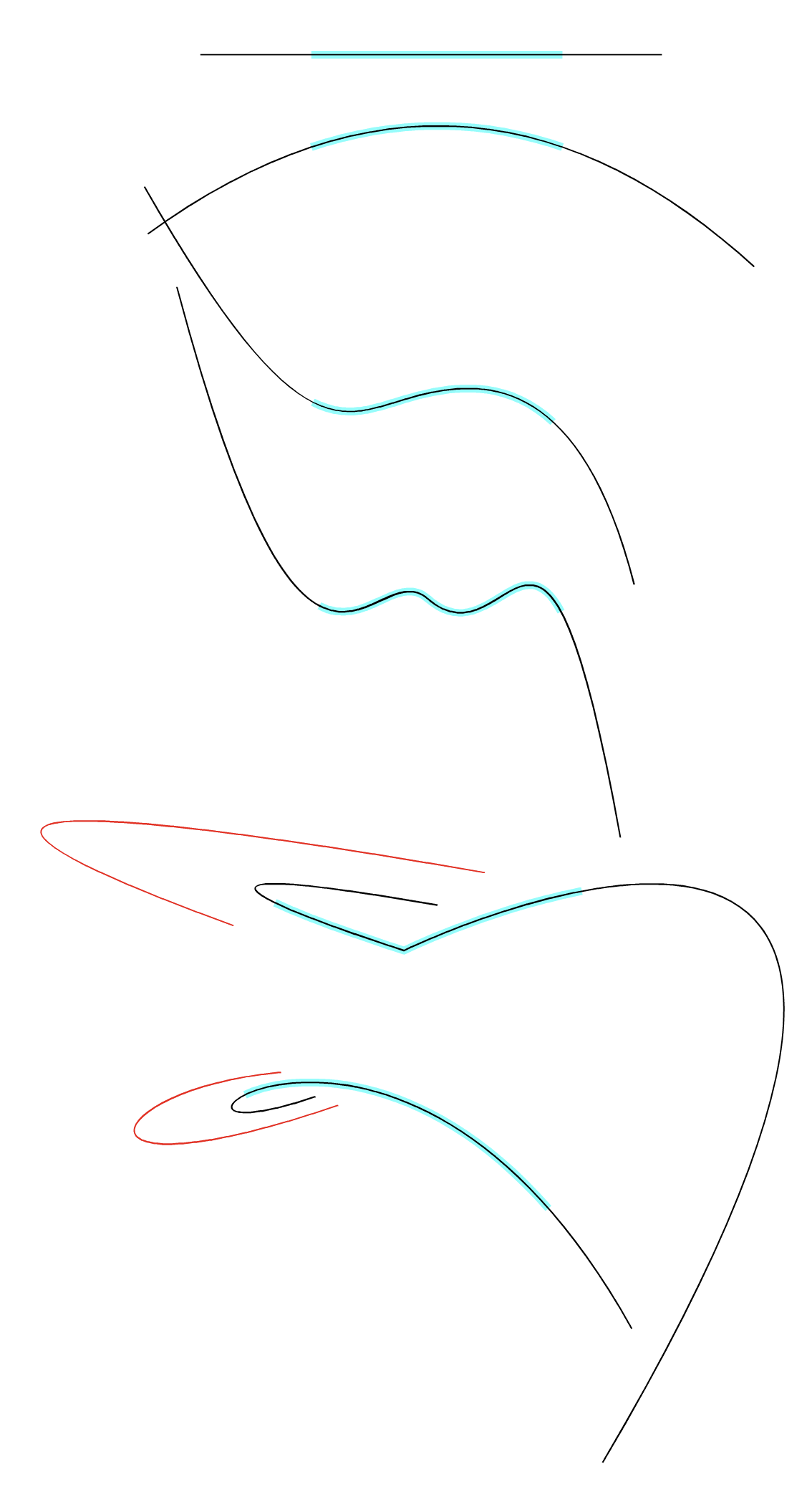
      Question: what exactly the tool does in terms of curvature.

      The extension mode can be selected in the context panel "Extend Mode" drop down (cut of, have to fix that).

      By default it will extend along where the curve would go, which in case of the cubic segment is just the continuation of the curve outside of the [0,1] interval.
      The Arc mode is the one that uses constant curvature.

      There is still a bit of a sensitivity issue with dragging the endings in arc mode, I have to fix that.

      AyoA b77B 2 Replies Last reply Reply Quote 1
      • AyoA Offline
        Ayo @VectorStyler
        last edited by

        @VectorStyler said in Quite pleasantly surprised with the Extend path tool:

        The extension mode can be selected in the context panel

        Missed that, thanks. Very Nice!

        VectorStylerV 1 Reply Last reply Reply Quote 0
        • b77B Offline
          b77 @VectorStyler
          last edited by

          @VectorStyler This tool needs a shortcut…

          MacBook Pro (Intel) running Monterey 12.6.4

          VectorStylerV 1 Reply Last reply Reply Quote 1
          • VectorStylerV Offline
            VectorStyler @Ayo
            last edited by

            @Ayo said in Quite pleasantly surprised with the Extend path tool:

            @VectorStyler said in Quite pleasantly surprised with the Extend path tool:

            The extension mode can be selected in the context panel

            Missed that, thanks. Very Nice!

            It is also possible to use shape presets (open paths) as extensions.

            1 Reply Last reply Reply Quote 0
            • VectorStylerV Offline
              VectorStyler @b77
              last edited by

              @b77 said in Quite pleasantly surprised with the Extend path tool:

              @VectorStyler This tool needs a shortcut…

              Yes, I will try to find a key for it.

              BoldlineB b77B 2 Replies Last reply Reply Quote 0
              • BoldlineB Online
                Boldline @VectorStyler
                last edited by

                @VectorStyler Can VS handle multi-key shortcuts now?

                🍎 macOS Tahoe 26.2, Mac mini (M1, 2020), Chip Apple M1, Memory 16 GB
                Cintiq 27QHD Display and LG Ultra HD Display

                VectorStylerV 1 Reply Last reply Reply Quote 1
                • VectorStylerV Offline
                  VectorStyler @Boldline
                  last edited by

                  @Boldline said in Quite pleasantly surprised with the Extend path tool:

                  @VectorStyler Can VS handle multi-key shortcuts now?

                  Yes.

                  1 Reply Last reply Reply Quote 1
                  • b77B Offline
                    b77 @VectorStyler
                    last edited by b77

                    @VectorStyler Thought better of it and…
                    When you are already in node editing mode (A) it would be faster if a
                    keyboard modifier would extend a path or slide a node directly.

                    Let's see:

                    • Shift-dragging a node moves it in horizontal, 45° or vertical direction. ✔

                    • Option-dragging a node duplicates the entire path. Hmm… kinda unusual. ❓
                      Maybe this could extend the path or slide the node instead?

                    • Option-clicking on path adds a node "flag" ✔

                    • Option-dragging anywhere on the path adds a node flag (with the click) and drag does nothing.
                      This oone could duplicate the path instead of Option-dragging a node, no?
                      (Or do something else that is useful).

                    MacBook Pro (Intel) running Monterey 12.6.4

                    VectorStylerV 1 Reply Last reply Reply Quote 1
                    • VectorStylerV Offline
                      VectorStyler @b77
                      last edited by

                      @b77 There is also the case in Extend Path tool where a node is shifted along the path.

                      b77B 1 Reply Last reply Reply Quote 0
                      • b77B Offline
                        b77 @VectorStyler
                        last edited by b77

                        @VectorStyler What I'm saying is I would prefer to not have to switch to another
                        tool so often.

                        When I'm in Node Editing mode (shortcut: A) it would be faster to be able to extend
                        a path directly by dragging any of the endnodes using a modifier.

                        I listed the current keyboard modifiers for the Node Editor, to see where
                        such a modifier could fit.

                        Option-dragging a node could do that — both extending and sliding.

                        Other opinions are welcome — maybe I missed some important detail?

                        MacBook Pro (Intel) running Monterey 12.6.4

                        b77B 1 Reply Last reply Reply Quote 1
                        • b77B Offline
                          b77 @b77
                          last edited by b77

                          Also:

                          When dealing with cusp nodes of closed shapes, Option-dragging a node can move it
                          along the extension of the two segments of that node:
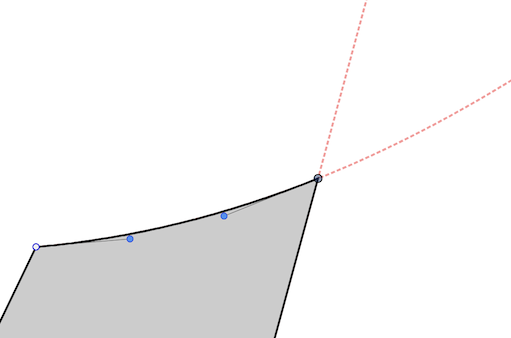
                          0_1698094014025_qdd.png

                          MacBook Pro (Intel) running Monterey 12.6.4

                          VectorStylerV 1 Reply Last reply Reply Quote 0
                          • VectorStylerV Offline
                            VectorStyler @b77
                            last edited by

                            @b77 I will test more the case with cusp corners. These might have problems with the current implementation (no curvature at the node).

                            The main obstacle to have the Extend Path and Node tool combined is the availability of a modifier key dedicated for this.

                            1 Reply Last reply Reply Quote 0
                            • encartE Offline
                              encart
                              last edited by

                              I don't know how I didn't notice this tool. I have had to fiddle so many times to construct an element, and here it is often trivial. This element is worth attention. Thank you

                              MacBook Air M4 24Gb, Tahoe 26.2

                              VectorStylerV 1 Reply Last reply Reply Quote 1
                              • VectorStylerV Offline
                                VectorStyler @encart
                                last edited by

                                @encart BTW: a path can also be extended automatically to the next intersection with the Trim and Join tool.

                                1 Reply Last reply Reply Quote 0
                                • First post
                                  Last post