VectorStyler
    • Categories
    • Unread
    • Recent
    • Tags
    • Popular
    • Register
    • Login

    Some comments and advice about the Layers panel
    Scheduled Pinned Locked Moved VectorStyler 1.2 beta
    17 Posts 7 Posters 15.9k Views 6 Watching
    Loading More Posts
    • Oldest to Newest
    • Newest to Oldest
    • Most Votes
    Reply
    • Reply as topic
    Log in to reply
    This topic has been deleted. Only users with topic management privileges can see it.
    • AyoA Offline
      Ayo
      last edited by

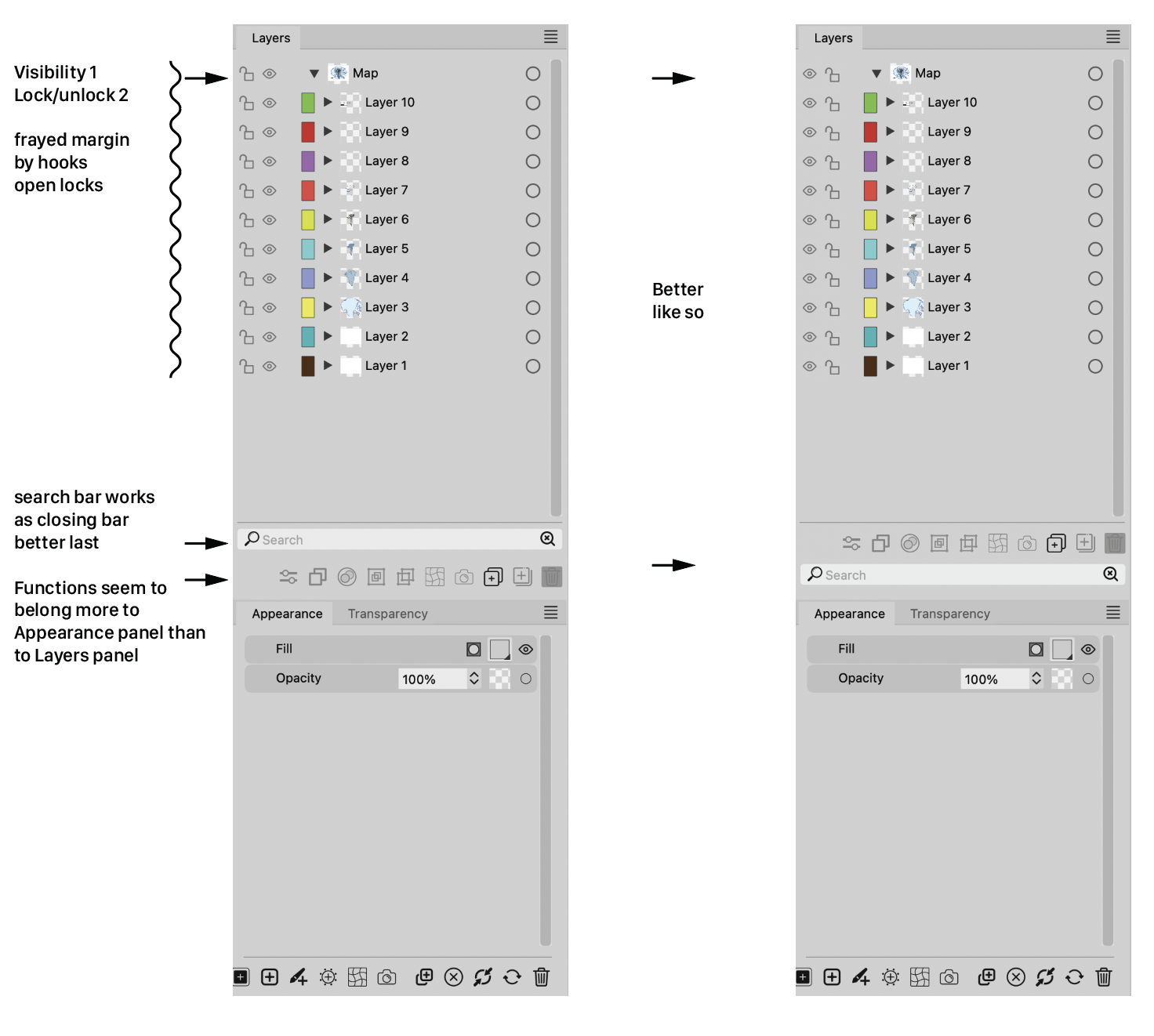
      Some comments and advice about the Layers panel

      0_1698138562683_346250f2-d64b-40ff-ae09-6580a3537f13-image.png

      S VectorStylerV 2 Replies Last reply Reply Quote 2
      • S Offline
        Subpath @Ayo
        last edited by

        @Ayo, agree with you, your idea look better

        Win 11
        CPU: AMD Ryzen 5 9600X, 6-core.
        GPU: Nvidia Geforce RTX 5070.

        1 Reply Last reply Reply Quote 1
        • VectorStylerV Offline
          VectorStyler @Ayo
          last edited by

          @Ayo I think this is doable, added it to the backlog.

          1 Reply Last reply Reply Quote 0
          • BoldlineB Offline
            Boldline
            last edited by

            The totally open lock with the part flying out to the side bothers me atheistically. I'd rather see the lock symbol with the top part flipped back around but there being a gap where it enters the locking mechanism. I just wonder if that would be too hard to read as a symbol and be confused with the lock symbol

            🍎 macOS Tahoe 26.2, Mac mini (M1, 2020), Chip Apple M1, Memory 16 GB
            Cintiq 27QHD Display and LG Ultra HD Display

            1 Reply Last reply Reply Quote 0
            • b77B Offline
              b77
              last edited by

              Guys, leave the buttons at the bottom of the panel, just like with any other panel.

              MacBook Pro (Intel) running Monterey 12.6.4

              AyoA 1 Reply Last reply Reply Quote 1
              • AyoA Offline
                Ayo @b77
                last edited by Ayo

                @b77 said in Some comments and advice about the Layers panel:

                just like with any other panel

                Other panels do not have a search function.

                Ai has it on top, above the layers. Seems to me the most logical place from a user functionality perspective. If you know where to find your layer/object, skip this and continue below to your target.

                I also wonder why there is the need for two magnifying glasses. One seems sufficient to me. Symbol on the right with the tiny cross is probably intended as a 'Clear' symbol. In that case, a simple cross will symbolize its function more clearly.

                b77B VectorStylerV 3 Replies Last reply Reply Quote 0
                • S Offline
                  Subpath
                  last edited by

                  Except that I like the idea of the eyes on the far left side and think it's better.

                  I wouldn't have a problem with it if the icons remained above the search field.
                  In that case, I can live with whatever @VectorStyler decides here.
                  I have to anyway 🙂

                  Win 11
                  CPU: AMD Ryzen 5 9600X, 6-core.
                  GPU: Nvidia Geforce RTX 5070.

                  1 Reply Last reply Reply Quote 1
                  • b77B Offline
                    b77 @Ayo
                    last edited by b77

                    @Ayo The Glyphs, Presets, Styles and Symbol panels each have a search field as well.

                    But anyway, if all other panels have the buttons at the bottom, why be visually
                    inconsistent here with the Layers panel?

                    MacBook Pro (Intel) running Monterey 12.6.4

                    1 Reply Last reply Reply Quote 1
                    • b77B Offline
                      b77 @Ayo
                      last edited by b77

                      @Ayo said in Some comments and advice about the Layers panel:

                      I also wonder why there is the need for two magnifying glasses. One seems sufficient to me. Symbol on the right with the tiny cross is probably intended as a 'Clear' symbol. In that case, a simple cross will symbolize its function more clearly.

                      I agree, a simple X is enough, and ideally should not appear when the search bar is empty.

                      MacBook Pro (Intel) running Monterey 12.6.4

                      1 Reply Last reply Reply Quote 1
                      • VectorStylerV Offline
                        VectorStyler @Ayo
                        last edited by

                        @Ayo said in Some comments and advice about the Layers panel:

                        Ai has it on top, above the layers. Seems to me the most logical place from a user functionality perspective

                        I think the top is a better place for the search field.

                        AyoA 1 Reply Last reply Reply Quote 0
                        • AyoA Offline
                          Ayo @VectorStyler
                          last edited by

                          @VectorStyler said in Some comments and advice about the Layers panel:

                          I think the top is a better place for the search field.

                          Do you mean: top, above the layers or top bottom group?

                          VectorStylerV 1 Reply Last reply Reply Quote 0
                          • VectorStylerV Offline
                            VectorStyler @Ayo
                            last edited by

                            @Ayo said in Some comments and advice about the Layers panel:

                            top, above the layers

                            I was thinking to move these search boxes above the list, if that is how it is done in other apps (expected behavior).

                            In my view, a search box should always be below a list, but this is just an opinion, so lets see what are the preferences.

                            AyoA 1 Reply Last reply Reply Quote 0
                            • AyoA Offline
                              Ayo @VectorStyler
                              last edited by

                              @VectorStyler
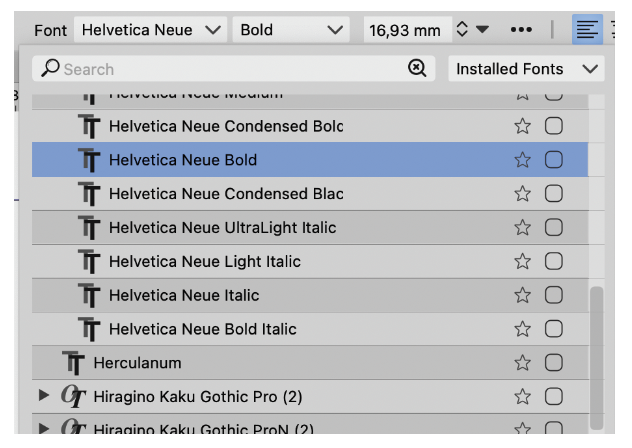
                              And also how it is done in your own font list!
                              0_1698225173190_71210750-da3f-420a-8048-999c56e097b1-image.png

                              VectorStylerV 1 Reply Last reply Reply Quote 0
                              • VectorStylerV Offline
                                VectorStyler @Ayo
                                last edited by

                                @Ayo said in Some comments and advice about the Layers panel:

                                And also how it is done in your own font list!

                                Yes, I admit it 🙂

                                1 Reply Last reply Reply Quote 0
                                • b77B Offline
                                  b77
                                  last edited by b77

                                  🙂 Assuming different opinions are still welcome:

                                  The font list needs the Search field at the top, to be closest to
                                  where you clicked to open it.

                                  This is not needed for the Layers panel and the other panels (Glyphs,
                                  Presets, Brush Presets, Styles, Symbols, etc) because they are not
                                  temporary lists/popovers opened with a click on a button.

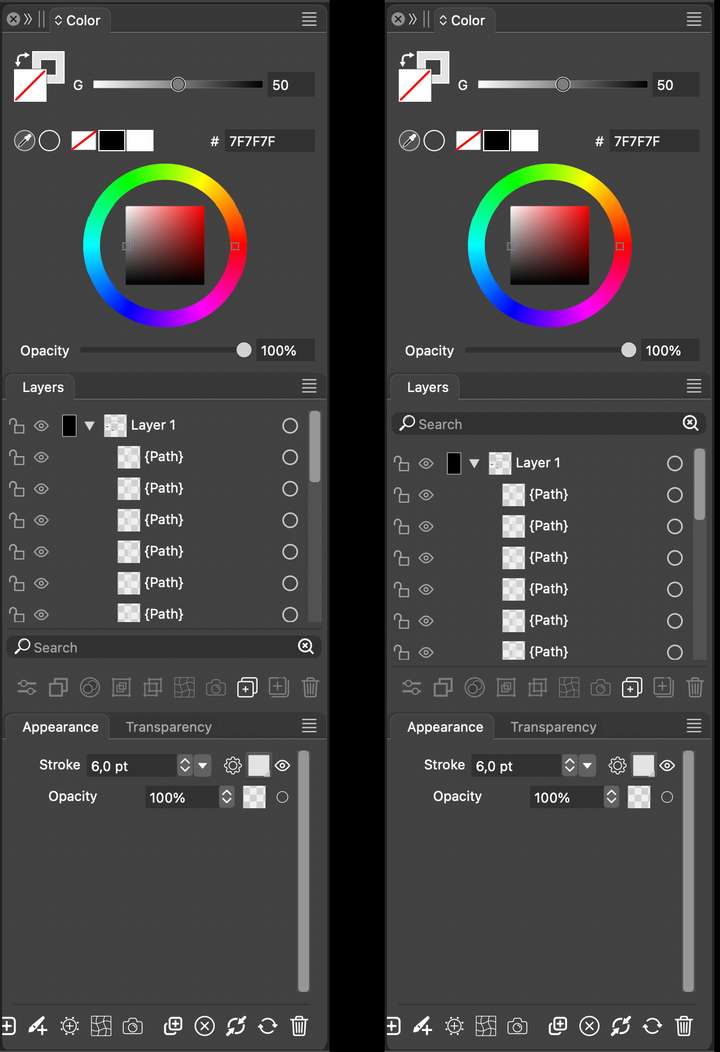
                                  Also: having a dark field so close to the darkened background of
                                  the Layers panel (the part behind the tab) would look like the
                                  image on the right:
                                  0_1698268677021_sb.png

                                  I for one already don't like that the horizontal divisions between
                                  panel groups are gone in v. 1.2…

                                  MacBook Pro (Intel) running Monterey 12.6.4

                                  1 Reply Last reply Reply Quote 2
                                  • IngolfI Offline
                                    Ingolf
                                    last edited by

                                    Just opinions and examples from me:

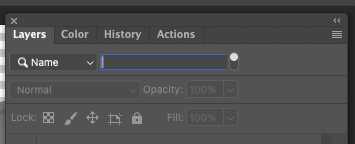
                                    Example Adobe:
                                    0_1698269418361_64d51527-1a3f-47d3-b165-01dd4f5d10a9-image.png

                                    What matters in their example is that the search field is only displayed when you actually search which is cool and how iOS apps often work. What is less cool is you often have to know how to activate it. I am not happy about the need for "In Photoshop CS6 and newer, you can press Shift + Ctrl + Alt + F (Mac: Shift + Command + Option + F) to search for a layer by Name."

                                    I mention this because I prefer the top placement IF the search field is only displayed when I click an icon (or use a shortcut). Otherwise it is distracting. I rarely search - and in that case the search field is just clutter. That is probably why iOS and Adobe hides the field when not needed. And they display it in the top ONLY because I actively requested a search and thus indirectly accepted more user interface controls visible for a time.

                                    The current bottom placement is therefore my favorite when it is displayed permantly. I actually forgot it was there because it never distracted me.

                                    So all in all I prefer it in the bottom if it will always be visible.

                                    🍏 macOS Sequoia Apple Silicon

                                    H 1 Reply Last reply Reply Quote 1
                                    • H Offline
                                      Harry @Ingolf
                                      last edited by

                                      @Ayo said in Some comments and advice about the Layers panel:

                                      I also wonder why there is the need for two magnifying glasses. One seems sufficient to me. Symbol on the right with the tiny cross is probably intended as a 'Clear' symbol. In that case, a simple cross will symbolize its function more clearly.

                                      @Ingolf said in Some comments and advice about the Layers panel:

                                      The current bottom placement is therefore my favorite when it is displayed permantly. I actually forgot it was there because it never distracted me.
                                      So all in all I prefer it in the bottom if it will always be visible.

                                      Same for me.

                                      Win 11, XP Pen Deco 01 V2 graphic tablet

                                      1 Reply Last reply Reply Quote 2
                                      • First post
                                        Last post
