VectorStyler
    • Categories
    • Unread
    • Recent
    • Tags
    • Popular
    • Register
    • Login

    Color Palettes opacity setting confusion
    Scheduled Pinned Locked Moved Questions and Support
    3 Posts 2 Posters 3.9k Views 2 Watching
    Loading More Posts
    • Oldest to Newest
    • Newest to Oldest
    • Most Votes
    Reply
    • Reply as topic
    Log in to reply
    This topic has been deleted. Only users with topic management privileges can see it.
    • AyoA Offline
      Ayo
      last edited by

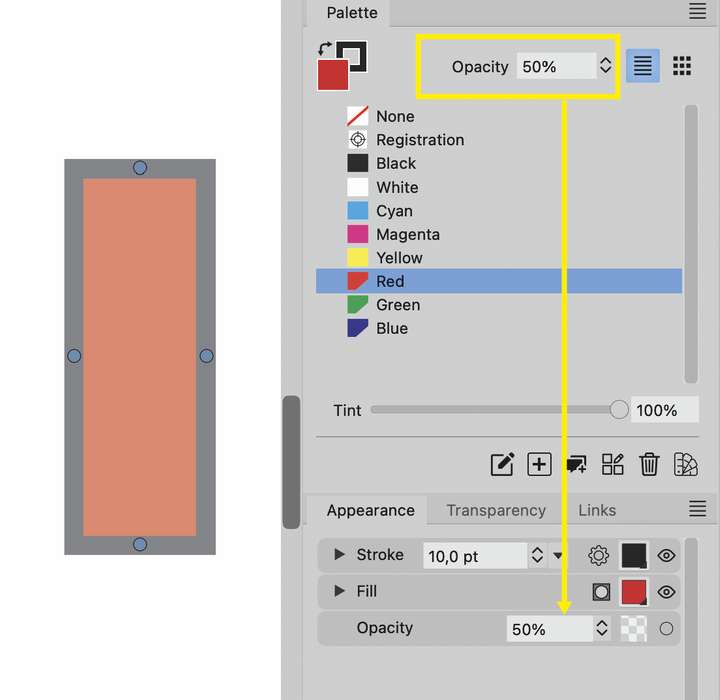
      Why does the Opacity setting in the Color Palette change the object's opacity property? Even as a whole (stroke also) if I'm only working on the filling? I don't understand what that setting does there anyway. A palette is for choosing color, not for assigning an opacity property to an object.
      0_1698850574050_90f05390-a384-4573-bac4-abe4f0f6b1cc-image.png

      VectorStylerV 1 Reply Last reply Reply Quote 0
      • VectorStylerV Offline
        VectorStyler @Ayo
        last edited by

        @Ayo It is the object opacity, and it is there for convenience.

        AyoA 1 Reply Last reply Reply Quote 1
        • AyoA Offline
          Ayo @VectorStyler
          last edited by

          @VectorStyler
          Crossing messages. Thanks for your reply to (/forum/topic/3679/what-does-adjust-style-opacity-do). I'm starting to get a picture together with this.

          Nevertheless, very confusing, impure and incorrect in my opinion. Glad I can turn off the Palette Tools.


          1 Reply Last reply Reply Quote 0
          • First post
            Last post