VectorStyler
    • Categories
    • Unread
    • Recent
    • Tags
    • Popular
    • Register
    • Login

    Clear all content from the object?
    Scheduled Pinned Locked Moved Questions and Support
    21 Posts 3 Posters 28.2k Views 3 Watching
    Loading More Posts
    • Oldest to Newest
    • Newest to Oldest
    • Most Votes
    Reply
    • Reply as topic
    Log in to reply
    This topic has been deleted. Only users with topic management privileges can see it.
    • AyoA Offline
      Ayo @VectorStyler
      last edited by

      @VectorStyler
      Hmm... ☹

      1 Reply Last reply Reply Quote 1
      • AyoA Offline
        Ayo
        last edited by Ayo

        @VectorStyler said in Clear all content from the object?:

        I will add a clear appearance feature, but that will not clear all content.

        Why not return to an unformatted form? No masks, effects, styles et.
        Dismantle the whole Christmas tree

        VectorStylerV b77B 2 Replies Last reply Reply Quote 1
        • VectorStylerV Offline
          VectorStyler @Ayo
          last edited by

          @Ayo said in Clear all content from the object?:

          Why not return to an unformatted form? No masks, effects, styles et.

          Yes, I think such a command should be added, but it has to be a new one (Synchronize Content is something else).

          But meanwhile I remembered that there is an Edit -> Attributes -> Copy / Paste Appearance. This might help.

          1 Reply Last reply Reply Quote 1
          • b77B Offline
            b77 @Ayo
            last edited by b77

            @Ayo There's also 'Remove All Image Effects' from the Effects menu, just in case.

            MacBook Pro (Intel) running Monterey 12.6.4

            AyoA 1 Reply Last reply Reply Quote 1
            • AyoA Offline
              Ayo @b77
              last edited by

              @b77

              A bit dazzling. Opacity, masks, Image effects, object, content, style, apearance.

              Anyway. Copy/Paste Appearance does the same as Synchronize Object Styles.

              From my user perspective and experience, the behavior is not easy to understand as long as there is no disclaimer attached to it.

              Cruel but a comparison.VS https://recordit.co/bwJ4clkqyC versus AI https://recordit.co/3UOc0Bv9Ft
              And don't get me wrong, deep respect for the developer. And very happy with the initiative, but I am only looking for things that I feel could or should be improved.

              If it's my problem, you should tell me. Then I'll stop whining about this.

              I sometimes get the feeling that the back-end structure is different from e.g. Illustrator but front-end design resembles it and therefore the apearance may be caught in two minds.

              What about the benchmarks?

              Illustrator includes the object level opacity. In 'clear apearance' and in 'drag/drop appearance object preview icon' to past apearance to new object (something equal to copy/paste appearance or synchronize) as well.

              Not familiar with this, but how does Coreldraw or Affinty D deal with this?

              b77B 1 Reply Last reply Reply Quote 0
              • b77B Offline
                b77 @Ayo
                last edited by b77

                @Ayo said in Clear all content from the object?:

                Anyway. Copy/Paste Appearance does the same as Synchronize Object Styles.

                Edit > Attributes > Copy & Paste Appearance includes the object
                level opacity — it's not the same as 'Sync Object Styles'.

                I'm sure the developer could include a 'Sync Appearance' button at the
                bottom of the Appearance panel, but it's already full. Having Copy &
                Paste Appearance in the Edit menu is good enough, IMO.

                @VectorStyler
                'Sync Object Content' is indeed better than 'Sync Object Style'.

                MacBook Pro (Intel) running Monterey 12.6.4

                AyoA 1 Reply Last reply Reply Quote 1
                • AyoA Offline
                  Ayo @b77
                  last edited by Ayo

                  @b77 said in Clear all content from the object?:

                  Edit > Attributes > Copy & Paste Appearance includes the object
                  level opacity — it's not the same as 'Sync Object Styles'.

                  You're right. 👍
                  Wouldn't a Sync apearance button at that position be more useful than Sync Object Style?
                  After all, it is the 'apearance' panel. Sync Object Style to a menu.

                  b77B 1 Reply Last reply Reply Quote 0
                  • b77B Offline
                    b77 @Ayo
                    last edited by

                    @Ayo said in Clear all content from the object?:

                    Wouldn't a Sync apearance button at that position be more useful than Sync Object Style?

                    I mostly use 'Copy & Paste Appearance', so… maybe…

                    I'm curious what other users say.

                    MacBook Pro (Intel) running Monterey 12.6.4

                    AyoA 1 Reply Last reply Reply Quote 1
                    • AyoA Offline
                      Ayo @b77
                      last edited by

                      @b77
                      I have an idea that might fit the bill.
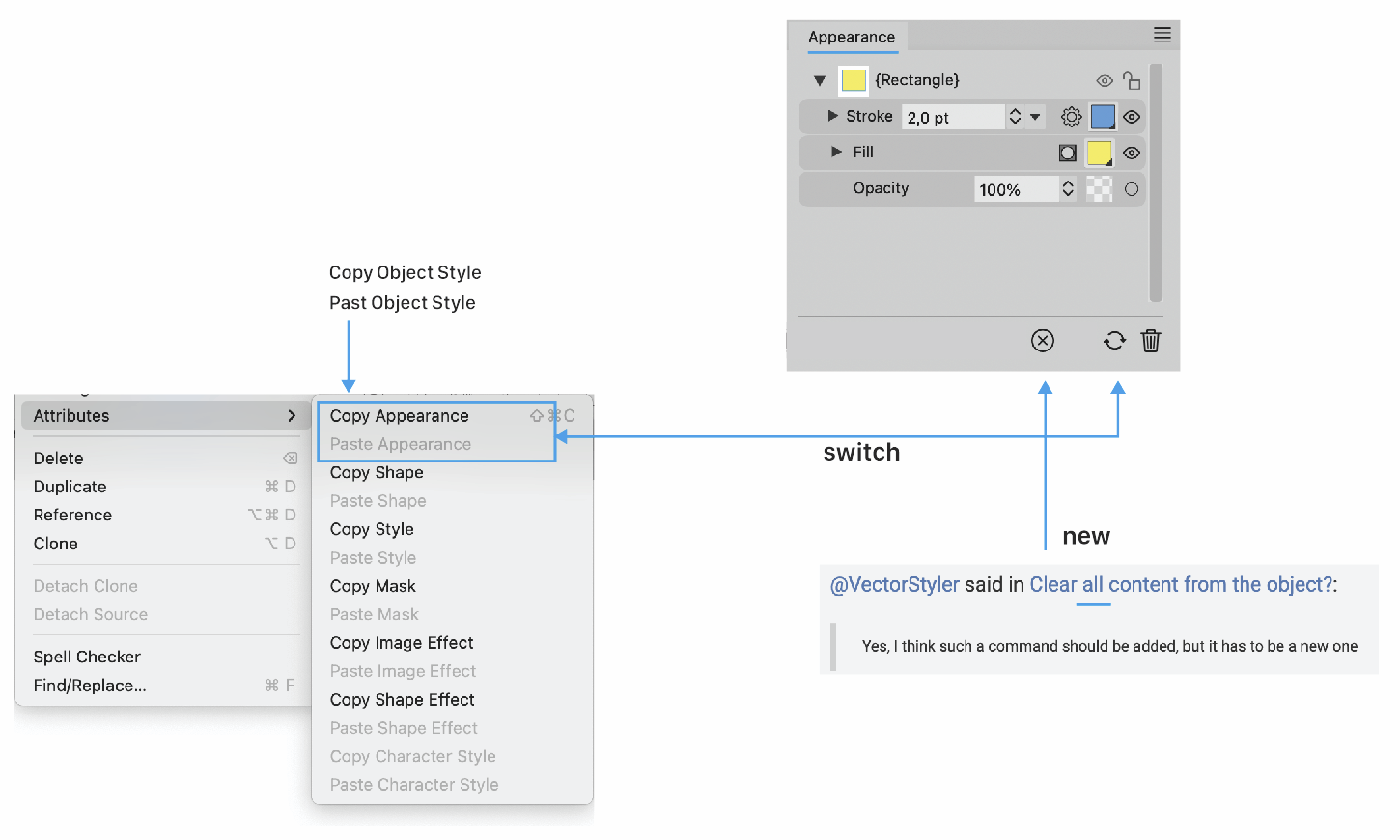
                      0_1698882566382_a3655052-4686-495d-99b0-aa4c3c43f4cd-image.png

                      VectorStylerV 1 Reply Last reply Reply Quote 1
                      • VectorStylerV Offline
                        VectorStyler @Ayo
                        last edited by

                        @Ayo said in Clear all content from the object?:

                        I have an idea that might fit the bill.

                        Tere are a bit too many buttons in the Appearance panel.
                        How about moving these two to the panel menu, adding copy / paste to the menu?
                        And adding a new button for the "basic styling" mode?

                        AyoA 2 Replies Last reply Reply Quote 0
                        • AyoA Offline
                          Ayo @VectorStyler
                          last edited by

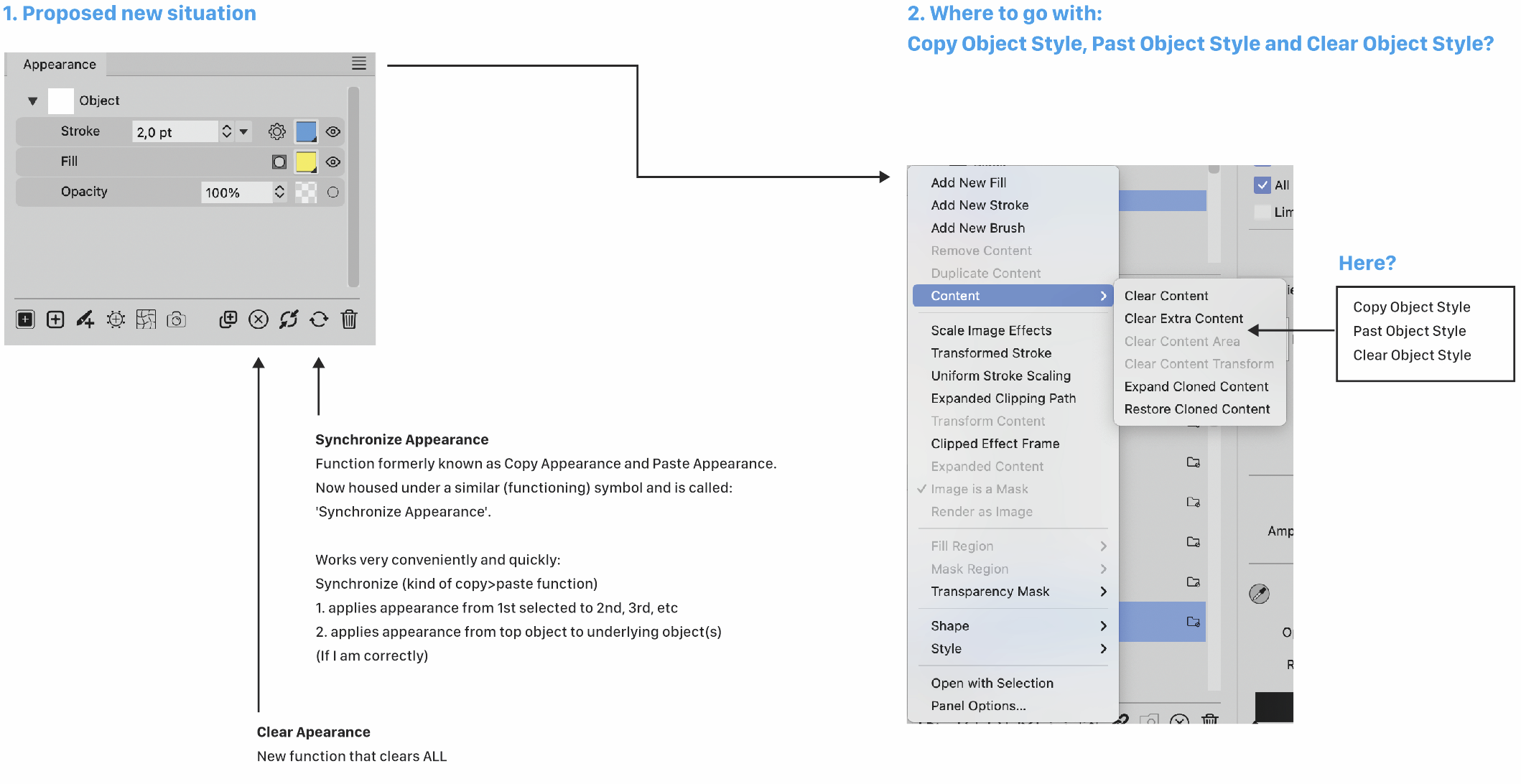
                          @VectorStyler More appearance under the flag appearance. Like so?
                          0_1698916312355_62803878-d0e4-40bf-8665-7bdd3de8d487-image.png

                          1 Reply Last reply Reply Quote 1
                          • AyoA Offline
                            Ayo @VectorStyler
                            last edited by Ayo

                            @VectorStyler
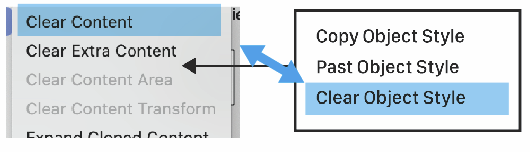
                            Don't quite understand these differences. Double, redundant?
                            0_1698918283653_8484cea2-0cc0-4e27-923f-45962731e4e3-image.png

                            VectorStylerV 1 Reply Last reply Reply Quote 0
                            • VectorStylerV Offline
                              VectorStyler @Ayo
                              last edited by

                              @Ayo said in Clear all content from the object?:

                              Don't quite understand these differences. Double, redundant?

                              Clear Content should clear all content from the object.

                              Clear Extra Content keeps one stroke and one fill content.

                              AyoA 1 Reply Last reply Reply Quote 0
                              • AyoA Offline
                                Ayo @VectorStyler
                                last edited by

                                @VectorStyler said in Clear all content from the object?:

                                Clear Content should clear all content from the object

                                Was wondering if Clear Content isn't the same as Clear object Style.

                                1 Reply Last reply Reply Quote 1
                                • First post
                                  Last post
