VectorStyler
    • Categories
    • Unread
    • Recent
    • Tags
    • Popular
    • Register
    • Login

    Typography 2: 'Auto' is a relative value

    Scheduled Pinned Locked Moved VectorStyler 1.2 beta
    10 Posts 3 Posters 9.9k Views 3 Watching
    Loading More Posts
    • Oldest to Newest
    • Newest to Oldest
    • Most Votes
    Reply
    • Reply as topic
    Log in to reply
    This topic has been deleted. Only users with topic management privileges can see it.
    • AyoA Offline
      Ayo
      last edited by

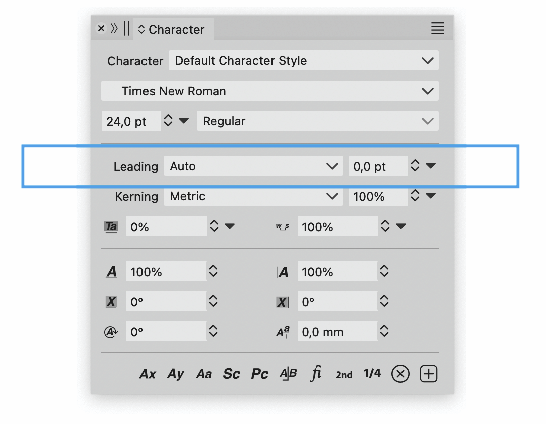
      Leading 'Auto' is a relative value.
      So percentage please or a disabled/greyed-out value setting if set somewhere else.

      That brings me to the next question:
      how/where to set default Auto Leading value for active and new documents?
      0_1699021121374_f91e749e-66c6-41c1-9bff-53af0fd5a2ce-image.png

      VectorStylerV b77B 2 Replies Last reply Reply Quote 1
      • VectorStylerV Offline
        VectorStyler @Ayo
        last edited by

        @Ayo said in Typography 2: 'Auto' is a relative value:

        how/where to set default Auto Leading value for active and new documents?

        The default "Character Style" (separate for shape and frame text) in the Styles panel.

        1 Reply Last reply Reply Quote 0
        • b77B Offline
          b77 @Ayo
          last edited by b77

          @Ayo said in Typography 2: 'Auto' is a relative value:

          Leading 'Auto' is a relative value.
          So percentage please or a disabled/greyed-out value setting if set somewhere else.

          When leading is set to Auto, Illustrator and InDesign add 20% to the leading of the font.

          So If the font size is 10 pt, AI will display (12pt) in the Leading value field.

          Do you mean a percentage value (120%) should be displayed here instead?

          ……………………………………

          @VectorStyler Btw, if I switch from 'Auto' to 'Fixed', VS displays 10 pts.
          Does that mean VS adds 10% to the leading of the font by default?

          MacBook Pro (Intel) running Monterey 12.6.4

          AyoA VectorStylerV 2 Replies Last reply Reply Quote 0
          • AyoA Offline
            Ayo @b77
            last edited by

            @b77 said in Typography 2: 'Auto' is a relative value:

            Do you mean a percentage value (120%) should be displayed here instead?

            Good idea but greyed out because it is set elsewhere.

            b77B 1 Reply Last reply Reply Quote 0
            • b77B Offline
              b77 @Ayo
              last edited by b77

              @Ayo You suggested a percentage value here, not me, that's why
              I'm trying to clarify how AI does it in order to ask why a percentage
              value here would be better than the calculated value in
              parentheses (like AI does it)?

              I cannot check how InDesign and QXP do this, btw, so feel free
              to bring that up.

              Also: I'm not saying displaying 0.00 pt here is better (unless I'm
              missing the logic behind this, @VectorStyler?)

              MacBook Pro (Intel) running Monterey 12.6.4

              AyoA 1 Reply Last reply Reply Quote 0
              • AyoA Offline
                Ayo @b77
                last edited by

                @b77
                'Auto' is always relative.
                Relative to the type point size.
                So 120% is indeed 12 pt line spacing for a type set 10 pt.
                Display 0.0 pt as you suggest, is an absolute value and incorrect.
                Zero does not equal 12.

                b77B 1 Reply Last reply Reply Quote 0
                • b77B Offline
                  b77 @Ayo
                  last edited by b77

                  @Ayo I didn't suggest that, sorry for any misunderstanding. 🙂

                  I asked why would displaying the percentage value (110%, 120%, whatever)
                  be better than displaying the calculated value in pts directly.

                  (As I said, AI displays the value in pt)

                  MacBook Pro (Intel) running Monterey 12.6.4

                  AyoA 1 Reply Last reply Reply Quote 0
                  • AyoA Offline
                    Ayo @b77
                    last edited by

                    @b77
                    I see that's equal ok like so...
                    Auto (12 pt)
                    calculated value in parentheses

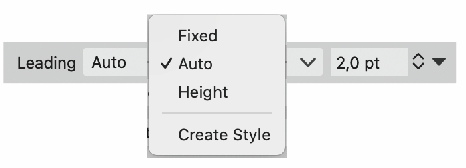
                    But problem/nice thing is that in VS you can specify leading by three methods. AI has that not, there you switch instantly to Fixed value when editing the Auto value between parentheses. So a readout from the setting elsewhere (120%) is a good feedback.
                    0_1699030244460_e1c2fe26-5383-4227-aced-df4903850b5a-image.png

                    1 Reply Last reply Reply Quote 0
                    • VectorStylerV Offline
                      VectorStyler @b77
                      last edited by

                      @b77 said in Typography 2: 'Auto' is a relative value:

                      Btw, if I switch from 'Auto' to 'Fixed', VS displays 10 pts.
                      Does that mean VS adds 10% to the leading of the font by default?

                      I have to test this part more, and will get back to this once the new build is out.

                      b77B 1 Reply Last reply Reply Quote 1
                      • b77B Offline
                        b77 @VectorStyler
                        last edited by

                        @VectorStyler 👍

                        MacBook Pro (Intel) running Monterey 12.6.4

                        1 Reply Last reply Reply Quote 0
                        • First post
                          Last post
