VectorStyler
    • Categories
    • Unread
    • Recent
    • Tags
    • Popular
    • Register
    • Login

    Nodes, Name of artboard and corners of warp tools seem oversized

    Scheduled Pinned Locked Moved VectorStyler 1.2 beta
    2 Posts 2 Posters 3.3k Views 1 Watching
    Loading More Posts
    • Oldest to Newest
    • Newest to Oldest
    • Most Votes
    Reply
    • Reply as topic
    Log in to reply
    This topic has been deleted. Only users with topic management privileges can see it.
    • BoldlineB Offline
      Boldline
      last edited by

      With the last few beta releases, the name of the artboard and the nodes and even the corners of the warp edits have all appeared much larger than normal on my 16 inch macbook pro. The same beta update on my main desktop computer (mac mini) with 27" screen looked normal
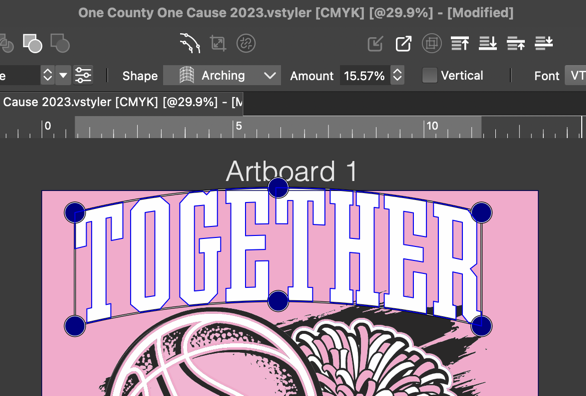
      0_1699162039133_9aa10f12-ac74-40fc-aaf5-c67050e2a940-CleanShot 2023-11-05 at 01.25.17.png

      🍎 macOS Tahoe 26.2, Mac mini (M1, 2020), Chip Apple M1, Memory 16 GB
      Cintiq 27QHD Display and LG Ultra HD Display

      VectorStylerV 1 Reply Last reply Reply Quote 0
      • VectorStylerV Offline
        VectorStyler @Boldline
        last edited by VectorStyler

        @Boldline Looks normal here (also 27").
        I will test on a macbook pro.

        Are there some settings that were changed related to Node or Screen scaling?

        1 Reply Last reply Reply Quote 0
        • First post
          Last post
