VectorStyler
    • Categories
    • Unread
    • Recent
    • Tags
    • Popular
    • Register
    • Login

    Settings: retain certain values
    Scheduled Pinned Locked Moved VectorStyler 1.2 beta
    31 Posts 3 Posters 46.2k Views 3 Watching
    Loading More Posts
    • Oldest to Newest
    • Newest to Oldest
    • Most Votes
    Reply
    • Reply as topic
    Log in to reply
    This topic has been deleted. Only users with topic management privileges can see it.
    • VectorStylerV Offline
      VectorStyler @B-Vs-V
      last edited by

      @Pat I will try to replicate this.

      B 1 Reply Last reply Reply Quote 0
      • B Offline
        B-Vs-V @VectorStyler
        last edited by

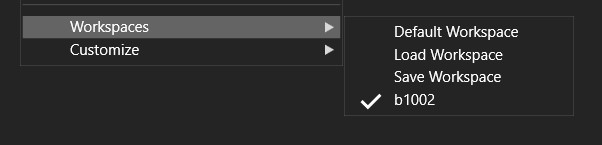
        @VectorStyler Again I have this same issue. VS opens without toolbox and many docked panels although it indicates that the right workspace is in use:
        0_1697007944963_workspace.jpg

        W11 Pro 25H2 - 12th Gen Intel(R) i7-12700K 3.61 GHz - RAM 64 Go - NVIDIA GF GTX 4070 Ti - Intuos - Dell UP3216Q / Eizo ColorEdge
        W11 Pro 25H2 - 12th Gen Intel(R) i7-12700KF 3.60 GHz -RAM 64 Go - NVIDIA GF GTX 3080 - IntuosPro- ProArt PA329C

        VectorStylerV B 2 Replies Last reply Reply Quote 1
        • VectorStylerV Offline
          VectorStyler @B-Vs-V
          last edited by

          @Pat said in Settings: retain certain values:

          Again I have this same issue. VS opens without toolbox and many docked panels although it indicates that the right workspace is in use:

          I opened a new bug on this one.

          B 1 Reply Last reply Reply Quote 0
          • B Offline
            B-Vs-V @VectorStyler
            last edited by B-Vs-V

            @VectorStyler I hope you could fix this bug. Always reloading the workspace each time you open the software is not very time-consuming but a bit annoying. I'm looking forward to installing the next update ☺

            W11 Pro 25H2 - 12th Gen Intel(R) i7-12700K 3.61 GHz - RAM 64 Go - NVIDIA GF GTX 4070 Ti - Intuos - Dell UP3216Q / Eizo ColorEdge
            W11 Pro 25H2 - 12th Gen Intel(R) i7-12700KF 3.60 GHz -RAM 64 Go - NVIDIA GF GTX 3080 - IntuosPro- ProArt PA329C

            VectorStylerV 2 Replies Last reply Reply Quote 0
            • VectorStylerV Offline
              VectorStyler @B-Vs-V
              last edited by

              @Pat said in Settings: retain certain values:

              I hope you could fix this bug.

              It is still in the list of bugs, I will try to have it for the next build.

              1 Reply Last reply Reply Quote 1
              • encartE Offline
                encart
                last edited by

                I'm not sure if this will help, but I think it might have something to do with this bug. A few days ago I hooked up a second monitor as a desktop extension. I dragged some panels there. After unplugging the second monitor VS still remembered the coordinates of the panels' positions. I tried selecting and deselecting them in the menu, but they did not appear. Only when I reloaded the .workspace file did it return to normal. Maybe in this case, too, the panels appear somewhere off-screen?

                MacBook Air M4 24Gb, Tahoe 26.2

                VectorStylerV 1 Reply Last reply Reply Quote 2
                • VectorStylerV Offline
                  VectorStyler @encart
                  last edited by

                  @encart said in Settings: retain certain values:

                  After unplugging the second monitor VS still remembered the coordinates of the panels' positions.

                  Could be a separate bug, but it is a bug nevertheless. I will try to replicate and fix this also.

                  1 Reply Last reply Reply Quote 1
                  • VectorStylerV Offline
                    VectorStyler @B-Vs-V
                    last edited by

                    @Pat said in Settings: retain certain values:

                    Always reloading the workspace each time you open the software is not very time-consuming but a bit annoying.

                    In beta 1.2 the workspace is kept after the restart (at least here). I also tested with the workspace you sent me (regarding the Pen tool bug, which BTW was replicated).

                    B 1 Reply Last reply Reply Quote 1
                    • B Offline
                      B-Vs-V @VectorStyler
                      last edited by

                      @VectorStyler said in Settings: retain certain values:

                      @Pat said in Settings: retain certain values:

                      Always reloading the workspace each time you open the software is not very time-consuming but a bit annoying.

                      In beta 1.2 the workspace is kept after the restart (at least here). I also tested with the workspace you sent me (regarding the Pen tool bug, which BTW was replicated).

                      I've restored defaults WKS, reposition some panels without reducing those & so far so good. The Tool box and the panels are always there when I open VS beta.
                      Great you could reproduce the issue ☺

                      W11 Pro 25H2 - 12th Gen Intel(R) i7-12700K 3.61 GHz - RAM 64 Go - NVIDIA GF GTX 4070 Ti - Intuos - Dell UP3216Q / Eizo ColorEdge
                      W11 Pro 25H2 - 12th Gen Intel(R) i7-12700KF 3.60 GHz -RAM 64 Go - NVIDIA GF GTX 3080 - IntuosPro- ProArt PA329C

                      1 Reply Last reply Reply Quote 1
                      • B Offline
                        B-Vs-V @B-Vs-V
                        last edited by

                        @Pat said in Settings: retain certain values:

                        @VectorStyler Again I have this same issue. VS opens without toolbox and many docked panels although it indicates that the right workspace is in use:

                        0_1697007944963_workspace.jpg

                        @VectorStyler Still there when I reduce some panels. It is fine with "normal" non-reduced panels even after resetting VS.

                        W11 Pro 25H2 - 12th Gen Intel(R) i7-12700K 3.61 GHz - RAM 64 Go - NVIDIA GF GTX 4070 Ti - Intuos - Dell UP3216Q / Eizo ColorEdge
                        W11 Pro 25H2 - 12th Gen Intel(R) i7-12700KF 3.60 GHz -RAM 64 Go - NVIDIA GF GTX 3080 - IntuosPro- ProArt PA329C

                        VectorStylerV 1 Reply Last reply Reply Quote 1
                        • VectorStylerV Offline
                          VectorStyler @B-Vs-V
                          last edited by

                          @Pat said in Settings: retain certain values:

                          Still there when I reduce some panels.

                          I could not replicate this yet. Send me the workspace and settings files from the /resources/ folder

                          1 Reply Last reply Reply Quote 0
                          • First post
                            Last post