VectorStyler
    • Categories
    • Unread
    • Recent
    • Tags
    • Popular
    • Register
    • Login

    Partially responsive icons in side tool bar

    Scheduled Pinned Locked Moved Questions and Support
    10 Posts 3 Posters 8.7k Views 3 Watching
    Loading More Posts
    • Oldest to Newest
    • Newest to Oldest
    • Most Votes
    Reply
    • Reply as topic
    Log in to reply
    This topic has been deleted. Only users with topic management privileges can see it.
    • K Offline
      Kumr
      last edited by

      First icon in some of the popup menus (side tool bar) does not hover with mouse pointer and non-responsive.
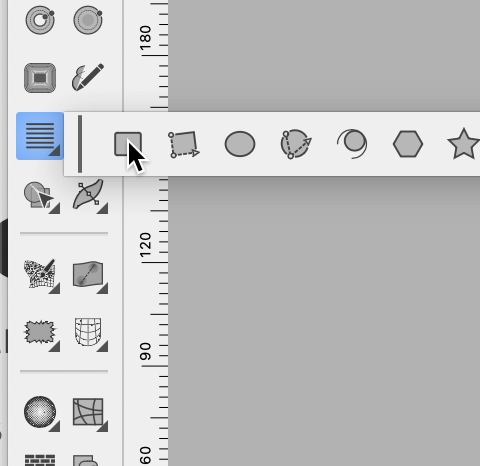
      0_1699336025769_Screenshot 2023-11-07 at 11.16.15 AM.png

      https://recordit.co/BQ9Z6hQHHe

      M1 MacBook Air, 16GB, macOS Sonoma 14.4.1

      VectorStylerV b77B 2 Replies Last reply Reply Quote 0
      • VectorStylerV Offline
        VectorStyler @Kumr
        last edited by

        @Kumr said in Partially responsive icons in side tool bar:

        First icon in some of the popup menus (side tool bar) does not hover with mouse pointer and non-responsive.

        Seems that then recording was removed.

        I could replicate this partially. The icons are responsive if pressed, but hovering is not indicated on Windows.

        K 1 Reply Last reply Reply Quote 0
        • K Offline
          Kumr @VectorStyler
          last edited by

          @VectorStyler For me I couldn't click the icon. Works around the icons.

          Sorry about the link. This is what I experience.
          https://recordit.co/OjuBU5mXTb

          M1 MacBook Air, 16GB, macOS Sonoma 14.4.1

          VectorStylerV 1 Reply Last reply Reply Quote 0
          • VectorStylerV Offline
            VectorStyler @Kumr
            last edited by

            @Kumr Could be the same as the text frame issue. back up the user settings and workspace and remove.

            K 1 Reply Last reply Reply Quote 0
            • K Offline
              Kumr @VectorStyler
              last edited by

              @VectorStyler Tried that solution. Didn't work for me.

              M1 MacBook Air, 16GB, macOS Sonoma 14.4.1

              VectorStylerV 1 Reply Last reply Reply Quote 1
              • VectorStylerV Offline
                VectorStyler @Kumr
                last edited by

                @Kumr Is this on Windows, with a scaled display?

                K 1 Reply Last reply Reply Quote 0
                • K Offline
                  Kumr @VectorStyler
                  last edited by

                  @VectorStyler I am on m1 macbook air.

                  M1 MacBook Air, 16GB, macOS Sonoma 14.4.1

                  VectorStylerV 1 Reply Last reply Reply Quote 1
                  • VectorStylerV Offline
                    VectorStyler @Kumr
                    last edited by

                    @Kumr What is the MacOS version?

                    1 Reply Last reply Reply Quote 0
                    • b77B Offline
                      b77 @Kumr
                      last edited by b77

                      @Kumr You could add your OS version and machine in your signature — https://www.vectorstyler.com/forum/user/Kumr/edit

                      MacBook Pro (Intel) running Monterey 12.6.4

                      K 1 Reply Last reply Reply Quote 1
                      • K Offline
                        Kumr @b77
                        last edited by

                        @b77 Thanks for the suggestion

                        M1 MacBook Air, 16GB, macOS Sonoma 14.4.1

                        1 Reply Last reply Reply Quote 0
                        • First post
                          Last post
