VectorStyler
    • Categories
    • Unread
    • Recent
    • Tags
    • Popular
    • Register
    • Login

    Turn off measurement readout

    Scheduled Pinned Locked Moved Questions and Support
    6 Posts 3 Posters 6.1k Views 3 Watching
    Loading More Posts
    • Oldest to Newest
    • Newest to Oldest
    • Most Votes
    Reply
    • Reply as topic
    Log in to reply
    This topic has been deleted. Only users with topic management privileges can see it.
    • AyoA Offline
      Ayo
      last edited by

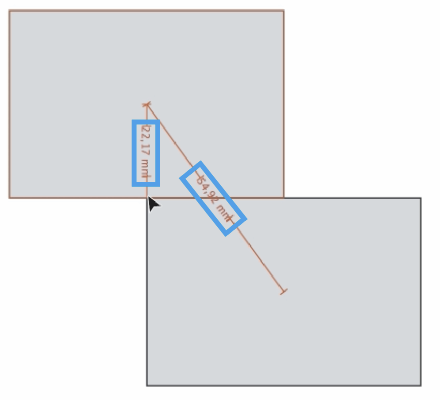
      Is there a setting that allows me to turn off the measurement readout?
      0_1698660913188_1f929e04-961c-40b6-b452-5ba49ad59651-image.png

      VectorStylerV 1 Reply Last reply Reply Quote 0
      • VectorStylerV Offline
        VectorStyler @Ayo
        last edited by

        @Ayo No such option. Do we need one?

        AyoA L 2 Replies Last reply Reply Quote 0
        • AyoA Offline
          Ayo @VectorStyler
          last edited by

          @VectorStyler
          'Need' is a bold word. Usually I don't need the measurement readout. The alignment indicators are sufficient. So I usually experience the readout values as clutter.

          1 Reply Last reply Reply Quote 1
          • L Offline
            Li Xiao @VectorStyler
            last edited by

            @VectorStyler
            Where can I change the size of the numbers displayed in the measurement values? I only found options to change the line width and color.
            https://youtu.be/oipzM4R7jqc

            I have a suggestion: it would be more convenient if we could input numerical values for spacing instead of just displaying them. It would make positioning shapes faster and more user-friendly than using alignment.

            VectorStylerV 1 Reply Last reply Reply Quote 0
            • VectorStylerV Offline
              VectorStyler @Li Xiao
              last edited by

              @Li-Xiao

              Where can I change the size of the numbers displayed in the measurement values? I

              Not possible to customize this font (for now).

              it would be more convenient if we could input numerical values for spacing instead of just displaying them

              There is an option in the Alignment panel that can space objects at a distance: with the Space field and the 4th and 8th icon for alignment.

              L 1 Reply Last reply Reply Quote 0
              • L Offline
                Li Xiao @VectorStyler
                last edited by

                @VectorStyler Thank you. I'm aware of the method to use spacing in the Alignment panel for positioning. However, it would be faster and more flexible in this case. Some improvements are needed on the Alignment panel to make it easier to use. I'll take some time to record.


                1 Reply Last reply Reply Quote 1
                • First post
                  Last post