VectorStyler
    • Categories
    • Unread
    • Recent
    • Tags
    • Popular
    • Register
    • Login

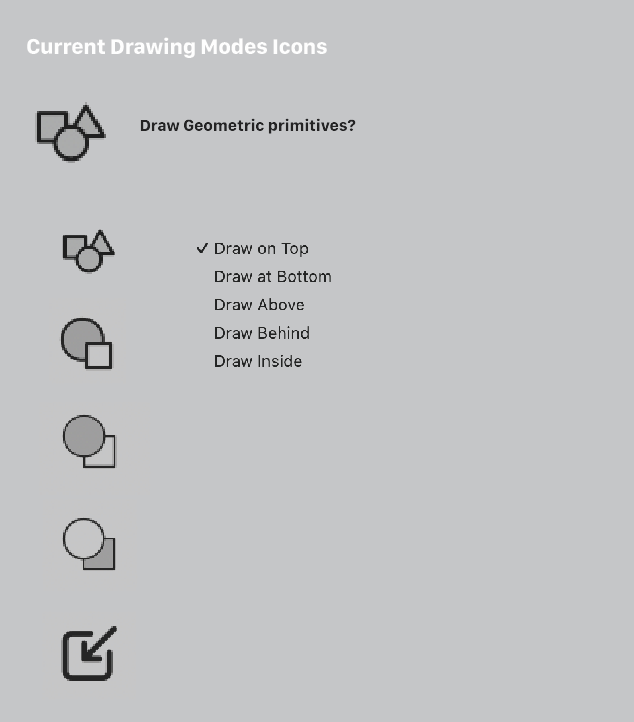
    Alternatives for 'drawing place' icons
    Scheduled Pinned Locked Moved Features and Ideas
    18 Posts 4 Posters 16.3k Views 4 Watching
    Loading More Posts
    • Oldest to Newest
    • Newest to Oldest
    • Most Votes
    Reply
    • Reply as topic
    Log in to reply
    This topic has been deleted. Only users with topic management privileges can see it.
    • AyoA Offline
      Ayo @VectorStyler
      last edited by

      @VectorStyler
      Just curious;
      I just sent you the icon file. When you open that, is your entire canvas white? In other words, does the file take my settings with it? Otherwise it might look weird and I'll have to put everything neatly on an artboard in the future.

      VectorStylerV 1 Reply Last reply Reply Quote 0
      • VectorStylerV Offline
        VectorStyler @Ayo
        last edited by

        @Ayo Got the file, thanks!

        Yes, the canvas is white. This settings is stored in the document.

        1 Reply Last reply Reply Quote 1
        • H Offline
          Harry @VectorStyler
          last edited by

          @Ayo
          @VectorStyler said in Alternatives for 'drawing place' icons:

          @Ayo These look great, thanks! I will try to add them.

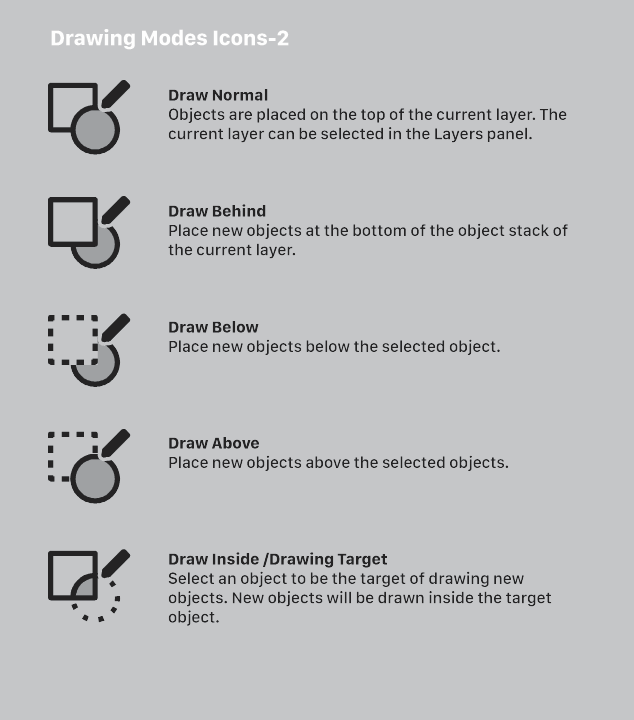
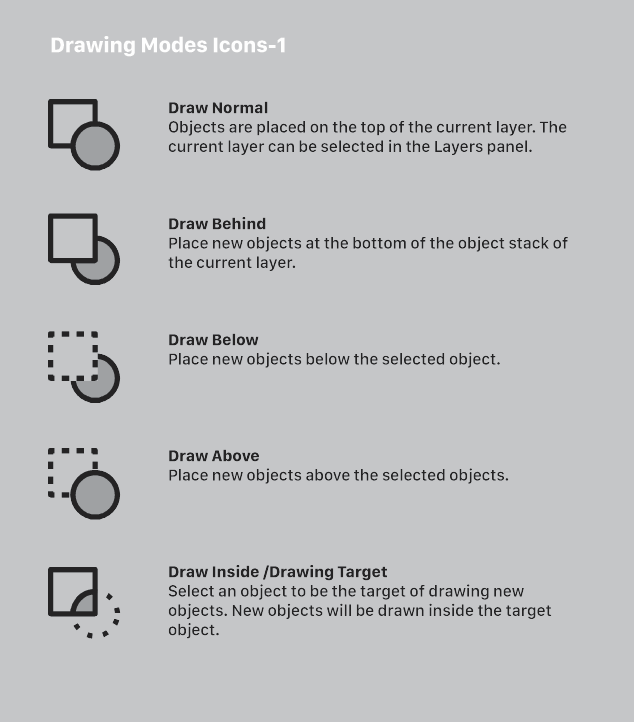
          Those icons (especially version 2) look very good.
          In my opinion, they should be all in the main toolbar, for example, next to snapping icons but with the separator. The highlighted icon (like for preview icons) would show the actual state of the drawing place.

          Win 11, XP Pen Deco 01 V2 graphic tablet

          VectorStylerV 1 Reply Last reply Reply Quote 1
          • VectorStylerV Offline
            VectorStyler @Harry
            last edited by

            @Harry said in Alternatives for 'drawing place' icons:

            In my opinion, they should be all in the main toolbar, for example, next to snapping icons but with the separator. The highlighted icon (like for preview icons) would show the actual state of the drawing place.

            It is possible to customize the toolbar and remove the current one icon that opens the menu and add the separate drawing place actions.

            AyoA b77B 2 Replies Last reply Reply Quote 1
            • AyoA Offline
              Ayo @VectorStyler
              last edited by

              @VectorStyler

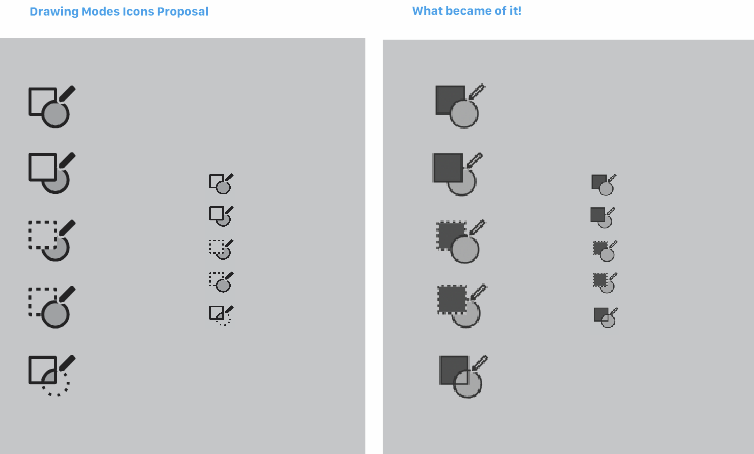
              Drawing Mode Icons and what became of it

              Previously I made non-binding proposals for the drawing icons in this section because I thought it could be better.
              Although it was still a sketch at the time not optimized, I now see that something has been done with it. It's just a shame that it has now become even worse. The icon set barely has any visual difference. And the highest contrast for the active part/subject is in the wrong place.
              The editors of Vectorstyler do not have to adopt my ideas, but if they do something with them, make them better. The old set, ugly and incoherent as it was, was better at being distinguishable. You get used to that.
              0_1699545527571_80cf4110-38ab-4201-ad4e-02cb8dedf2e6-image.png

              VectorStylerV H 2 Replies Last reply Reply Quote 1
              • b77B Offline
                b77 @VectorStyler
                last edited by b77

                @VectorStyler What is the best way to distribute the custom icon set I made?

                As .vswork files or as the new .vsicon?

                .vswork is limited to the icons of the toolbox and the first
                row of the context bar.

                .vsicon allows me to change all the icons of the app but I'm not
                sure how easy it is to install it.

                MacBook Pro (Intel) running Monterey 12.6.4

                VectorStylerV 1 Reply Last reply Reply Quote 0
                • VectorStylerV Offline
                  VectorStyler @b77
                  last edited by

                  @b77 said in Alternatives for 'drawing place' icons:

                  As .vswork files or as the new .vsicon?

                  .vsicon is better. In this way the icons can be used "globally" in the app, not just inside a toolbox.

                  1 Reply Last reply Reply Quote 0
                  • VectorStylerV Offline
                    VectorStyler @Ayo
                    last edited by

                    @Ayo Yes, there were some changes. The problem was at it did not work well in the dark theme.
                    I will try to make these icons look better.

                    AyoA 1 Reply Last reply Reply Quote 0
                    • AyoA Offline
                      Ayo @VectorStyler
                      last edited by Ayo

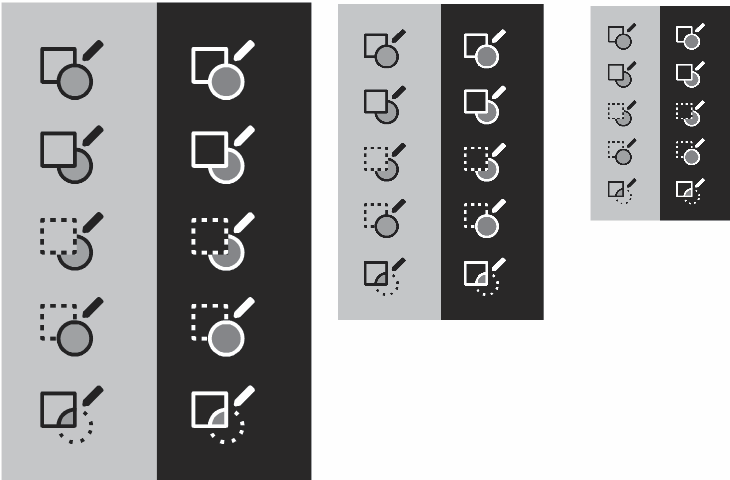
                      @VectorStyler How about something like this?
                      0_1699554457555_6444b083-1a38-45c1-8863-17117f96de21-image.png

                      VectorStylerV 1 Reply Last reply Reply Quote 1
                      • VectorStylerV Offline
                        VectorStyler @Ayo
                        last edited by

                        @Ayo I will try to add these.

                        AyoA 1 Reply Last reply Reply Quote 0
                        • AyoA Offline
                          Ayo @VectorStyler
                          last edited by

                          @VectorStyler
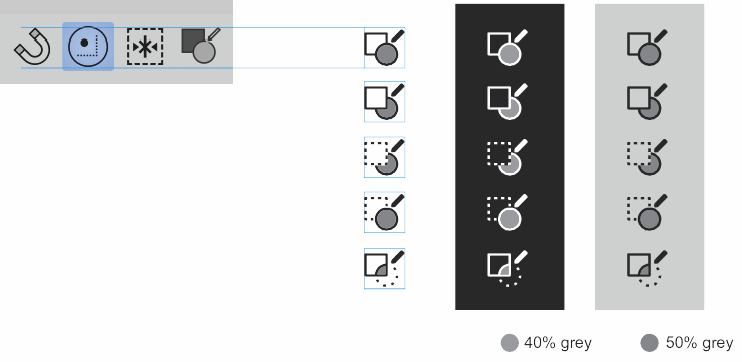
                          Sent you this file as outlines in case this is useful.
                          0_1699570624512_2dbe595c-3479-4289-a66c-7989f5614609-image.png

                          VectorStylerV 1 Reply Last reply Reply Quote 1
                          • VectorStylerV Offline
                            VectorStyler @Ayo
                            last edited by

                            @Ayo said in Alternatives for 'drawing place' icons:

                            Sent you this file as outlines in case this is useful.

                            Got it, thank you 🙂

                            1 Reply Last reply Reply Quote 1
                            • H Offline
                              Harry @Ayo
                              last edited by

                              @Ayo said in Alternatives for 'drawing place' icons:

                              Drawing Mode Icons and what became of it

                              @Ayo You are right. Here's how it looks on a 17" laptop—you barely see the difference.

                              But - from some distance, the pencil and the circle remind me of a magnifying glass:

                              0_1699607714425_obraz_2023-11-10_101514421.png

                              Win 11, XP Pen Deco 01 V2 graphic tablet

                              AyoA 1 Reply Last reply Reply Quote 1
                              • AyoA Offline
                                Ayo @Harry
                                last edited by

                                @Harry
                                Thank you.
                                You're right, that association also occurred to me. Now I have placed the pencil a little further away (as far as possible because space is limited in a square) and more away from pointing towards the center of the circle. Think that's better.
                                Send an update of the file to Vectorstyler.
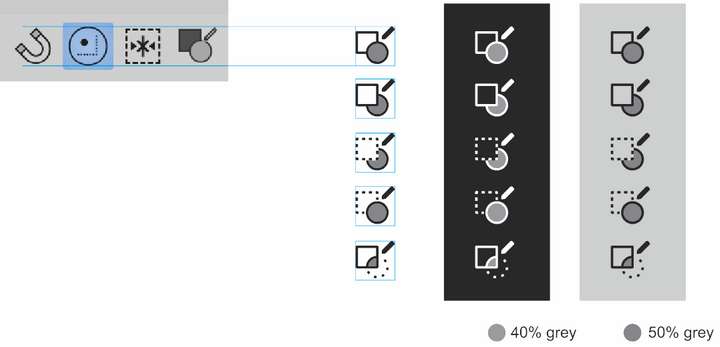
                                0_1699610507035_4834800c-2c6a-4c80-9a49-26c37aef0524-image.png

                                1 Reply Last reply Reply Quote 2
                                • First post
                                  Last post