VectorStyler
    • Categories
    • Unread
    • Recent
    • Tags
    • Popular
    • Register
    • Login

    Can't find the Object Selection Frame
    Scheduled Pinned Locked Moved VectorStyler 1.2 beta
    7 Posts 2 Posters 6.7k Views 2 Watching
    Loading More Posts
    • Oldest to Newest
    • Newest to Oldest
    • Most Votes
    Reply
    • Reply as topic
    Log in to reply
    This topic has been deleted. Only users with topic management privileges can see it.
    • AyoA Offline
      Ayo
      last edited by

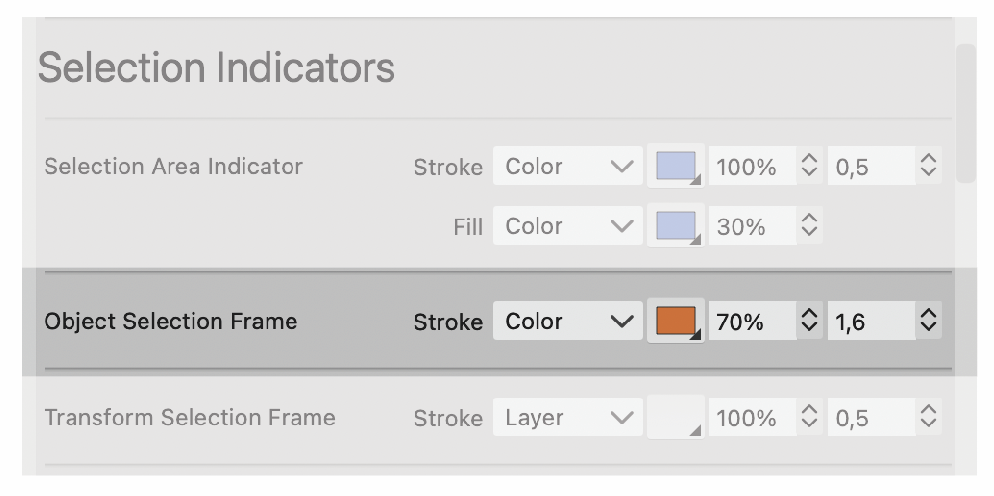
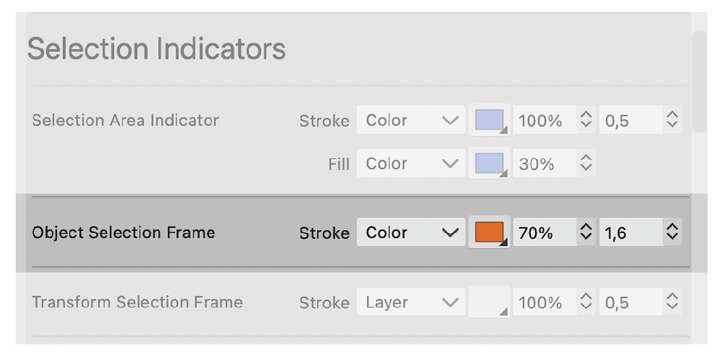
      Can't find the 'Object Selection Frame' anywhere. What kind of object/tool can I use to get this frame under my pointer? Or is it a non-working remnant of the Indicator Styles reorganization?
      0_1700424510711_b47d6c7d-567e-40fd-87b0-3de6555f74d0-image.png

      VectorStylerV 1 Reply Last reply Reply Quote 0
      • VectorStylerV Offline
        VectorStyler @Ayo
        last edited by

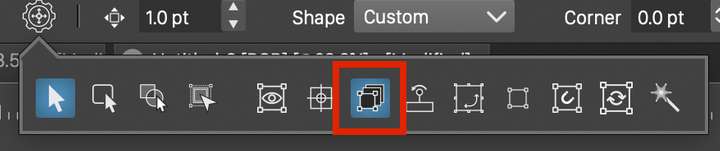
        @Ayo Shown for the selected objects in "Transform Each" mode (other than the last object, for which the normal frame is shown).
        0_1700463280556_transformeach.png

        AyoA 2 Replies Last reply Reply Quote 1
        • AyoA Offline
          Ayo @VectorStyler
          last edited by

          @VectorStyler
          Naming thing. How about:

          • Transform Each Frame
          • Transform Each Selection?

          Then it is traceable

          1 Reply Last reply Reply Quote 0
          • AyoA Offline
            Ayo @VectorStyler
            last edited by

            @VectorStyler
            Thank you, nice, kind of Synchronized Dancing 👋 👋 👋

            One last thing in this category that I can't make visible:

            • Center Snapping Indicator

            Can you give me some direction for that?

            VectorStylerV 1 Reply Last reply Reply Quote 0
            • VectorStylerV Offline
              VectorStyler @Ayo
              last edited by

              @Ayo said in Can't find the Object Selection Frame:

              Center Snapping Indicator

              When you move the pivot (center) point, it should temporarily show a snapping indicator to the object origin point.
              (the object origin is not always the center, for example for point text it is the starting point of the text)

              AyoA 1 Reply Last reply Reply Quote 0
              • AyoA Offline
                Ayo @VectorStyler
                last edited by

                @VectorStyler
                Aha, but it is hidden under the pivot point itself with normal settings. Only if I increase the line thickness extremely to, say, 8 point, then I see it.

                VectorStylerV 1 Reply Last reply Reply Quote 0
                • VectorStylerV Offline
                  VectorStyler @Ayo
                  last edited by

                  @Ayo said in Can't find the Object Selection Frame:

                  Only if I increase the line thickness extremely to, say, 8 point, then I see it.

                  I will look into this.

                  1 Reply Last reply Reply Quote 1
                  • First post
                    Last post
