Unable to use the rounded corners tool
-
Is anyone else having the same issue where they cannot use the round corners tool at all? When I go to drag over a corner or all corners, nothing changes. I tried with stylus and mouse, I restarted VS, tried a new document... same issue.
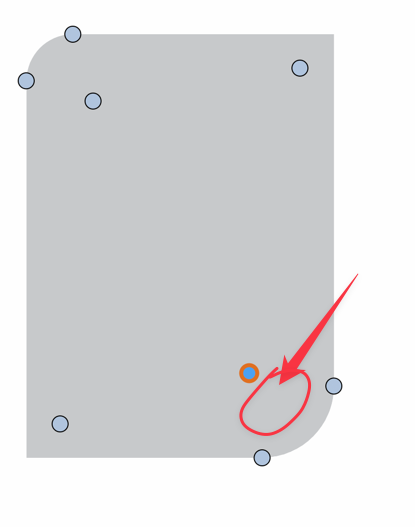
UPDATE: Almost by accident after I posted the initial issue, I realized that if my cursor was in the red circled area, there was a faint cursor change to the half circle and plus sign and I could then edit the corner. I don't remember this being an issue before. I would think it might be better if that area of activation included the highlighted circle icon as well
-
@Boldline Could not replicate here.
Send me the current workspace / settings files you have, I see the corner knob sizes were changed. I will try to replicate it. -
@VectorStyler I had not thought about resetting the workspace. I sent you the current workspace files and then afterward, reset VS to the default workspace and tried again and still had the same trouble for some reason, even when using the default workspace
-
@Boldline said in Unable to use the rounded corners tool:
@VectorStyler I had not thought about resetting the workspace. I sent you the current workspace files and then afterward, reset VS to the default workspace and tried again and still had the same trouble for some reason, even when using the default workspace
I got the workspace files and the the issue cannot be replicated here.
I will open a bug on this one, could be screen resolution. -
@VectorStyler said in Unable to use the rounded corners tool:
could be screen resolution.
could this be related to the other screen resolution issue I posted more on today? https://www.vectorstyler.com/forum/topic/3629/where-do-i-adjust-the-node-default-size-in-the-new-beta/9
-
@Boldline said in Unable to use the rounded corners tool:
could this be related to the other screen resolution issue I posted more on today
Yes, it could be. I checked the settings file and the node sizes are not scale.
BTW: due to a bug, the node size adjustment is missing in 1.2 settings. I will fix that ASAP.But that is not the problem here. I tried both retina and non-retina displays (with MacOS) and in both cases the node adjustment worked.
I also tried the "Scaled" display modes (MacOS display settings), and that also worked.
These are with the default settings of VS.Based on the screenshots from the other post. I think that MacOS might be giving VS some display scaling that VS is not prepared to handle.
How is it working with other display?
-
@VectorStyler said in Unable to use the rounded corners tool:
How is it working with other display?
I can't check that right at this moment, but I will test it in a few hours and let you know
🍎 macOS Tahoe 26.2, Mac mini (M1, 2020), Chip Apple M1, Memory 16 GB
Cintiq 27QHD Display and LG Ultra HD Display -
@Boldline @VectorStyler Reported earlier before here
https://www.vectorstyler.com/forum/topic/3718/corner-editor-cursor
-
@Kumr said in Unable to use the rounded corners tool:
@Boldline @VectorStyler Reported earlier before here
https://www.vectorstyler.com/forum/topic/3718/corner-editor-cursor
Very likely a related issue.
-
@Boldline This issue can be replicated on MacOS Sonoma. It is a compatibility issue with the new OS, I will try to have this fix in the next build.

