VectorStyler
    • Categories
    • Unread
    • Recent
    • Tags
    • Popular
    • Register
    • Login

    Select-menu out of line and can't find customize in view-menu

    Scheduled Pinned Locked Moved VectorStyler 1.2 beta
    12 Posts 5 Posters 11.1k Views 5 Watching
    Loading More Posts
    • Oldest to Newest
    • Newest to Oldest
    • Most Votes
    Reply
    • Reply as topic
    Log in to reply
    This topic has been deleted. Only users with topic management privileges can see it.
    • F Offline
      FastVector
      last edited by FastVector

      When I hover over the topmenu and go over select-menu it pops to the top of the screen. And when the program is filling the bottom half of the screen, all the menu's are going partly out of the program window, except the help menu. Anyone having the same issue?

      And when hitting the view-menu and going all the way down I can't find 'customize' in which you can find the application menu, contextual menu etc.

      Windows 10 | 1920x1080 | 125%

      b77B VectorStylerV H 4 Replies Last reply Reply Quote 0
      • b77B Offline
        b77 @FastVector
        last edited by b77

        @FastVector Is this happening on Windows? Which version?

        (Btw, you can add the OS version in your signature:
        https://www.vectorstyler.com/forum/user/FastVector/edit)

        MacBook Pro (Intel) running Monterey 12.6.4

        1 Reply Last reply Reply Quote 0
        • VectorStylerV Offline
          VectorStyler @FastVector
          last edited by

          @FastVector What is the OS, and what is the screen size?

          1 Reply Last reply Reply Quote 0
          • F Offline
            FastVector
            last edited by

            OS: Windows
            Screenresolution: 1920x1080

            Windows 10 | 1920x1080 | 125%

            VectorStylerV 1 Reply Last reply Reply Quote 1
            • VectorStylerV Offline
              VectorStyler @FastVector
              last edited by

              @FastVector I will try to replicate this, with a similar config.

              1 Reply Last reply Reply Quote 0
              • S Offline
                Subpath
                last edited by Subpath

                @FastVector

                no Problem here everything works
                like it should, customize also avaible
                in view

                same resolution as you, also on window

                Win 11
                CPU: AMD Ryzen 5 9600X, 6-core.
                GPU: Nvidia Geforce RTX 5070.

                1 Reply Last reply Reply Quote 0
                • VectorStylerV Offline
                  VectorStyler @FastVector
                  last edited by VectorStyler

                  @FastVector

                  EDIT: scroll the menu with the trackpad downwards, it does not show the customize menu for some reason.

                  In the View menu, the Customize commands are under the last submenu.
                  If the menu does not fit into the screen, there should be a small knob at the menu bottom (downward triangle), hovering over it will scroll the menu down.

                  The "Customize" submenu contains all these menu customization commands.

                  Is there some screen / display scaling set in the Windows display settings?

                  H 1 Reply Last reply Reply Quote 0
                  • S Offline
                    Subpath
                    last edited by

                    @FastVector

                    made a video here of VS UI

                    Win 11
                    CPU: AMD Ryzen 5 9600X, 6-core.
                    GPU: Nvidia Geforce RTX 5070.

                    1 Reply Last reply Reply Quote 0
                    • H Offline
                      Harry @FastVector
                      last edited by Harry

                      @FastVector said in Select-menu out of line and can't find customize in view-menu:

                      When I hover over the topmenu and go over select-menu it pops to the top of the screen. And when the program is filling the bottom half of the screen, all the menu's are going partly out of the program window, except the help menu. Anyone having the same issue?

                      And when hitting the view-menu and going all the way down I can't find 'customize' in which you can find the application menu, contextual menu etc.

                      I have the same problem - win 10, resolution 1920x1080, 125% screen scaling
                      It's not possible to reach "customize" menu with stylus - only mouse wheel

                      Win 11, XP Pen Deco 01 V2 graphic tablet

                      VectorStylerV F 2 Replies Last reply Reply Quote 1
                      • VectorStylerV Offline
                        VectorStyler @Harry
                        last edited by

                        @Harry said in Select-menu out of line and can't find customize in view-menu:

                        It's not possible to reach "customize" menu with stylus - only mouse wheel

                        I will try to improve this.

                        1 Reply Last reply Reply Quote 1
                        • H Offline
                          Harry @VectorStyler
                          last edited by Harry

                          @VectorStyler said in Select-menu out of line and can't find customize in view-menu:

                          If the menu does not fit into the screen, there should be a small knob at the menu bottom (downward triangle), hovering over it will scroll the menu down.

                          In my opinion, we have another issue here.

                          For some menus, is there a need for this knob to scroll the menu down at all?
                          On my 125% scaled screen, I have plenty of room to expand most of the full menus. It is also visible on the @Subpath video that this little knob only expands a few lines of the menu that would fit the screen anyway.

                          In other words,some menus are shortened by the downward triangle too early:
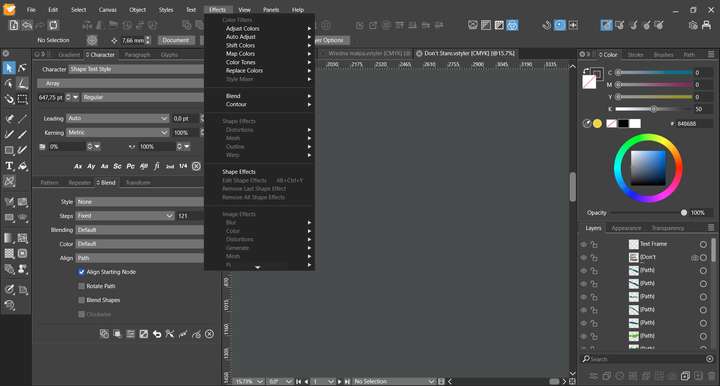
                          0_1701341247554_obraz_2023-11-30_114727550.png

                          Win 11, XP Pen Deco 01 V2 graphic tablet

                          1 Reply Last reply Reply Quote 1
                          • F Offline
                            FastVector @Harry
                            last edited by

                            @Harry Thanks for your reply. 100% scaling or the mousewheel helped me for now to solve the problem with the 'customize' menu.


                            Windows 10 | 1920x1080 | 125%

                            1 Reply Last reply Reply Quote 2
                            • First post
                              Last post