VectorStyler
    • Categories
    • Unread
    • Recent
    • Tags
    • Popular
    • Register
    • Login

    Stroke and fill in the contextual menu are not displaying information
    Scheduled Pinned Locked Moved VectorStyler 1.2 beta
    6 Posts 5 Posters 8.0k Views 4 Watching
    Loading More Posts
    • Oldest to Newest
    • Newest to Oldest
    • Most Votes
    Reply
    • Reply as topic
    Log in to reply
    This topic has been deleted. Only users with topic management privileges can see it.
    • BoldlineB Offline
      Boldline
      last edited by

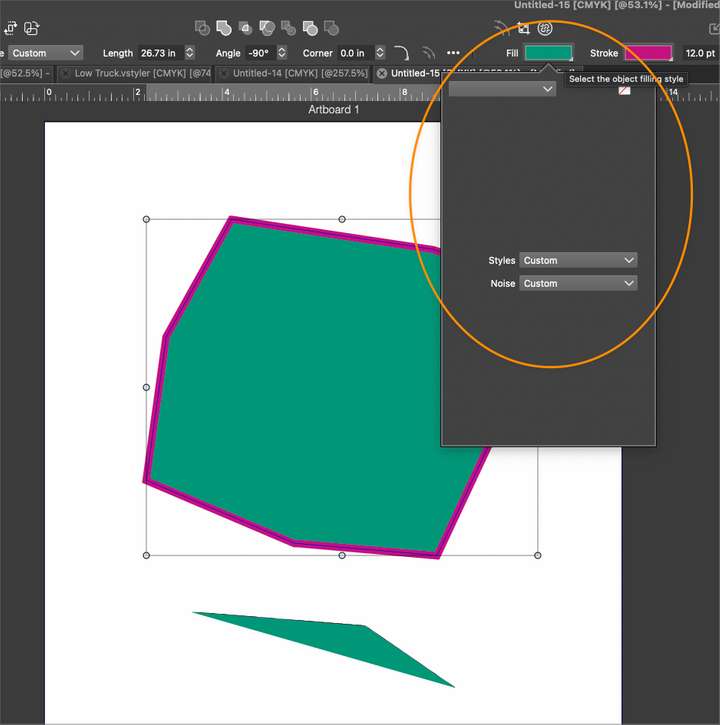
      I've been running into an issue where the stroke and fill in the contextual menu are not displaying the proper information and instead are blank.

      Here is a link to this happening
      0_1702063927468_a4eb5160-e25a-4ed6-8e77-8a128fdbfd62-BLD 2023-12-08 at 14.31.42.png
      It not only lacks a color source to begin with, but it also forgets whatever was last chosen as a source for the color and occurs with both the fill and stroke.

      I found the same issue occurs on both my laptop and my desktop Mac M1 machines (mac mini and mac laptop), but I don't know if it's something I did in a settings or workspace or if its an issue with VS itself.

      @VectorStyler let me know if you need a specific file from me to find this bug out. thanks!

      🍎 macOS Tahoe 26.2, Mac mini (M1, 2020), Chip Apple M1, Memory 16 GB
      Cintiq 27QHD Display and LG Ultra HD Display

      VectorStylerV 2 Replies Last reply Reply Quote 0
      • F Offline
        FastVector
        last edited by

        I can replicate this on my windows laptop.

        Windows 10 | 1920x1080 | 125%

        1 Reply Last reply Reply Quote 1
        • VectorStylerV Offline
          VectorStyler @Boldline
          last edited by

          @Boldline Can be replicated here also. It is a bug.

          1 Reply Last reply Reply Quote 1
          • W Offline
            Wurstkäs
            last edited by

            Hello,
            this bug exists also in 1.1116

            1 Reply Last reply Reply Quote 0
            • I Offline
              Iriseg524
              last edited by

              Also replicate on beta 1.2.007.

              windows11 23H2
              Nvidia Geforce RTX 3060 laptop GPU
              intel i7-12700H CPU
              16GB memory
              2560*1600 150%

              1 Reply Last reply Reply Quote 0
              • VectorStylerV Offline
                VectorStyler @Boldline
                last edited by

                @Boldline A temporary workaround: select the "Color" mode from the top-right drop down of that popover.


                1 Reply Last reply Reply Quote 0
                • First post
                  Last post