VectorStyler
    • Categories
    • Unread
    • Recent
    • Tags
    • Popular
    • Register
    • Login

    Easier way to change brush in brushes panel?
    Scheduled Pinned Locked Moved Features and Ideas
    2 Posts 2 Posters 3.1k Views 1 Watching
    Loading More Posts
    • Oldest to Newest
    • Newest to Oldest
    • Most Votes
    Reply
    • Reply as topic
    Log in to reply
    This topic has been deleted. Only users with topic management privileges can see it.
    • BoldlineB Offline
      Boldline
      last edited by

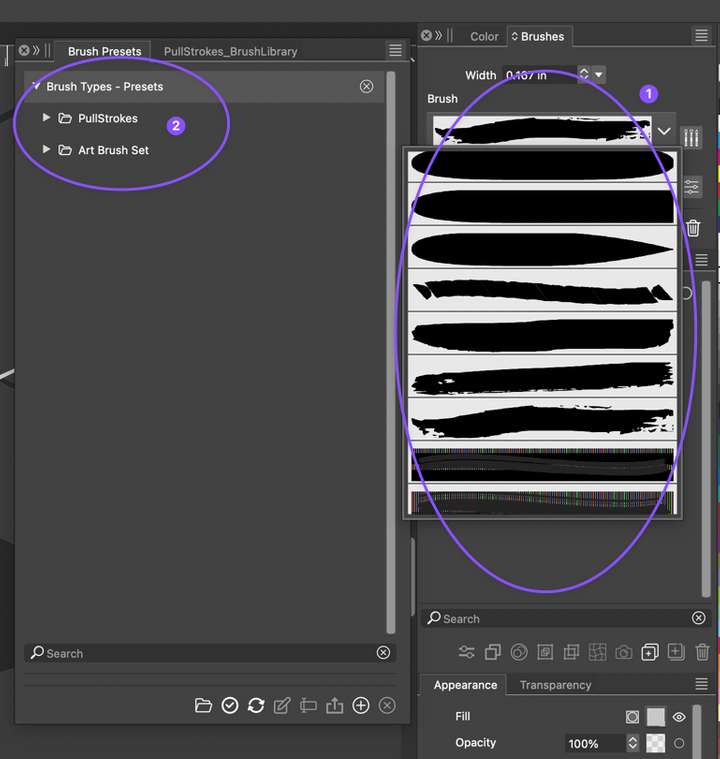
      When I am using the brushes in the "brushes panel", its difficult to switch to a different brush because the dropdown currently shows ALL the available brushes. (Labeled as #1 in the pic below) This method works if there are only a few brushes to choose between, but as a user adds more brushes in the future, the scrolling will take longer.
      Could we mimic what can be done in the brush presets panel where descriptive folders could house the different types of brush sets? Maybe even allow for a "favorites" area and/or "recently used" where the user could quickly access brushes they use often without having to scroll at all?
      0_1703454450882_8d9a3726-4fe1-445b-a545-fb35b40661c5-CleanShot 2023-12-24 at 16.45.20.png

      🍎 macOS Tahoe 26.2, Mac mini (M1, 2020), Chip Apple M1, Memory 16 GB
      Cintiq 27QHD Display and LG Ultra HD Display

      VectorStylerV 1 Reply Last reply Reply Quote 0
      • VectorStylerV Offline
        VectorStyler @Boldline
        last edited by

        @Boldline I will try to find a solution for this.

        1 Reply Last reply Reply Quote 1
        • First post
          Last post
