VectorStyler
    • Categories
    • Unread
    • Recent
    • Tags
    • Popular
    • Register
    • Login

    Making Brushes Organization more Intuitive
    Scheduled Pinned Locked Moved Questions and Support
    2 Posts 2 Posters 2.9k Views 1 Watching
    Loading More Posts
    • Oldest to Newest
    • Newest to Oldest
    • Most Votes
    Reply
    • Reply as topic
    Log in to reply
    This topic has been deleted. Only users with topic management privileges can see it.
    • BoldlineB Offline
      Boldline
      last edited by

      The brush preset panel does not seem to be as straight-forward and intuitive as I believe it could be. (If I am missing something, let me know)

      By default, VS opens with a set of grunge-like rough brushes, but they are not inside of a sub-folder to help keep them organized. If I open a new brush set, it adds them as a new panel and not inside the main "brush presets" panel. This becomes confusing because I would expect them to be under the umbrella of "brush presets".If I append a new brush set, they are individually loose and intermix with the default ones.
      From my perspective, it would make more sense to have the default brushes be inside a subfolder by default. Adding an existing brush set would create an automatic named folder inside the "brush preset" panel.
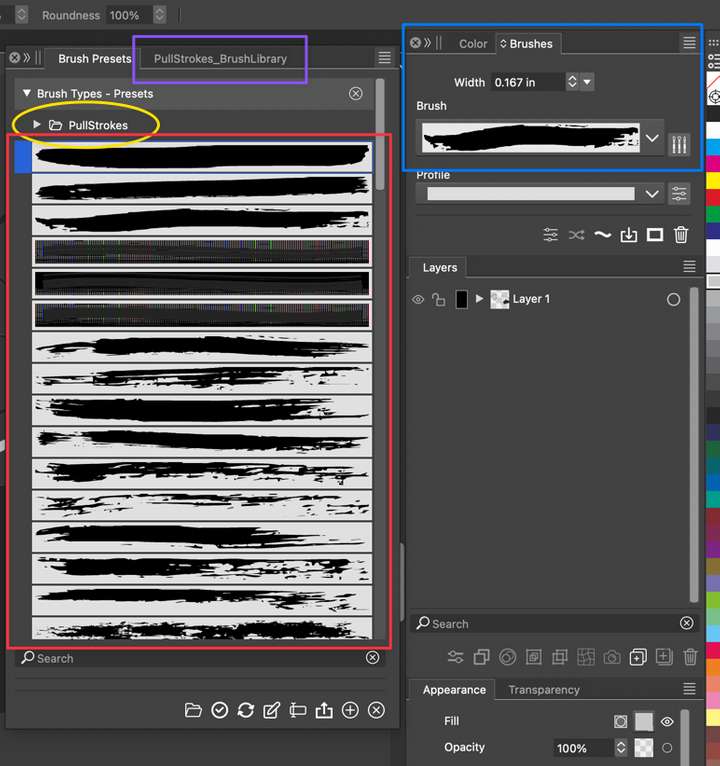
      0_1703444202720_487e2261-935a-4fab-a8f5-452719fa5f1f-CleanShot 2023-12-24 at 13.52.12.png

      🍎 macOS Tahoe 26.2, Mac mini (M1, 2020), Chip Apple M1, Memory 16 GB
      Cintiq 27QHD Display and LG Ultra HD Display

      b77B 1 Reply Last reply Reply Quote 0
      • b77B Offline
        b77 @Boldline
        last edited by

        @Boldline You need to enable' Group Folders' from the panel's menu / Display for that.
        Should this be enabled by default?

        MacBook Pro (Intel) running Monterey 12.6.4

        1 Reply Last reply Reply Quote 1
        • First post
          Last post