VectorStyler
    • Categories
    • Unread
    • Recent
    • Tags
    • Popular
    • Register
    • Login

    Maths operation in panels

    Scheduled Pinned Locked Moved Questions and Support
    14 Posts 4 Posters 11.7k Views 4 Watching
    Loading More Posts
    • Oldest to Newest
    • Newest to Oldest
    • Most Votes
    Reply
    • Reply as topic
    Log in to reply
    This topic has been deleted. Only users with topic management privileges can see it.
    • Devil DinosaurD Offline
      Devil Dinosaur
      last edited by

      Hi Everyone,

      Do I miss something : I thought I could change values in the panels using the 4 maths operations e.g. I want to add 5 mm to a shape width, I add "+5" in the width value after the original measurement. Not sure if I'm clear. 😕
      Does or did VS offer this possibility ? Should I activate some setting ? Maybe I'm mistaken with other softwares but it would become a suggestion then.

      Fred.
      MacBook Pro (M1) - MacOs Sonoma 14

      VectorStylerV 1 Reply Last reply Reply Quote 0
      • VectorStylerV Offline
        VectorStyler @Devil Dinosaur
        last edited by

        @Devil-Dinosaur Math operations should be supported in panels (and other number fields).

        S 1 Reply Last reply Reply Quote 0
        • S Offline
          Subpath @VectorStyler
          last edited by

          @VectorStyler, @Devil-Dinosaur

          Seems it works only with Integer Values
          i test it in Transform Panel with Scale and Position

          so 564 + 200 will work
          and 564,5 + 200 not

          Win 11
          CPU: AMD Ryzen 5 9600X, 6-core.
          GPU: Nvidia Geforce RTX 5070.

          VectorStylerV 1 Reply Last reply Reply Quote 0
          • VectorStylerV Offline
            VectorStyler @Subpath
            last edited by

            @Subpath The issue could be with the decimal character, use '.'

            b77B 1 Reply Last reply Reply Quote 1
            • b77B Offline
              b77 @VectorStyler
              last edited by

              @VectorStyler Here it works when '+10' overwrites the highlighted value:
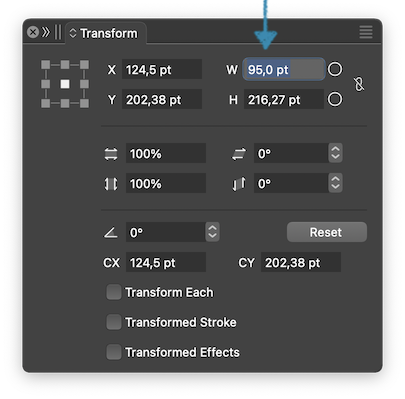
              0_1704402567344_Screenshot 2024-01-04 at 23.06.54.png

              When the value is not highlighted, it doesn't work:
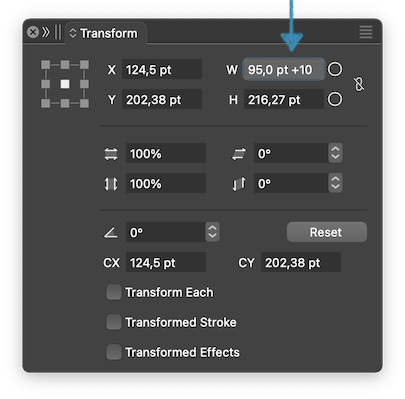
              0_1704402545369_Screenshot 2024-01-04 at 23.04.21.png

              MacBook Pro (Intel) running Monterey 12.6.4

              VectorStylerV 1 Reply Last reply Reply Quote 0
              • S Offline
                Subpath
                last edited by

                @VectorStyler

                indeed works with 622.3 + 200
                and not with 622,3 + 200

                but i doesnt set the decimal char
                VS did it

                btw in my tests i used "pt"

                Win 11
                CPU: AMD Ryzen 5 9600X, 6-core.
                GPU: Nvidia Geforce RTX 5070.

                1 Reply Last reply Reply Quote 1
                • Devil DinosaurD Offline
                  Devil Dinosaur
                  last edited by

                  @Subpath said in Maths operation in panels:

                  @VectorStyler

                  indeed works with 622.3 + 200
                  and not with 622,3 + 200

                  but i doesnt set the decimal char
                  VS did it

                  btw in my tests i used "pt"

                  Yes, I just tried and it seems it brings some changes with dot as a separator instead of the comma. But the result is not accurate (?) : 90+10 becomes 265,118 (movie here).
                  I will do some other tries, it may be some issue with Mac Sonoma and it's keyboard settings.

                  Fred.
                  MacBook Pro (M1) - MacOs Sonoma 14

                  VectorStylerV 1 Reply Last reply Reply Quote 0
                  • VectorStylerV Offline
                    VectorStyler @b77
                    last edited by

                    @b77 said in Maths operation in panels:

                    When the value is not highlighted, it doesn't work:

                    The problem is with the "pt" in the middle of that expression.

                    1 Reply Last reply Reply Quote 0
                    • VectorStylerV Offline
                      VectorStyler @Devil Dinosaur
                      last edited by

                      @Devil-Dinosaur said in Maths operation in panels:

                      But the result is not accurate (?)

                      The "mm" in the middle of the expression causes the problems.

                      1 Reply Last reply Reply Quote 0
                      • Devil DinosaurD Offline
                        Devil Dinosaur
                        last edited by

                        OK it works but I have 2 actions to execute : changing "," comma into "." dot and erase mm (writing the operation before mm doesn't work).
                        Is there a way in VS to change the decimal to "." (or is it something to do in the Sonoma?).

                        Fred.
                        MacBook Pro (M1) - MacOs Sonoma 14

                        VectorStylerV S 2 Replies Last reply Reply Quote 0
                        • VectorStylerV Offline
                          VectorStyler @Devil Dinosaur
                          last edited by

                          @Devil-Dinosaur I will try to fix these

                          1 Reply Last reply Reply Quote 2
                          • S Offline
                            Subpath @Devil Dinosaur
                            last edited by

                            @Devil-Dinosaur, @VectorStyler

                            I'm wondering too.
                            Because everywhere I've looked in VS the "," char is used. (Win 10)
                            If mathematical operations in value fields only work with the character “.”
                            Then I think VS should be able to change the "," to "." somewhere in the settings.
                            Or convert that char in general.

                            Win 11
                            CPU: AMD Ryzen 5 9600X, 6-core.
                            GPU: Nvidia Geforce RTX 5070.

                            VectorStylerV 1 Reply Last reply Reply Quote 1
                            • VectorStylerV Offline
                              VectorStyler @Subpath
                              last edited by

                              @Subpath Such a conversion happens for numbers, but not for expressions.

                              The problem is that starting from 1.2 expressions can also be used with number variables to create dynamic values for these types for number fields, and these expressions are stored in the document.

                              Moving such a document from one computer to another will cause problems with the expressions.
                              So currently the expression parser uses "."

                              Also, the comma ',' character may be used in such expressions as parameter separator. So we cannot just convert it.
                              This is why all programming languages use "." for decimal separators regardless of system settings.

                              This is a problem I have to figure out in VS.

                              Devil DinosaurD 1 Reply Last reply Reply Quote 2
                              • Devil DinosaurD Offline
                                Devil Dinosaur @VectorStyler
                                last edited by

                                @VectorStyler
                                Works fine now, thanks. ☺

                                Fred.
                                MacBook Pro (M1) - MacOs Sonoma 14

                                1 Reply Last reply Reply Quote 0
                                • First post
                                  Last post