VectorStyler
    • Categories
    • Unread
    • Recent
    • Tags
    • Popular
    • Register
    • Login

    Toolbox Reconfigure creates a UI glitch

    Scheduled Pinned Locked Moved VectorStyler 1.2 beta
    3 Posts 2 Posters 4.1k Views 2 Watching
    Loading More Posts
    • Oldest to Newest
    • Newest to Oldest
    • Most Votes
    Reply
    • Reply as topic
    Log in to reply
    This topic has been deleted. Only users with topic management privileges can see it.
    • Victor VectorV Offline
      Victor Vector
      last edited by

      Hello,
      Excited to be testing the 1.2 beta!
      Started by playing with the setup controls. Here is what happened:

      1. Panels > Toolbox Style > Chose "Two Column Toolbox".
      2. View > Customize > Customize Toolboxes
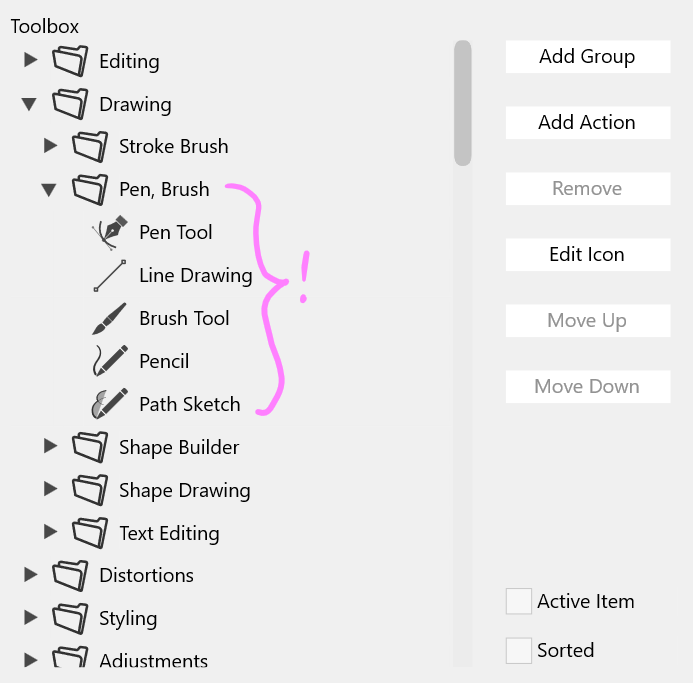
      3. Add Group under "Drawing" with a label "Pen, Brush" and added the pen and brush tools to it.
      4. Clicked OK.
      5. Result:
        0_1704517145171_Toolbox_glitch.png

      Here is the Toolbox Group Setup:
      0_1704517178935_Toolbox_glitch2.png

      I can include the "*.vswork" file if need be, but the bug should replicate with these instructions.

      VectorStylerV 1 Reply Last reply Reply Quote 1
      • VectorStylerV Offline
        VectorStyler @Victor Vector
        last edited by

        @Victor-Vector I will try to replicate this.
        I think it is caused by the odd number of folders in the Drawing group.

        Victor VectorV 1 Reply Last reply Reply Quote 1
        • Victor VectorV Offline
          Victor Vector @VectorStyler
          last edited by

          @VectorStyler I tried adding another subgroup to the drawing group to make it an even 6 groups and it did not solve the issue. It appears that the Pen Tool, Line Drawing, Brush Tool, Pencil, and Path Sketch tool are not in a subgroup in the toolbox interface.


          1 Reply Last reply Reply Quote 1
          • First post
            Last post