VectorStyler 1.2 beta
-
@VectorStyler Wow! Lots to explore!
Some questions

- How do I…
- Duplicate a section of a path using the Node tool.
- Rotate and stretch a section of a path using the Node tool.
- Deleting a segment with the Node tool will cut the path.
-
I cannot find the skew option for the Star shape tool.
-
What and where are the 'slab type alignment presets'?
MacBook Pro (Intel) running Monterey 12.6.4
-
Amazing list of features and improvements! I can't wait to dig into all of them and test them out. Thank you @VectorStyler
I took a fresh glance at the roadmap and noticed "Phase one" is now gone and several sections of the other phases are emptied as well. Progress!
-
@b77 said in VectorStyler 1.2 beta:
Duplicate a section of a path using the Node tool.
- select multiple consecutive nodes
- start moving and then press Option(Alt)
Rotate and stretch a section of a path using the Node tool.
- select the first and the last node (do not select in between)
- start moving the select node.
- press Option(Alt) to keep the first fixed and rotate.stretch all in between.
- shift blocks stretching, control rotation.
Deleting a segment with the Node tool will cut the path.
- select inside a segment (shows a triangle knob in the path direction)
- press the delete key.
I cannot find the skew option for the Star shape tool.
I have to check this, removed for now.
What and where are the 'slab type alignment presets'?
Alignment panel menu Block Stretching.
-
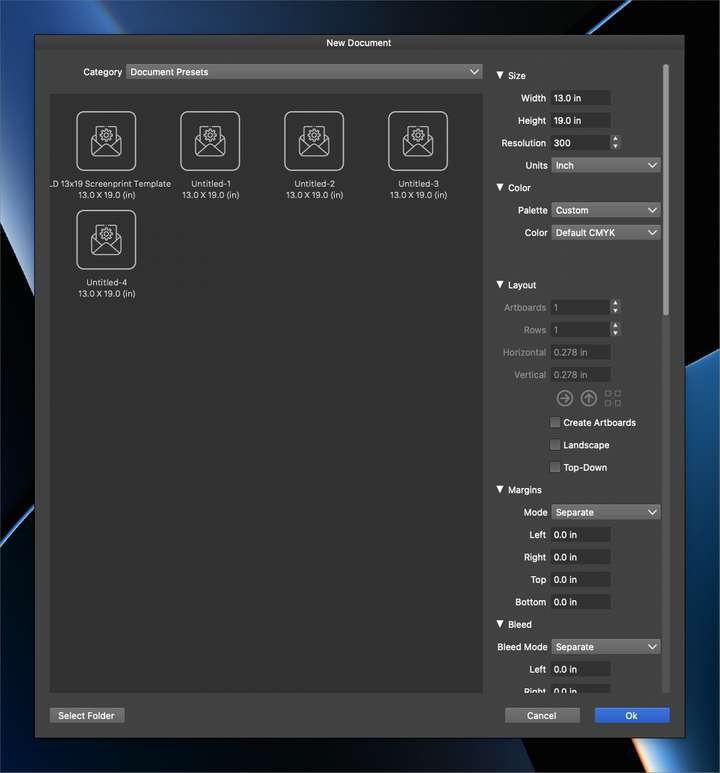
How do I delete a document preset I created? Also how do I rename a document preset? The methods I tried did not work for either.
-
@Boldline Should be doable in the Styles -> Preset Manager
-
@VectorStyler said in VectorStyler 1.2 beta:
Should be doable in the Styles -> Preset Manager
Ok I found it there. I totally understand and like the preset manager as the "home base" for finding and editing any and all presets, but I think this is a case where adding some basic editing to the "new document" panel would help users and make VS more user-friendly. Using the preset manager hub is more of an advanced user thing in my mind. New users are not going to know to go dig in there to find and delete/rename templates.
If you decided to do so, I would allow right-click on the icon in the "new document" panel and give the option to rename it and also the option to delete it.
Also, right now, if I double click the template icon in the "new document" panel, it creates a totally new template file, not just a new working file to use in VS. I would change this double click function to the same as the "ok" button, because some people will just think to double-click to select that specific template and not realize it's making copies of it as well
-
@Boldline Will try to add this to the new document setup view.
-
@VectorStyler Too many improvements, thank you very much
-
in a comment to @b77 in VectorStyler 1.2 beta:
How Do I: Rotate and stretch a section of a path using the Node tool.
@VectorStyler said:
- select the first and the last node (do not select in between)
- start moving the select node.
- press Option(Alt) to keep the first fixed and rotate/stretch all in between.
- shift blocks stretching, control rotation.
@VectorStyler Just so you know, this works 100% with my keyboard's left ALT but it is jittery on my keyboard's right ALT.
I thought you may want to check it yourself.
-
@Victor-Vector said in VectorStyler 1.2 beta:
Just so you know, this works 100% with my keyboard's left ALT but it is jittery on my keyboard's right ALT.
Yes, there were some issues in working with the right ALT key on Windows.
I will try to improve this.



