
VectorStyler
    • Categories
    • Unread
    • Recent
    • Tags
    • Popular
    • Register
    • Login

    trapezoid

    Scheduled Pinned Locked Moved Features and Ideas
    18 Posts 7 Posters 14.9k Views 6 Watching
    Loading More Posts
    • Oldest to Newest
    • Newest to Oldest
    • Most Votes
    Reply
    • Reply as topic
    Log in to reply
    This topic has been deleted. Only users with topic management privileges can see it.
    • S Offline
      Subpath @861475_VctSt
      last edited by Subpath

      @861475_VctSt

      here also a description from me 🙂

      Freehand:
      create a rectangle
      convert it to curve
      select the two upper nodes
      switch to transform Tool
      hold ctrl (win) while move the Nodes

      With the Transform Panel:
      create a rectangle
      convert it to curve
      select the two upper nodes
      change the Value in the width Field
      ( with Up and Down Keys
      or with the Mouse - Scrollwheel
      or just typing )

      Here a video

      Win 11
      CPU: AMD Ryzen 5 9600X, 6-core.
      GPU: Nvidia Geforce RTX 5070.

      1 Reply Last reply Reply Quote 0
      • S Offline
        Subpath
        last edited by Subpath

        Because of adding other shapes

        I'm missing more of a Shape Library Panel

        Where you can insert and remove your shapes using drag and drop.

        This way you could store shapes you've created once
        and put them back on the canvas when you need them again

        A Panel like this could also be helpful for a kind of kitbashing

        Win 11
        CPU: AMD Ryzen 5 9600X, 6-core.
        GPU: Nvidia Geforce RTX 5070.

        B VectorStylerV 2 Replies Last reply Reply Quote 1
        • B Offline
          B-Vs-V @Subpath
          last edited by

          @Subpath said in trapezoid:

          I'm missing more of a Shape Library Panel

          Where you can insert and remove your shapes using drag and drop.

          This way you could store shapes you've created once
          and put them back on the canvas when you need them again

          A Panel like this could also be helpful for a kind of kitbashing

          @Subpath I thought this feature was already there in VS. I await the next update impatiently so that I can get to work with VS again.

          W11 Pro 25H2 - 12th Gen Intel(R) i7-12700K 3.61 GHz - RAM 64 Go - NVIDIA GF GTX 4070 Ti - Intuos - Dell UP3216Q / Eizo ColorEdge
          W11 Pro 25H2 - 12th Gen Intel(R) i7-12700KF 3.60 GHz -RAM 64 Go - NVIDIA GF GTX 3080 - IntuosPro- ProArt PA329C

          1 Reply Last reply Reply Quote 1
          • VectorStylerV Offline
            VectorStyler @Subpath
            last edited by

            @Subpath said in trapezoid:

            I'm missing more of a Shape Library Panel

            You can create shape presets with the Presets panel. Then select those shapes to replace some shape in the canvas.
            (I will also add drag&drop creation).

            S 861475_VctSt8 L 3 Replies Last reply Reply Quote 4
            • S Offline
              Subpath @VectorStyler
              last edited by

              @VectorStyler said in trapezoid:

              @Subpath said in trapezoid:

              I'm missing more of a Shape Library Panel

              You can create shape presets with the Presets panel. Then select those shapes to replace some shape in the canvas.
              (I will also add drag&drop creation).

              remember that, but be able to use drag and drop
              would be a little more fluid

              the idea it self came from the app "Concepts"
              on my iPad, here a sketch how it works in Concepts
              just for inspiration
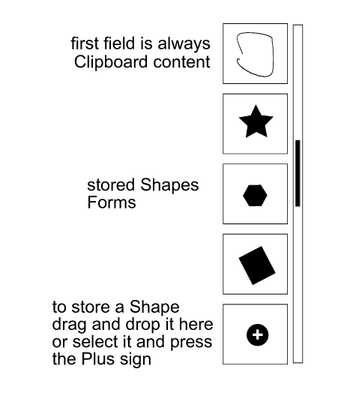
              0_1705236671680_Shape Library in Concepts.png

              Win 11
              CPU: AMD Ryzen 5 9600X, 6-core.
              GPU: Nvidia Geforce RTX 5070.

              BoldlineB 1 Reply Last reply Reply Quote 2
              • BoldlineB Offline
                Boldline @Subpath
                last edited by

                @Subpath The solution "concepts" uses seems like a very effective solution. What do you do if you have many more unique shapes? There seems to be a limit to what can be shown in that layout example you shared

                🍎 macOS Tahoe 26.2, Mac mini (M1, 2020), Chip Apple M1, Memory 16 GB
                Cintiq 27QHD Display and LG Ultra HD Display

                S 1 Reply Last reply Reply Quote 1
                • S Offline
                  Subpath @Boldline
                  last edited by Subpath

                  @Boldline said in trapezoid:

                  @Subpath The solution "concepts" uses seems like a very effective solution. What do you do if you have many more unique shapes? There seems to be a limit to what can be shown in that layout example you shared

                  The maximum of that storage fields visible on the screen are 12, on my iPad Pro 12.9.
                  The maximum number of shapes is higher because you can switch between different libraries.
                  For architecture, electronics, shoes, faces, etc.

                  Since scrolling on the iPad is fast and smooth, scrolling back and forth isn't
                  much of a problem

                  Saving a shape only takes one click,
                  also just one click to place a shape on the canvas (or drag & drop).
                  So using this shape storage is also pretty fluid.

                  Win 11
                  CPU: AMD Ryzen 5 9600X, 6-core.
                  GPU: Nvidia Geforce RTX 5070.

                  B 1 Reply Last reply Reply Quote 0
                  • B Offline
                    B-Vs-V @Subpath
                    last edited by

                    @Subpath I could be mistaken, but isn't that also the case for the Affinity suite (assets)?

                    W11 Pro 25H2 - 12th Gen Intel(R) i7-12700K 3.61 GHz - RAM 64 Go - NVIDIA GF GTX 4070 Ti - Intuos - Dell UP3216Q / Eizo ColorEdge
                    W11 Pro 25H2 - 12th Gen Intel(R) i7-12700KF 3.60 GHz -RAM 64 Go - NVIDIA GF GTX 3080 - IntuosPro- ProArt PA329C

                    S 1 Reply Last reply Reply Quote 0
                    • S Offline
                      Subpath
                      last edited by Subpath

                      I'm creating a thread in " Features and Ideas. " on this topic,
                      because it is a bit more extensive as I thought.

                      So, my Post about a Shape Library is now in "Features and Ideas"
                      Here the Link:
                      https://www.vectorstyler.com/forum/topic/3878/kind-of-shape-library

                      Win 11
                      CPU: AMD Ryzen 5 9600X, 6-core.
                      GPU: Nvidia Geforce RTX 5070.

                      1 Reply Last reply Reply Quote 2
                      • S Offline
                        Subpath @B-Vs-V
                        last edited by

                        @Pat

                        I think there are some similarities.

                        Win 11
                        CPU: AMD Ryzen 5 9600X, 6-core.
                        GPU: Nvidia Geforce RTX 5070.

                        1 Reply Last reply Reply Quote 1
                        • 861475_VctSt8 Offline
                          861475_VctSt @VectorStyler
                          last edited by

                          @VectorStyler

                          I am sure everyone agrees on how to draw trapezoids using VS's advanced functionality.

                          I think that since there are "star" and "spiral" tools, there should be a "trapezoid" tool as well. I think this is a short-sighted idea.

                          I wonder if this kind of tool is already obsolete.

                          LIc. 0 OS10.15.7
                          MacBook Air (13-inch, Mid 2012) / Intel Core i5, 8GB / Intel HD Graphics 4000
                          LIc. 1 OS13.6.7
                          MacBook Pro (14-inch, 2023) / Apple M2 Pro, 16GB / Apple GPU

                          1 Reply Last reply Reply Quote 0
                          • L Offline
                            Li Xiao @VectorStyler
                            last edited by

                            @VectorStyler It is necessary to add a tool that can generate precise irregular polygon shapes, including isosceles triangles, trapezoids, etc. This tool should allow parameterized inputs for different side lengths, angles, and other properties.

                            1 Reply Last reply Reply Quote 0
                            • S Offline
                              Subpath
                              last edited by

                              @861475_VctSt , @Li-Xiao

                              could the "Envelope Distortion" be helpful
                              with this kind of Transformation ?

                              See Video here

                              Win 11
                              CPU: AMD Ryzen 5 9600X, 6-core.
                              GPU: Nvidia Geforce RTX 5070.

                              L 1 Reply Last reply Reply Quote 1
                              • L Offline
                                Li Xiao @Subpath
                                last edited by

                                @Subpath Thank you! I need to generate a correct triangle based on the known values of its three sides, as shown in the following diagram.
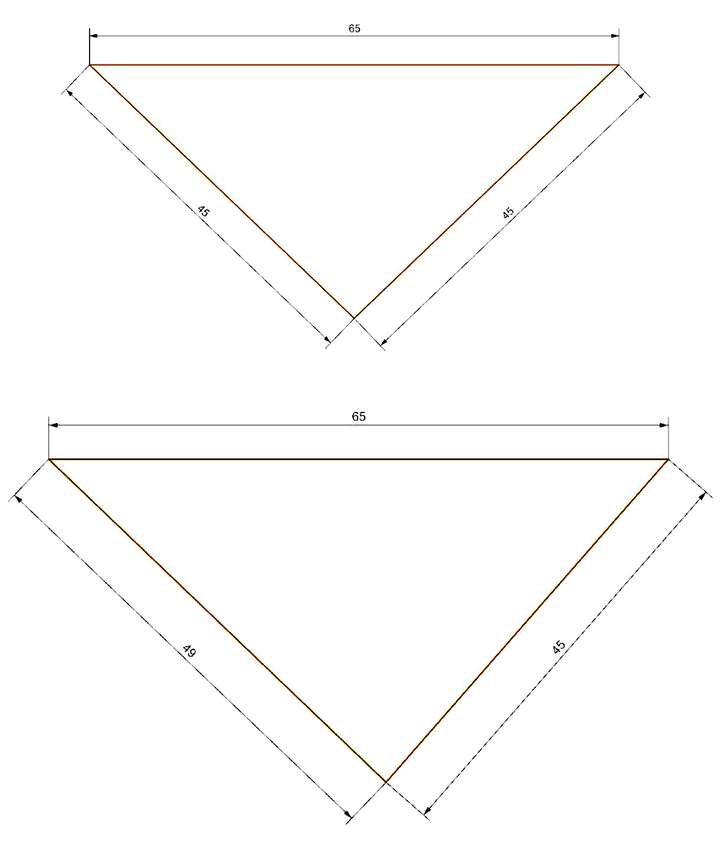
                                0_1705395041002_triangle.jpg

                                S 1 Reply Last reply Reply Quote 2
                                • S Offline
                                  Subpath @Li Xiao
                                  last edited by

                                  @Li-Xiao, your welcome

                                  looks like a CAD case to me ?

                                  Win 11
                                  CPU: AMD Ryzen 5 9600X, 6-core.
                                  GPU: Nvidia Geforce RTX 5070.

                                  L 1 Reply Last reply Reply Quote 0
                                  • L Offline
                                    Li Xiao @Subpath
                                    last edited by

                                    @Subpath Yes, it is relatively easy to implement in CAD software. Apps like AI or CD have plugins available for generating such shapes.

                                    1 Reply Last reply Reply Quote 0
                                    • First post
                                      Last post