VectorStyler
    • Categories
    • Unread
    • Recent
    • Tags
    • Popular
    • Register
    • Login

    There are some issues with the align to shape

    Scheduled Pinned Locked Moved VectorStyler 1.2 beta
    13 Posts 2 Posters 11.4k Views 2 Watching
    Loading More Posts
    • Oldest to Newest
    • Newest to Oldest
    • Most Votes
    Reply
    • Reply as topic
    Log in to reply
    This topic has been deleted. Only users with topic management privileges can see it.
    • VectorStylerV Offline
      VectorStyler @Li Xiao
      last edited by

      @Li-Xiao Can be replicated here also. I added this to the backlog as a bug.

      L 1 Reply Last reply Reply Quote 0
      • L Offline
        Li Xiao @VectorStyler
        last edited by

        @VectorStyler Thanks.

        For imported files, where the text has been converted to curves, aligning it to a shape while maintaining the spacing and relative X-axis position is not possible. It is desired to have an option to preserve the original spacing and X-axis position.

        Manual adjustment is too difficult, and it is not possible to automatically identify the position of each shape.

        0_1698336096559_Align to Shape 2.vstyler
        https://youtu.be/qmKN6lNMdnk

        VectorStylerV 1 Reply Last reply Reply Quote 1
        • VectorStylerV Offline
          VectorStyler @Li Xiao
          last edited by

          @Li-Xiao said in There are some issues with the align to shape:

          For imported files, where the text has been converted to curves, aligning it to a shape while maintaining the spacing and relative X-axis position is not possible

          Most likely a bug.

          L 1 Reply Last reply Reply Quote 1
          • L Offline
            Li Xiao @VectorStyler
            last edited by

            @VectorStyler
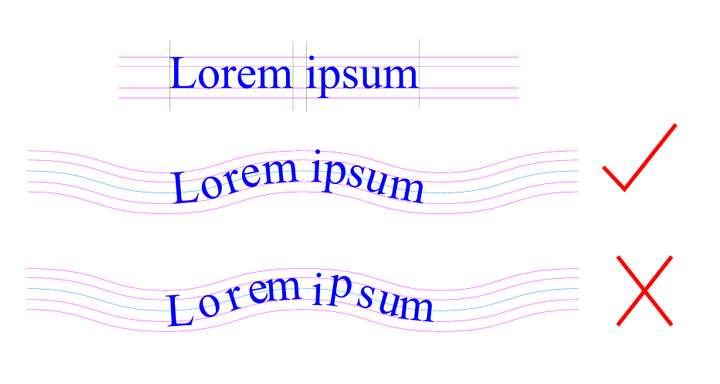
            The first issue has been fixed.

            Regarding the second issue, my previous description was inaccurate. It should maintain the original object's x-coordinate spacing and relative position on the y-coordinate.
            0_1705394008175_align to shape.jpg

            VectorStylerV 2 Replies Last reply Reply Quote 2
            • VectorStylerV Offline
              VectorStyler @Li Xiao
              last edited by

              @Li-Xiao said in There are some issues with the align to shape:

              It should maintain the original object's x-coordinate spacing and relative position on the y-coordinate.

              I opened a bug on this one.

              1 Reply Last reply Reply Quote 1
              • VectorStylerV Offline
                VectorStyler @Li Xiao
                last edited by

                @Li-Xiao Was this done with text on path, or with the Alignment panel using separates glyphs?

                L 1 Reply Last reply Reply Quote 0
                • L Offline
                  Li Xiao @VectorStyler
                  last edited by

                  @VectorStyler On the Alignment panel, some externally received files have text that has been converted to curves, so they can only be aligned to shape for arrangement.

                  VectorStylerV 1 Reply Last reply Reply Quote 0
                  • VectorStylerV Offline
                    VectorStyler @Li Xiao
                    last edited by

                    @Li-Xiao said in There are some issues with the align to shape:

                    @VectorStyler On the Alignment panel, some externally received files have text that has been converted to curves, so they can only be aligned to shape for arrangement.

                    There is a problem with that, because once converted to curves the text metric info (baseline, cap height, etc) are lost, so glyphs are just centered along the axis (shape).

                    L 3 Replies Last reply Reply Quote 0
                    • L Offline
                      Li Xiao @VectorStyler
                      last edited by

                      @VectorStyler CorelDRAW has a plugin that can achieve this, but I don't know how it is implemented.

                      1 Reply Last reply Reply Quote 0
                      • L Offline
                        Li Xiao @VectorStyler
                        last edited by

                        @VectorStyler I tried different methods in VS to achieve this, and only one method was relatively convenient. I used "Bending" and then made some manual adjustments. Although it was slower, it achieved the desired result.

                        https://youtu.be/lT7jhmozjjk

                        1 Reply Last reply Reply Quote 0
                        • L Offline
                          Li Xiao @VectorStyler
                          last edited by

                          @VectorStyler
                          Please refer to the video
                          https://youtu.be/Uf49XtLHu5Q

                          VectorStylerV 1 Reply Last reply Reply Quote 1
                          • VectorStylerV Offline
                            VectorStyler @Li Xiao
                            last edited by

                            @Li-Xiao said in There are some issues with the align to shape:

                            Please refer to the video

                            Got it, it uses the original relative positions.

                            1 Reply Last reply Reply Quote 1
                            • First post
                              Last post